Taking requests for DGIV skins

That I don't know about.I'll try,but if I cant i'll tell you.
 
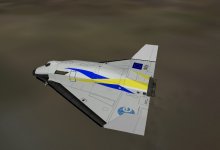
Is this good chobolatom?
 

Attachments

  • 11.08.01 09-39-22 GL-01.jpg
    11.08.01 09-39-22 GL-01.jpg
    125.2 KB · Views: 24
That is awesome! :thumbup: But it's possible get blue line undeer yellow line? Something like that?

72571774.png


Uploaded with ImageShack.us

And more saturated blue please? :) But it looks great!
 
Message is edit. :)

---------- Post added at 04:52 PM ---------- Previous post was at 01:51 PM ----------

It's possible do that? :rolleyes:
 
Last edited:
I have 0 personal interest in the AEB skin, but, if I may be so bold. What would it take to straighten out the text on fuselage?

I believe the text should have been moved forward a bit, and the trailing letters on the back end should not be dropping off like they do now.

To me that looks wrong. But that's just me..
 
Last edited:
I have 0 personal interest in the AEB skin, but, if I may be so bold. What would it take to straighten out the text on fuselage?

I believe the text should have been moved forward a bit, and the trailing letters on the back end should not be dropping off like they do now.

To me that looks wrong. But that's just me..

I tried straightining it out, but If I move the text forward up or down,it still appears like its dropping off.
 
I tried straightining it out, but If I move the text forward up or down,it still appears like its dropping off.

I've never made a skin before, but what if you distort it in the opposite direction, upwards. Then I would think the "downward distortion" would be canceled out?
 
BTW, this is kind of unrelated, but how do you made a skin for the DGIV?
 
Well,you would copy the DGIV's default skin,and edit it in a photo editor such as Paint.NET.
 
Tribute to USCG 1705

How about a tribute to the crew of Rescue 1705?
they died in a rescue almost 2 years ago off San Diego:salute::cry:
(image attached)
 
Last edited:
Back
Top