
You are using an out of date browser. It may not display this or other websites correctly.
You should upgrade or use an alternative browser.
You should upgrade or use an alternative browser.
High-res planet textures in archive (tree) format
- Thread starter martins
- Start date

- Joined
- Jan 14, 2008
- Messages
- 9,266
- Reaction score
- 1,740
- Points
- 203
- Location
- VA
- Website
- alteaaerospace.com
- Preferred Pronouns
- he/him
I had a lot of trouble getting the files, too. Most of them required trying about six times each. I didn't use a download manager as I find them somewhat less than effective. Since I am still working through my testing of RC4 I haven't noticed much of a difference. Perhaps once I get everything working together.
It would be real helpful if torrents were available. I have had zero problems trying to get files with BitTorrent.
Good luck.
BTW the official high-res textures are available as torrents (and, in fact, torrents are recommended) -- links are on the official Orbiter 2016 download page.


Ok. My first time for hi-res textures. I used the torret to get the moon ones. So I copied into C:\Orbiter2016\Textures\Moon\Archive
It replaces the default ones. But It looks the same.
It replaces the default ones. But It looks the same.
Iacomus Maximus
New member
Is there some kind of 'smoothing' that was done to the hi-res textures? I flew out to Devil's Tower from China Lake (full SCRAM in the XR-5 - good practice monitoring temps and speed - anyway...) I got all the way out there and couldn't find it.
Weirdo Earthtorch
Member
- Joined
- Mar 23, 2008
- Messages
- 165
- Reaction score
- 0
- Points
- 16
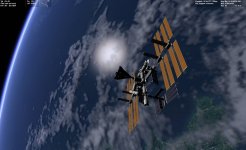
I have this cloud problem, both with default LoRes 2016 textures and with HiRes ones. Look at the left clouds, they are so blocky:

Scenario is Views -> Atmospheric haze.
Rotate the view as to look at DG's belly.
Hi Ripley
Hopefully this is one of several scenarios where I've hand-corrected the cloud textures - the issue is present in the base image from which the cloud textures have been generated. See http://www.orbiter-forum.com/showthread.php?p=540114#post540114
I've submitted the modified textures to OH Mods, but that was over a week ago, and I guess the queue hasn't been checked recently by the admins <gentle nudge Xyon/GaryW etc?> since it's my first upload.
The corrections are in the cache format, I used texpack.exe to re-compress them into the archive format.
Edit: in fact, here is that scenario in my Orbiter 2016: any better?
Attachments
Last edited:

- Joined
- Sep 12, 2010
- Messages
- 3,131
- Reaction score
- 415
- Points
- 123
- Location
- Rome
- Website
- www.tuttovola.org
Thanks, it's smoother, but still looks rather blocky to me.
Weirdo Earthtorch
Member
- Joined
- Mar 23, 2008
- Messages
- 165
- Reaction score
- 0
- Points
- 16
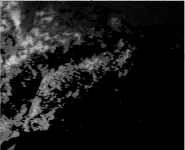
Yes, it's one of the more obvious ones with a lot of pixellation and hard edges. I'm no graphic artist - I just used some manual blur, smudge and occasional heal in Gimp. Here's what it looks like in the original (attached)
I didn't want to mess too much with each bit, because I was working separately on the level 9, 8 and 7 versions of the affected tiles, so needed them to still look the same.
It was all a bit ad-hoc - I just saved each scenario where I noticed issues, then hunted down the area in a scaled-down version of the source images (with a numbered grid overlaid to work out the tile location).
In an ideal world, someone could examine and edit the actual source images for re-processing into the tile tree format. If no-one else wants to, I guess I could, and then submit them to Dr S for subsequent processing....
I didn't want to mess too much with each bit, because I was working separately on the level 9, 8 and 7 versions of the affected tiles, so needed them to still look the same.
It was all a bit ad-hoc - I just saved each scenario where I noticed issues, then hunted down the area in a scaled-down version of the source images (with a numbered grid overlaid to work out the tile location).
In an ideal world, someone could examine and edit the actual source images for re-processing into the tile tree format. If no-one else wants to, I guess I could, and then submit them to Dr S for subsequent processing....
Attachments

So these are higher quality than 2016 stock? Do they work in the stock Orbiter or do they require the Dx9 client?
- Joined
- Sep 12, 2010
- Messages
- 3,131
- Reaction score
- 415
- Points
- 123
- Location
- Rome
- Website
- www.tuttovola.org
1) They are higher quality
2) They don't require external graphics clients
2) They don't require external graphics clients
ok. How do you install them? I used the torret to get the ones for the moon and using regular graphic it appears they are the same
.

hires lunar

default lunar

So is there a way to make another 2016 orbiter using the installer. It seems to only make an Orbiter2016 folder
.
hires lunar
default lunar
So is there a way to make another 2016 orbiter using the installer. It seems to only make an Orbiter2016 folder
- Joined
- Sep 12, 2010
- Messages
- 3,131
- Reaction score
- 415
- Points
- 123
- Location
- Rome
- Website
- www.tuttovola.org
If what you mean is having multiple Orbiter installations, no, you cannot do it with the MSI installer.
You can however, if you download the ZIP package :thumbup:
Read here:
http://orbit.medphys.ucl.ac.uk/mirrors/orbiter_radio/base_help.html
And you can save HD space by sharing textures among your installs.
Read here:
http://www.orbiter-forum.com/showthread.php?t=21471
BTW, I'd like to hear an answer about your textures problem too.
MSI installation instructions
Run the Orbiter2016.exe file after downloading. This will extract and launch the installer dialog which guides you through the installation process. This method installs Orbiter as a standard Windows application, and provides desktop shortcuts, a start menu entry and uninstall option. You can only install a single instance of Orbiter.
You can however, if you download the ZIP package :thumbup:
Read here:
http://orbit.medphys.ucl.ac.uk/mirrors/orbiter_radio/base_help.html
And you can save HD space by sharing textures among your installs.
Read here:
http://www.orbiter-forum.com/showthread.php?t=21471
BTW, I'd like to hear an answer about your textures problem too.
Last edited:

I've had the torrents for both Earth and Moon running for twelve days now, and have only managed to get 21MB of Earth and 898MB of the Moon. I can see dozens of seeds on both, but can't seem to download from any of them most of the time.
- Joined
- Jan 14, 2008
- Messages
- 9,266
- Reaction score
- 1,740
- Points
- 203
- Location
- VA
- Website
- alteaaerospace.com
- Preferred Pronouns
- he/him
I've had the torrents for both Earth and Moon running for twelve days now, and have only managed to get 21MB of Earth and 898MB of the Moon. I can see dozens of seeds on both, but can't seem to download from any of them most of the time.
I would double-check that your router's port forwarding is configured to forward incoming torrent peer requests through its firewall -- check out this page for details.
- Joined
- Jan 14, 2008
- Messages
- 9,266
- Reaction score
- 1,740
- Points
- 203
- Location
- VA
- Website
- alteaaerospace.com
- Preferred Pronouns
- he/him
ok. How do you install them? I used the torret to get the ones for the moon and using regular graphic it appears they are the same
.
hires lunar
default lunar
Take a closer look at the file sizes -- the default texture files are 266 MB and 250 MB, but the high-res textures are 11.6 GB (43x larger) and 3.6 GB (14x larger).
You won't see a difference from high orbit because Orbiter uses the default lower-res textures at long distances anyway. You should see a big difference up close, though.As for how for how install the high-res textures, there is a link to the installation instructions on the texture download page.
Another stupid question: Are these the same textures found at http://orbit.medphys.ucl.ac.uk/download.html under the heading, "Optional high-resolution texture download"?
That is where I got mine.Another stupid question: Are these the same textures found at http://orbit.medphys.ucl.ac.uk/download.html under the heading, "Optional high-resolution texture download"?
Ok I download the zip version of Orbiter2016. This is what I get:

and hi res. Looks the same to me?

- Joined
- Jan 14, 2008
- Messages
- 9,266
- Reaction score
- 1,740
- Points
- 203
- Location
- VA
- Website
- alteaaerospace.com
- Preferred Pronouns
- he/him
That's because you're looking at the stock landing pad textures and vessel textures, not terrain textures and elevation maps. Try looking at the runway and ground textures while landed at KSC or from low altitude while flying around on the moon, for example.
Try looking at the runway and ground textures while landed at KSC or from low altitude while flying around on the moon, for example.
Well I took a DG off the pad around 100 meters and flew around both it looked the same either way.
I just downloaded the moon. Do I need to be running it in D3D9?
I just downloaded the moon. Do I need to be running it in D3D9?

4throck
Enthusiast !
- Joined
- Jun 19, 2008
- Messages
- 3,489
- Reaction score
- 1,012
- Points
- 153
- Location
- Lisbon
- Website
- orbiterspaceport.blogspot.com
Did you overwrite the standard textures with the high resolution ones?
Are the textures on the right folders (ex: \Textures\Moon\Archive ) ?
Are the textures on the right folders (ex: \Textures\Moon\Archive ) ?
Yes. I have 2 installs one with default and one with hi res.
Similar threads

- Sticky
- Replies
- 6
- Views
- 11K
- Replies
- 2
- Views
- 1K

- Replies
- 6
- Views
- 5K


- Replies
- 11
- Views
- 4K


- Replies
- 15
- Views
- 9K
