General Question Best Earth Clouds

jbsheridan

New member
Joined
Jan 10, 2011
Messages
46
Reaction score
0
Points
0
I have tried a number of clouds for Orbiter with D3D9. Currently have Earth Clouds Hi Res installed.

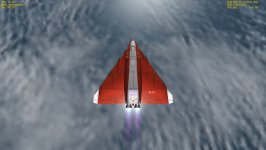
At a far off angle they look okay, I think. But looking straight down I see a gross pixelated structure to the clouds. It looks awful.

Do I need to do something to get the clouds looking like clouds?

Are there better clouds?


Thanks,

jb
 
have you tried cloudmicrotex? best I've found but I am a noob so I may be wrong..
 
by high res I assume you mean this? [ame="http://www.orbithangar.com/searchid.php?ID=5856"]Earth High-Resolution Clouds[/ame]

Yeah, cloudmicrotex2 is probably what you're looking for.

:cheers:
 
Yes, Earth High Resolution Clouds is the one.

I have also tried the CloudMicrotex, and I still get the large pixelation in the down view and I am not sure I can tell any difference between the two, which is why I am thinking that maybe I need to do something else to get the clouds looking nice.

Which is also why I am wondering if anyone else sees large pixelation when looking straight down.

Thanks,

jb
 
Can you post a picture of what you are seeing please? It would be easier for us to figure out what your problem is.
 
Here is screen shot.

jb
 

Attachments

  • SP32-20130627-120204.jpg
    SP32-20130627-120204.jpg
    404 KB · Views: 67
Are you talking about the terrible resolution? It looks kinda like you're not actually using the high res clouds. Where did you extract the files to? And is your launcher set to display higher level planet textures?
 
The planet hi res textures are just fine. It is the clouds looking straight down that are terrible.

I used JSGME to extract the files and also tried a manual extraction.

1. Where in the launcher does one set to higher level planet textures?

The micro tex or high res clouds are definitely better than the stock clouds.

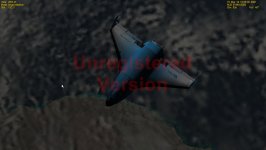
See other screen shot below. This also is of microtex clouds.


jb
 

Attachments

  • Untitled.jpg
    Untitled.jpg
    363 KB · Views: 42
there is another thing that might help. In the microtex readme it instructs you to change one of the parameters in the earth.cfg file. have aread through that as the change in the cfg number is large and may make all the difference.
 
Yes, thank you for mentioning that.

I did make the change.


Would some one please post a screen shot of the microtex clouds looking straight down, so that I could compare what I am seeing to what the addon should look like?


Thanks,

jb
 
Back
Top