Problem Big GeoTIFF file help needed

martins

Orbiter Founder
Orbiter Founder
Joined
Mar 31, 2008
Messages
2,448
Reaction score
474
Points
83
Website
orbit.medphys.ucl.ac.uk
I've recently discovered a very nice source for a global land cover map:
http://postel.mediasfrance.org/en/BIOGEOPHYSICAL-PRODUCTS/Land-Cover/

It's a segmentation into various surface types (about 20 or so) and could come in handy for various purposes. For example a new higher resolution water mask (the one I am currently using isn't quite up to level-11 resolution, resulting in some ugly coastlines). It may also prove helpful in improving the night lights, by providing a sharper city area mask.

The map is in 300m resolution, and it is distributed as one big GeoTIFF image (129600 x 64800 pixels). Unfortunately I haven't found a way to open it. Photoshop dies just looking at it. Matlab does better, but only seems to be able to load one hemisphere, the rest is garbled, and it takes up more than 8GB RAM(*). Does anybody have the means to open this image, and cut it into smaller pieces for me?

You will need to register to get access. After registering, you will be directed to an ftp server. The image is called GLOBCOVER_200412_200606_V2.2_Global_CLA.tif, and is contained in globcover_200412_200606_v2.2_global.zip.

Any help appreciated.

Martin

(*) RAM isn't the problem though. I tried on a 96GB machine with the same result. Maybe it's a Matlab limitation.
 
(*) RAM isn't the problem though. I tried on a 96GB machine with the same result. Maybe it's a Matlab limitation.

I want to see that kind of hardware.

I'll give it a go, though I'm not sure what kind of luck I'll have. What kind of smaller pieces would be helpful?
 
I want to see that kind of hardware.

I'll give it a go, though I'm not sure what kind of luck I'll have. What kind of smaller pieces would be helpful?
Cheers for giving it a go. I should be able to handle 4x2 pieces of 32400 x 32400 pixels each.
 
Just opened it with Photoshop CS3, it took about 7 minutes.
This is what it looks like when opened. (The map is in Grayscale mode).
martin.jpg

I read the size you want it, from the answer to Xyon's post.
Do you want it in the same (TIFF) format or any other?
 
Excellent. TIFF should be ok, but some other lossless format (PNG or GIF) should be equally good, if it is smaller.
 
Two down, another six to go. Is it ok if i make each tile slightly bigger?
This way they will overlap when you put them back together and there will be no loss.
I usually do this when i make panoramas, but i haven't handled a TIFF this big before.
 
Not sure I understand why they have to be bigger to avoid loss, but it's fine by me. How will I get the images once you have processed them? Do you have somewhere to upload them?
 
Unfortunately, no.
I found this site in a google search. I'll see what i can do with that.
Unless you can recommend a better one.
I haven't really got any better solution. The anonymous ftp upload space on the uni server I've got access to is woefully small and nearly full. Unless somebody else has upload space they can briefly provide for this purpose, I'd say go for the one you found, as long as it is free.
 
Ok, file processing complete. 8 TIFF files starting with GlobalA1 (upper left corner), GlobalA2,GlobalA3... GlobalB4 (lower right corner).
After zipping each of them, they take up a total of 680 MB.

I signed up on this site.
All i need is an email address to send the files to. (PM)
 
Well, looks like dgat got much further with it than I did. Nothing I tried would play nicely with that file. :/
 
If you want the ability to share them on the web then I'd recommend dropbox (www.dropbox.com)

Just put the files into the public folder and it'll give you a link. You get 2GB for free, works like a charm and is used a lot by the IRC folks.

Ok, now I'll stop sounding like a salesman! :lol:
 
Ok, everything is sorted out now. I've got the map in nice managable chunks, thanks to Dimitris. Now I have to see how well they translate into specular masks for the next Earth texture update.

Thanks to everyone who offered help and advice.
 
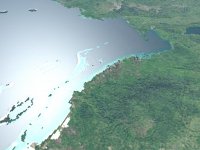
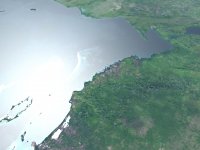
Just to show you that your effort hasn't gone to waste, here is a little teaser comparison current/next generation Earth surface. Compare the resolution of the water mask along the coastline (ignore the texture itself, this is a work in progress).
 

Attachments

  • earth_current.jpg
    earth_current.jpg
    132.6 KB · Views: 110
  • earth_nextgen.jpg
    earth_nextgen.jpg
    120.6 KB · Views: 110
That's a pretty big improvement! looks awesome :cheers:
 
I know that this is an older thread, but I found some even higher resolution geotiff's and .png's than these in the thread from another source. Here they are:

True Marble Imagery - Free Download

I'm not sure if you guys already know about this or if the projection is off, but I thought it was worth a try. I think it is 250m resolution for the highest free ones and it is divided in many segments (you have to scroll down to see the 250m ones). It could use a little bit of touching up before it is used (there are a couple clouds around some islands and in small regions) I tried making a texture out of it myself but my computer committed suicide before it finished.
 
Last edited:
Back
Top