
Bug [IMS] BT201 are rotated during integration

Dantassii

HUMONGOUS IMS shipbuilder
Joined
Jul 14, 2012
Messages
508
Reaction score
20
Points
33
Location
Somewhere.... out there.....
Preferred Pronouns
he/him
Whenever I try to integrate my BT201 modules into my space station in IMS, they get rotated during the integration process to an orientation that I do not want.

What am I doing wrong?

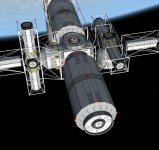
Picture shows what I mean. One on the left is in the proper orientation, one on the right is post-integration.

During the integration process, I get a 'Successful undocking' message instead of the "Successful integration" message.
 

Attachments

  • TwistedIMS-Integration.jpg
    TwistedIMS-Integration.jpg
    66.9 KB · Views: 23
Please restart Orbiter after integration and check this module is still in wrong position. If it is please post here the content of your BT201.cfg file.
 
Still rotated after restart, so here's the config file

; === Configuration file for Space Station Building Blocks 3.0 Truss Anchor ===

Meshname = burchismo\BT201
ImageBmp=Images\Vessels\IMS\SBB41B\BT201.bmp
Mass = 4000
Size = 6.0
Inertia = 6.2 5.2 2

; === Docking ports ===
BEGIN_DOCKLIST
0 1.05991 5 0 0 1 0 1 0
0 1.05991 -5 0 0 -1 0 1 0
1.12 1.05991 0 1 0 0 0 0 1
-1.12 1.05991 0 -1 0 0 0 0 1
0 -2.2444 0 0 -1 0 1 0 0
0 2.149907 0 0 1 0 1 0 0
END_DOCKLIST

; === Attachment specs ===
BEGIN_ATTACHMENT
P 0 1.05991 5 0 0 1 0 1 0 IM
P 0 1.05991 -5 0 0 -1 0 1 0 IM
P 1.12 1.05991 0 1 0 0 0 0 1 IM
P -1.12 1.05991 0 -1 0 0 0 0 1 IM
P 0 -2.2444 0 0 -1 0 1 0 0 IM
P 0 2.149907 0 0 1 0 1 0 0 IM
P 0 -2.2444 0 0 -1 0 1 0 0 XS
P 0 2.149907 0 0 1 0 1 0 0 GS
P -0.5 0 0 1 0 0 0 -1 0 XRCARGO
END_ATTACHMENT

; ======================================
; IMS specific parameters
; ======================================
ModuleType = Truss

; ======================================
; XR Cargo Specifications
; ======================================
XRPayloadEnabled = true;
Description = BT201 Truss to Module Adapter
Dimensions = 10 2.4 2.4
AttachmentPointIndex = 8
ThumbnailPath = ..\Images\Vessels\IMS\SBB41B\XR5_Thumbnails\BurchismoLogo.bmp
PrimaryCenterOfMassOffset = 0 0 0.5
 
Bug closed, problem found

IMS is not compatible with either the DX9 or DX11 clients. Once that is disabled, the add-on works as intended.

Bug closed.
 
Back
Top