LEO targeting - a numerical tool for orbital maneuvering planning

It's been a while, but I'm now adding support for rendezvous calculations into the tool - here's a first test for a relative motion plot - both target and chaser initialized at the same position, but chaser has a lower speed.

rendezvous.gif


The plan is to add a search for the best transfer orbit as well as a simulation of the stationkeeping problem.
 
Seems I now have a numerical Lambert solver running...

For specified ignition times TIG 1 and TIG 2 , this computes a 2-burn transfer solution via a numerical fit (i.e. J3 gravity, nth body perturbations and finite burn duration optionally taken into account).

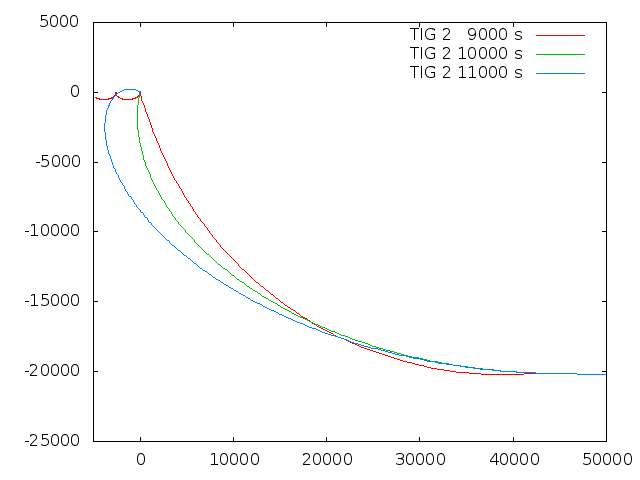
Here's a range of trajectories in target-relative coordinates for the interceptor starting on a phasing orbit 20 km lower using TIG 1 of 8150 s for different values of TIG 2.

lambert_solver.gif


The first transfer is really quick and hence quite pathological - it uses large Delta v values to get there so quickly, so the deceleration burn isn't perfect and there's a residual relative motion with the target. The 11000 s solution already goes through a higher apsis and intercepts the target from the front.

The tool spits it out all nicely:

Code:
Parameters of burn: Lambert_1
TIG             : 8150
Lambert 1
Dx (prograde)   : 6.93143
Dy (normal)     : 0
Dz (radial)     : -6.34362

TIG             : 12000
Lambert 2
Dx (prograde)   : 4.66364
Dy (normal)     : -0
Dz (radial)     : 11.8419

The fit is also able to null normal errors when this is possible - when not, the normal error can be disabled.

For too unreasonable transfer problems, the fit refuses to converge.

After some more stress-testing of the fit, I'll implement a fit for TIG1 fo get a near-Hohmann solution automatically. This is actually fun to play with...

 
... and I'm happy to present the 0.4 release of the code (source code available from the usual place ).

This version now includes the ability to define a rendezvous target, do relative motion plots and obtain numerical solutions for the Lambert problem (transfer to the target for specified start and end times) - at least where the transfer is 'reasonable' (it won't do multiple orbit phasing solutions or split second transfers with warp acceperations...)

What does a numerical tool do which an analytical Lambert solver does not? J3 gravity, finite burn duration and such things.

Here's an example of a solution obtained for the analytical situation (spherical gravity field, impulse approximation for burns) in black - with the parameters then inserted into a J3 field and a spacecraft with the acceleration capability of the Shuttle OMS engines (the initial point is a good 350 km away, shown is the magnified arrival region).

rendezvous_spherical_J3.jpg


The analytical solution misses the target by about 2.5 km and does not actually bring the chaser to a good rest relative to the target - so it'd require further corrections.

I found this feature of the code really fun to play with and explore when one can forget about orbital mechanics, when this won't work, what solutions rendezvous with emore eccentric orbits etc.

Enjoy!
 
Thanks...

The plot is the same I get, but unfortunately it shows that I've put a regression into the fit strategy (the last burn doesn't come out as precise as it could...).

I'll have to delve into this and decide whether a bugfix is needed or whether this can wait till the next version.:(
 
Last edited:
Okay, the regression seems fairly minor, so I won't make a special bugfix release and just fix it in the next version.

Thanks for everyone's patience!
 
Is this available for Orbiter or is this for Flight Gear ?
 
It's a stand-alone C++ program - you can use it for whatever purpose you like (I suppose someone could even wrap it into an Orbiter MFD if so desired).

I have benchmarked it against JSBSim, but I have no reason to suspect it would not capture the Orbiter numerics with decent precision as well.
 
Would it be possible to release some instructions on how to install and use this tool with Orbiter? Maybe a mini tutorial?
 
Thanks to Face, we're providing a Windows executable. I've not tried it under Windows, but I guess you put it into a directory, put the config file into the same directory, open a command prompt, change into the directory and type something

leo_targeting <configfile>.cfg

all output is either written on-screen or into a file in the same directory (if you want to do plots).

(Since Face evidently got it to run under Win, maybe he can correct anything I'm saying wrong here...) I'm only using it under Linux with gnuplot or xmgrace for doing the plots. Under Windows I guess Excel does plots, gnuplot surely is to be had as well,...

As for what to write into the config file, I have this tutorial series.

I'm not sure what Orbiter provides in terms of the state vector, but I'm fairly sure you can get position in (lat/lon/alt) format, a course, velocity and vertical speed if you want to specify a state.
 
I've not tried it under Windows, but I guess you put it into a directory, put the config file into the same directory, open a command prompt, change into the directory and type something

leo_targeting <configfile>.cfg

all output is either written on-screen or into a file in the same directory (if you want to do plots).

Yes, this is how I use it. It is a normal Windows command-line application. The *.cfg defines what files are created, and after the program ran through, you can import the 2D files into Excel to do an XY plot diagram. For some 3D animated data I have used Python under Windows with matplotlib and a small script (posted here before).
 
I forgot to say:

If there's some format/option/... I can add to make this more useful with Orbiter, please let me know. So far most active users of this are on the FG side, so naturally the feedback is a bit biased.
 
I got some use cases with higher orbit insertion (Shuttle with OMS kit mostly...) recently for which the tool wasn't really working well, so I invested some work to fix various issues.

The PEG-4 fitting should now be more stable (aka the range of parameters for which it converges higher) and the fit becomes progressively more permissive with the number of iterations - assuming people would rather want an inexact solution than no solution - for practical applications I think it's often about fractions of a second of burn time, so it may not even be possible to reach perfect accuracy anyway.

There's also a bug fixed for the second Lambert burn when inperial units are chosen, and the 'up' velocity definition in proximity coordinates is now based on the proper parallel-transported derivative.

Here's the v0.41 bugfix release - enjoy!
 
GinGin tested a workflow to apply the tool to solve de-orbit problems in Orbiter, and found that using a position (rather than state_vector) declaration is easiest. Unfortunately by mistake the mission elapsed time (MET) could not be set properly when using this way of init, so I made a 0.42 bugfix release where this is corrected - which should make it easier to let the solver go for Orbiter problems.

Download from the usual place.

(The context is that the state vector assumed by LEO targeting is the same as used by JSBSim, i.e. it always assumes a fixed orientation or the coordinate system with respect to Earth at simulation init irrespective of the date, which would have to be rotated by a sidereal time angle when comparing with a state vector as extracted from Orbiter - so just using position and altitude is easier).
 
Nice, thanks.
Indeed, really easy to use it with position in Orbiter.
Peg 4 for insertion and deorbit :)
 
Back
Top