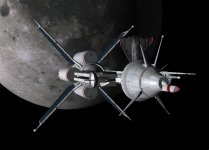
OHM Lodestone-Class Advanced Cislunar Cruiser

OrbitHangar

Addon Comments
Joined
Apr 9, 2008
Messages
3,832
Reaction score
18
Points
0
This is my second add-on and my first foray into C++ and making a .dll module. It's a large-ish Gas Core Fission-powered vessel, designed to simulate the maximum power that type of engine would theoretically be capable of producing.nbsp; I did all the math to make sure its capabilities were realistic, but tweaked a few things for the sake of user-friendliness. The main impetus behind this add-on, however, was to design a neat-looking original ship for Orbiter, so the visual design is based more on my own sense of proportion and what looks good as opposed to any specific calculations, although I did take the mass ratio and area of the radiator panels into account.nbsp; Hope you enjoy it! Requires the Universal Cargo Deck: [ame="http://www.orbithangar.com/searchid.php?ID=3262"]Universal Cargo Deck, release 4[/ame]

[ame=http://www.orbithangar.com/searchid.php?ID=3847]More...[/ame]
 
I've dowloaded but not yet installed it. Based on what I saw in the image it looks like the kind of ship that will easily fit into most scifi type scenarios. If everything runs 5x5, I'll add it to the list of compatible vessels for RTF multi-ship scenarios. I can't wait to put her thru the ringer and see how she flys.

:cheers:
 
Nice craft! I created your ship with the Scenario Editor, but it turned out invisible :(
Might be my orbiter-installation though.

When you save your scenario will the settings of the Universal Cargo Deck get saved as well? When I use it on my ship that I'm developing they do not - all the cargo deattach.
 
Nice craft! I created your ship with the Scenario Editor, but it turned out invisible :(
Might be my orbiter-installation though.

When you save your scenario will the settings of the Universal Cargo Deck get saved as well? When I use it on my ship that I'm developing they do not - all the cargo deattach.


That's too bad... I haven't had any trouble like that (well, I wouldn't have released it otherwise) and the Cargo Deck settings have always been carried over for me when I saved the scenario - I used just one scenario as a template to generate the others, including some I left out. Neither my clean install for testing add-ons nor my regular install with all the bells and whistles had any problem with it.

I actually used to have weird problems like that all the time, though, until I reinstalled Orbiter and used this thing from the get-go: http://www.users.on.net/~jscones/software/products-jsgme.html Sorry if you know about it already, but it's saved me a lot of headaches and I feel a need to evangelize.

Glad you liked the ship, though - First time I've done any real 3D modeling with multiple textures, and now that I know how that works, I think an O'Neill Colony is next in the pipeline.
 
Nice craft! I created your ship with the Scenario Editor, but it turned out invisible :(
Might be my orbiter-installation though.

When you save your scenario will the settings of the Universal Cargo Deck get saved as well? When I use it on my ship that I'm developing they do not - all the cargo deattach.

A had too problem with few ship...when I run it thay are invisible,than I install
this: http://www.microsoft.com/Express/VB/
All problem gone.
Maybe you have same problem as I had before?
 
A had too problem with few ship...when I run it thay are invisible,than I install
this: http://www.microsoft.com/Express/VB/
All problem gone.
Maybe you have same problem as I had before?

I have a big problem recently with vessels that do not show on my screen.
When I zoom out to about 7 km, it do show on the screen, but very small.
The labels are there.
I check and dubble check the mesh and texture files and they are in there correct folders.
The vessels I do not see is the Lodestone add. The Niburi planet and the death star.
My XR2 ship do show, but after a while it also disapear.
Any help?
 
My XR2 ship do show, but after a while it also disapear.

I could only guess,maybe to reinstall Orbiter...if happend again maybe graphic card problem...For Death Star I can't see it too...mesh is to big for my config.
 
I could only guess,maybe to reinstall Orbiter...if happend again maybe graphic card problem...For Death Star I can't see it too...mesh is to big for my config.

I done that. I install a "clean" Orbiter. The problem persist.
And it can't be the Graphic card. It is a Nvidia 9600 GT 512 Meg ram card.
And all the other ship DO show. Like the XR5, DGIV, shuttle, stock DG, XR2, although the XR2 also disappear after a while. And with the fresh install, there is just the barebone mod's that running except for the Univeral Cargo Deck. It is needed by the Lodestone. And it DOES appear when zoom out to 7 km, but VERY small. Just a small image. Almost like a piont. The Planet Niburu is also very small when zoomed out, but I can see some texture.
 
I have also been having this problem with invisibility of certain vessels, despite having all meshes and tex in place. This is also a problem with this addon.
I'm gonna try the solution suggested above, ie install the MS Visual Basic package. I'll report back later.
 
About planet Nubiru,mesh used for it is from moon3d add...
Mesh in Nubiru is small for planet size...probably author size it with config file but from some reason mesh still remain small when I run it,probably you have same problem.
Why this happening don't know.
 
A had too problem with few ship...when I run it thay are invisible,than I install
this: http://www.microsoft.com/Express/VB/
All problem gone.
Maybe you have same problem as I had before?

Mm, I think I have that crap already, but I might be wrong. Is it because some addons are dependant on dlls from that package?
Ah, just remembered also: The same problem with invisibility appears for me when using the new-ish ISS addon:
[ame="http://www.orbithangar.com/searchid.php?ID=3737"]International Space Station v.1.1[/ame]
 
Last edited:
missing ships

It look's like all the new adds have the problem. I install the latest from OH. It's the Donovan. Guess what. It's missing. But what is puzzle me is that if I zoom out, it do appear. But very small. I recieved a new Nibiru file from Liber via my Private message box. It's named "Nibiru2.zip". That one works now. I am baffeled by this.
 
Yes. It is likely caused by the missing run-time files. I am not 100% sure, but the free Express versions of the compiler kit can only produce dynamically linked versions of the DLLs, you don't have such problems with statically linked DLLs.
 
Yes. It is likely caused by the missing run-time files. I am not 100% sure, but the free Express versions of the compiler kit can only produce dynamically linked versions of the DLLs, you don't have such problems with statically linked DLLs.

Must I download and install Visual Studio 2008 Express? That is a large download for a dailup user.:(:(:(
 
Must I download and install Visual Studio 2008 Express? That is a large download for a dailup user.:(:(:(

No. if you would stress your reading skills, you would have found out, that we are telling you to download and install the VC2008 Run-Time files. Not the full VS2008 Express.
 
Lodestone supply run

Nice looking ship, and loads better than anything I've been working on. I thing I'll stick to base design for now, ships later...

I took her on a run from Earth to Lunar orbit, then dock a DGIV with her under the guise of a crew swap, here's a screen grab for you all.
 

Attachments

  • Crew Swap.jpg
    Crew Swap.jpg
    70.2 KB · Views: 42
Back
Top