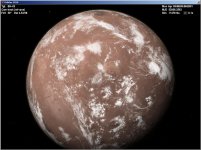
Request Mars clouds

Enjo

Mostly harmless
Addon Developer
Tutorial Publisher
Donator
Joined
Nov 25, 2007
Messages
1,667
Reaction score
19
Points
38
Location
Germany
Website
www.enderspace.de
Preferred Pronouns
Can't you smell my T levels?
Yes, my Matees. In my opinion, Mars clouds is the only thing that Orbiter2016 now misses on the visual side. Any takers?
 
Any place we could get a Mars cloud map? I haven't seen any resource coming close to that.
 
I don't know, but even something fictional (perlin noise?) would be OK for me.
 
Hm. I'll dig a bit on how Mars clouds are formed, maybe I could make a "guided Perlin generation", because plain old Perlin for clouds isn't the best, especially on Mars...
 
They were beautiful, but unfortunately they don't seem to be compatible now.

Yes, Rolf.

I was not thinking about a direct use in 2016 vers but maybe as models.

Don't remember how it was implemented ? yes: a .tex.

Mars' Earth cloud'ized::tiphat:
 

Attachments

  • moon_clouds.jpg
    moon_clouds.jpg
    104.7 KB · Views: 42
Last edited:
This is the bmp of a canal alpha coming from one of the .dds at level 7 of one of the mars cloud addon .tex ( mars cloud 5 ?... i have all it's set on my hdd) made by Rolf ( extracted with OrbiterNet Texture tool 2.0 made by Daver ). By the fact and with it's autorization, could it be possible, for example, to re make the whole picture ( 100 dds here at level 7 ) - assembler ( in french ) at each level - and make a cloud.tree file with that...

An idea...

Not sure to have the time to make it personnaly and i've read somewhere that one must be under a 64 bits OS ( for Matlab ) to work with such files. It's not the case for me for the moment if i'm preparing that actually with an XP 64 or seven 64 dedicated to that sort of thing.

So for the moment...
 

Attachments

Last edited:
I'm currently working on a texture tree manipulation tool. Would it make sense for such a tool to have a feature that takes old-style *.tex files and automatically generates appropriate tree tiles? This here looks like a use-case to me.
 
Last edited:
Only for information, programs made in the past to extract dds from *.tex files:

Thanks for the info. Unfortunately, none of them comes with sources, so they are useless to me.
Fortunately though, the *.tex format is super simple (just linear concatenation of DDS files of all levels). So it will only be a matter of splitting and correctly positioning in the tree directory.

---------- Post added at 21:40 ---------- Previous post was at 12:41 ----------

I've made some progress with the converter, getting all DDS extracted from the *.tex files. Since this only goes to level 8 and tex-files used a non-equidistant tile-grid, the tiles are not directly fitting into the texture tree. They'd need resizing, splitting, merging. Which I will of course do, too.

But... did you know that the Mars clouds addon works just fine in 2016 if you add the following to the Mars.cfg:
Code:
; === Cloud parameters ===
CloudAlt = 15e3                 ; altitude of cloud layer
CloudRotPeriod = 0.722e5
CloudShadowDepth = 0.7
CloudMicrotextureAlt = 30e3 240e3
MinCloudResolution = 1         ; cloud layer from this resolution
MaxCloudResolution = 8         ; highest cloud resolution level
That plus rendering options set to "cache first, then archive" make them appear just fine on my machine.
 
But... did you know that the Mars clouds addon works just fine in 2016 if you add the following to the Mars.cfg
(...)
That plus rendering options set to "cache first, then archive" make them appear just fine on my machine.
Doesn't work here. I either get clouds without planet textures on DX7, or planet textures but no clouds on DX9.
 
Doesn't work here. I either get clouds without planet textures on DX7, or planet textures but no clouds on DX9.

That's interesting. I've tested it in inline client with RC.3 and high-res Mars tree archive. OVP-related, perhaps?
 
Test with that Mars cfg:

; === Atmospheric Parameters ===
...............................................................

; === Cloud parameters ===

CloudAlt = 15e3 ; altitude of cloud layer
CloudRotPeriod = 0.722e5 ; for Clouds-V
;CloudRotPeriod = 0.788e5 ; alt 1.22e5, 1.506e5 for Clouds-1-Lite
;CloudRotPeriod = 1.22e5 ; alt 1.506e5 for Clouds-2-Medium and Clouds-4-HvyLargeSand
;CloudRotPeriod = 1.08e5 ; alt 1.223e5, 1.506e5 for Clouds-3-MediumSand
CloudShadowDepth = 0.7
CloudMicrotextureAlt = 30e3 240e3
MinCloudResolution = 1 ; cloud layer from this resolution
MaxCloudResolution = 8 ; highest cloud resolution level

; === Visualisation Parameters ===
..........................................

Mars_cloud.tex in Textures2 (but works also in Textures1)

Windows XP
Standard install of Orbiter RC3 ( i can't experiment actually with d3d9; CTD since r55 i think)
All parameters by default ( no particular rendering options except default's one )
Basic textures ( not high level )

Clouds ( as well of sandstorm - could be necessary to rework on the coulor of the sand ) are there.


Edit.

And for Saturn and Neptune

( Better looking gas giant ):
[ame="http://www.orbithangar.com/searchid.php?ID=4375"]Better looking gas giants[/ame]

... possible parameters:

Neptune:

; === Cloud parameters ??? ===
CloudAlt = 35e3 ; altitude of cloud layer
CloudRotPeriod = 4e4
CloudShadowDepth = 0.4
CloudMicrotextureAlt = 20e3 200e3
MinCloudResolution = 1 ; cloud layer from this resolution
MaxCloudResolution = 7 ; highest cloud resolution level

Saturn:

; === Cloud parameters ??? ===
CloudAlt = 85e3 ; altitude of cloud layer
CloudRotPeriod = 4e4 ;
CloudShadowDepth = 0.4 ;
CloudMicrotextureAlt = 50e3 500e3 ;
MinCloudResolution = 1 ; cloud layer from this resolution
MaxCloudResolution = 7 ; highest cloud resolution level
 
Last edited:
Back
Top