
General Question Mars Hi-Res Surface Elevation Installation

BrianJ

Addon Developer
Addon Developer
Joined
Apr 19, 2008
Messages
1,875
Reaction score
1,281
Points
128
Location
Code 347
Hi,
I decided to try out the Orbiter2016 Mars Hi-Res Surface Elevation pack(8Gb) available here:
http://web1.orbiter.us/tex_mirror.html#mars

I followed the installation instructions here:
http://web1.orbiter.us/tex_help.html#tex_install

I noticed a couple of anomalies:
From high orbit, there is quite a gap between the horizon and atmosphere
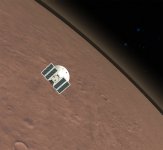
mars_hires_atmos1.jpg

Also, the Phoenix landing site is at -19.7km alt.
Using the default Mars Surface Elevation, it is at -4.06km which is more correct.

Using the "MinElevation = -22000" parameter in Mars.cfg (as per installation instructions) doesn't seem to make any difference.

Am I missing something in the install process?

Many thanks,
Brian
 
Hi Brian,
Why do you mention the elevation pack with a size of 8Gb? Do you mean that you did not install the Surf.tree file which is 12Gb? If not, perhaps that introduces the problem.

I remembered that I had some minor issues with the Mars horizon as well. The color of the atmospheric haze changed suddenly from bright yellow to darkish yellow at some point. I did not worry about this too much since I blame my modest video card for that.

I did check it again just a few minutes ago. And for some reason I have a similar issue as you now. I don't have a steady gap, it's actually blinking. Zoom levels seem to affect this.

Maybe try some other resolution and AA settings. I think that's the only thing I ever changed since it was working ok.
 
Hi,
that is correct - I only installed the Elev.tree (8Gb).
I might try the hi-res Surf.tree, but I don't see why that would make a difference to elevation or atmosphere rendering.

I'm not that bothered about the atmosphere rendering glitch, but the difference in altitude for Phoenix landing site (haven't checked any others) is surprising.

Cheers,
Brian
 
I might try the hi-res Surf.tree, but I don't see why that would make a difference

Me neither, but that's the only difference. I checked the installation instructions against my \Orbiter\Config\Mars.CFG and you did not miss anything.

Is your video card able to have anti-aliasing set to 4x while maintaining 60fps at all times? I recently had to set AA to 0 to maintain 60 fps. I think I have these glitches as well since then. But I need to test that.

---------- Post added at 08:08 PM ---------- Previous post was at 07:41 PM ----------

At 125.723W 068.194N, my Orbiter says the altitude at ground level is -19.7km. Google Earth in Mars mode says it's about -4km.
 
Just a couple more observations about the Mars Hi-Res Surface Elevation vs. the Default Lo-Res version.

I set a vessel to "landed" status at a few different lat. and long. points and note the altitude.

Lat. Long. Lo-Res Alt.(km) Hi-Res Alt.(km)
89 0 -2.56 -20.00
0 0 -1.52 -1.89
0 180 -2.55 -3.27
-89 0 3.75 -13.53

Difference seems greater at the poles.

---------- Post added at 06:20 PM ---------- Previous post was at 06:08 PM ----------

Is your video card able to have anti-aliasing set to 4x while maintaining 60fps at all times? I recently had to set AA to 0 to maintain 60 fps. I think I have these glitches as well since then. But I need to test that.
I'm using the default Orbiter rendering, not sure what my default AA is for that.
 
Perhaps we should check some other platform which uses HRSC data to see whether this 15km difference is exaplained by the data or the platform. No idea where to look..

---------- Post added at 08:25 PM ---------- Previous post was at 08:21 PM ----------

I'm using the default Orbiter rendering, not sure what my default AA is for that.

I meant the setting in the Advanced settings of the D3D9 client setup. It's on the left under Graphic options. Try 0x to see if that makes any difference on the horizon glitch. And if it was set to 0x, try 4x.

---------- Post added at 09:09 PM ---------- Previous post was at 08:25 PM ----------

According to this view using HRSC data, -4km is the correct elevation of the terrain level: http://hrscview.fu-berlin.de/cgi-bi...E=Update+view&image0=f771_0000&code=015129937
 
Back
Top