Advanced Question Parent-Child Animations

n0mad23

Addon Developer
Addon Developer
Joined
Feb 10, 2008
Messages
1,078
Reaction score
17
Points
0
Location
Montesano
Website
soundcloud.com
I'm trying to animate some legs for a lunar landing craft, and am having trouble figuring out the right approach here. After spending most of my Sunday puzzling over my animations, I thought it's probably time to see if anyone can point me in the right direction.

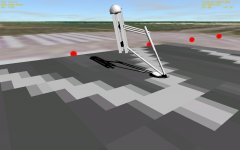
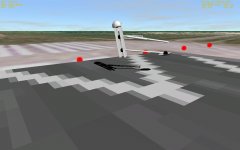
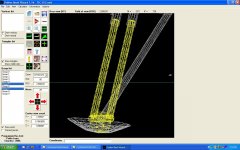
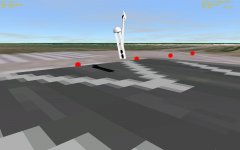
I'm using Spacecraft 3 for this, and am basically doing a series of rotations and translations with 2 primary structures and a total of 8 mesh groups. Doing the animations in a linear series is fairly straight forward, but I really need several of the rotations and translations to happen simultaneously. In the attached group of pics, what I'm really seeking is having the T-bar on the end of the upper leg's assembly stay connected with the foot plate.

Here's the animation code as it currently stands:

Code:
[ANIM_SEQ_0]
; Landing gear upanddown 
KEY=G
DURATION=6

[ANIM_COMP_0]
SEQ=0
TYPE=ROTATE
GROUPS=1,2,7,9
RANGE=(0.0,0.2)
ROT_PNT=(-0.2261176,2.336487,0.2280593)
ROT_AXIS=(0.708135245911708,0.0,0.706076818411116)
ANGLE=45

[ANIM_COMP_1]
SEQ=0
TYPE=ROTATE
GROUPS=3,4,5,6,8
RANGE=(0.0,0.2)
ROT_PNT=(-0.1066215,2.841195,9.723303E-02)
ROT_AXIS=(0.706082757732833,0.0,0.708129323804909)
ANGLE=45

[ANIM_COMP_2]
SEQ=0
TYPE=TRANSLATE
GROUPS=5
RANGE=(0.2,0.4)
SHIFT=(-0.65,-0.05,0.65)

[ANIM_COMP_3]
SEQ=0
TYPE=TRANSLATE
GROUPS=1,2,7,9
RANGE=(0.4,0.8)
SHIFT=(0.2094961,0.257707,-0.26082625) 
PARENT=0

[ANIM_COMP_4]
SEQ=0
TYPE=TRANSLATE
GROUPS=3,4,5,6,8
RANGE=(0.4,0.8)
SHIFT=(0.7,0.748847,-0.7)
PARENT=1

[ANIM_COMP_5]
SEQ=0
TYPE=ROTATE
GROUPS=4,5
RANGE=(0.8,0.9)
ROT_PNT=(-0.2214981,2.56657,0.2198978)
ROT_AXIS=(0.702073307332462,0.0,0.712104677088459)
ANGLE=47

[ANIM_COMP_6]
SEQ=0
TYPE=TRANSLATE
GROUPS=4,5
RANGE=(0.8,0.9)
SHIFT=(0.26,1.1,-0.26)

[ANIM_COMP_7]
SEQ=0
TYPE=TRANSLATE
GROUPS=3
RANGE=(0.8,0.9)
SHIFT=(-0.65,0.0,0.65)

[ANIM_COMP_8]
SEQ=0
TYPE=ROTATE
GROUPS=1,2,7,9
RANGE=(0.8,0.9)
ROT_PNT=(-0.1066215,2.841195,9.723303E-02)
ROT_AXIS=(0.706082757732833,0.0,0.708129323804909)
ANGLE=35

[ANIM_COMP_9]
SEQ=0
TYPE=ROTATE
GROUPS=3,4,5,6,8
RANGE=(0.9,1.0)
ROT_PNT=(-5.451512E-02,3.503583,6.438237E-02)
ROT_AXIS=(0.676655448439267,0.0,0.736299805851838)
ANGLE=13

[ANIM_COMP_10]
SEQ=0
TYPE=ROTATE
GROUPS=1
RANGE=(0.9,1.0)
ROT_PNT=(-2.166257,-1.066035,2.158304)
ROT_AXIS=(0.711327992411393,0.0,0.702860218828735)
ANGLE=-15
I'm basically wondering it the right way to go about this is to take each of the meshes, and position them where I want them to be to get the vectors. In other words, do I calculate where the upper arm will be when it rotates rather than where it was at the beginning of the sequence?

And is there anyway of keeping the T-bar and upper assembly in contact with the lower segment throughout the sequence?
 

Attachments

  • LG-up.JPG
    LG-up.JPG
    59.6 KB · Views: 24
  • LG-down.JPG
    LG-down.JPG
    70.8 KB · Views: 25
  • LG-prob.JPG
    LG-prob.JPG
    65.7 KB · Views: 19
  • LG-connect.JPG
    LG-connect.JPG
    143.3 KB · Views: 21
Is this the type of movement you want, nOmad23?

http://s89.photobucket.com/albums/k207/Notebook_04/?action=view&current=Door_1.mp4

This is the .cfg:
Code:
[CONFIG]
MESHNAME="spacecraft\PrepArea"
SIZE=15
COG=.1


[ANIM_SEQ_0]
; doors
KEY=0
DURATION=5

[ANIM_COMP_0]	;DoorBaseHinge
SEQ=0
GROUPS=2
RANGE=(0,1)
;TYPE=TRANSLATE
;SHIFT=(0,4,0)
TYPE=ROTATE
ROT_PNT=(157,8,0)
ROT_AXIS=(0,0,1)
ANGLE=-90

[ANIM_COMP_1]	;DoorBase
PARENT=0
SEQ=0
GROUPS=0
RANGE=(0,1)
TYPE=ROTATE
ROT_PNT=(157,4,0)
ROT_AXIS=(0,0,1)
ANGLE=180


[ANIM_COMP_2]	;DoorTop
SEQ=0
GROUPS=1
RANGE=(0,1)
TYPE=ROTATE
ROT_PNT=(157,8,0)
ROT_AXIS=(0,0,1)
ANGLE=-90
;PARENT=1

[ANIM_COMP_3]	;Barriers East
SEQ=0
GROUPS=8,10
RANGE=(0,1)
TYPE=ROTATE
ROT_PNT=(120,1,0)
ROT_AXIS=(0,0,1)
ANGLE=90

[ANIM_COMP_4]	;Barrier West
SEQ=0
GROUPS=13
RANGE=(0,1)
TYPE=ROTATE
ROT_PNT=(47,1,0)
ROT_AXIS=(0,0,1)
ANGLE=90

[ANIM_COMP_5]	;Barrier West
SEQ=0
GROUPS=15
RANGE=(0,1)
TYPE=ROTATE
ROT_PNT=(52.5,1,0)
ROT_AXIS=(0,0,1)
ANGLE=90

The last three entries are for the barriers you can see here:
http://s89.photobucket.com/albums/k207/Notebook_04/?action=view&current=Doors2.mp4
Not relelvant to the door animation, just to make it clear.

I can't remember how it works now, still some ";" in the .cfg file, so a bit trial and error!
If its usefull I'll root around and see if I made any notes at the time.

N.
 
As usual, no notes, but some memories came back...

This shows what you get if you comment out "PARENT=0" from [ANIM_COMP_1;DoorBase.

http://s89.photobucket.com/albums/k207/Notebook_04/?action=view&current=Door_2.mp4

It shows that the door base has a 180 degree rotation, that gets subtracted from the [ANIM_COMP_0];DoorBaseHinge -90 rotation.

I think this surprised me at the time, but it makes sense. Its not intuitive though.

Don't know if any of this help?

N.
 
Yes, this is basically what I have in mind.

It's weird how adding or disabling a PARENT= comment in the animations, and you're quite right - it's quite non-intuitive.

I'm going to study your attached configuration file and see if I get any insights.

I did go back to my animations last night (after having an unbidden "aha" moment) and got the basics working a lot better. Some of my ROTATION_POINT settings had been totally over thought and now work a lot better.

Thanks Notebook!
 
This is the most complex I've done so far with SC3:

http://s89.photobucket.com/albums/k207/Notebook_04/?action=view&current=Launcher_1.mp4

and the .cfg file:
Code:
[CONFIG]
MeshName = spacecraft\LauncherMechanism
Size =4
COG=.01

;================================== Start of animations 
[ANIM_SEQ_0]
; Arms
KEY=0
DURATION=1.0

;MainArms and pins +Z mechanisms
[ANIM_COMP_0]
SEQ=0
GROUPS=4,5,6,7,8,9,10,11,29,30,31,32,33,34,35,36
RANGE=(0,1)
TYPE=ROTATE
ROT_PNT=(0.6,2.84,1.94)
ROT_AXIS=(1,0,0)
ANGLE=15

;MainArms and pins -Z mechanisms
[ANIM_COMP_1]
SEQ=0
GROUPS=63,64,65,66,67,68,69,70,88,89,90,91,92,93,94,95
RANGE=(0,1)
TYPE=ROTATE
ROT_PNT=(0.6,2.84,-1.94)
ROT_AXIS=(1,0,0)
ANGLE=-15

;MainRam and hinges  +Z mechanisms
[ANIM_COMP_2]
SEQ=0
GROUPS=15,16,17,40,41,42
RANGE=(0,1)
TYPE=ROTATE
ROT_PNT=(0.6,2.84,3.126)
ROT_AXIS=(1,0,0)
ANGLE=7

;MainRam and hinges  -Z mechanisms
[ANIM_COMP_3]
SEQ=0
GROUPS=74,75,76,99,100,101
RANGE=(0,1)
TYPE=ROTATE
ROT_PNT=(0.6,2.84,-3.126)
ROT_AXIS=(1,0,0)
ANGLE=-7

;MainRam Piston +Z mechanisms
[ANIM_COMP_4]
SEQ=0
GROUPS=51,26
RANGE=(0,1)
PARENT=2
TYPE=TRANSLATE
SHIFT=(0,-0.2,0.14)


;MainRam Piston -Z mechanisms
[ANIM_COMP_5]
SEQ=0
GROUPS=85,110
RANGE=(0,1)
PARENT=3
TYPE=TRANSLATE
SHIFT=(0,-0.2,-0.14)

;ReleaseJaws and pins +Z mechanisms
[ANIM_COMP_6]
SEQ=0
GROUPS=18,19,20,43,44,45
RANGE=(0,1)
TYPE=ROTATE
ROT_PNT=(0.6,4.43,1.40)
ROT_AXIS=(1,0,0)
ANGLE=30
PARENT=0

;ReleaseJaws and pins -Z mechanisms
[ANIM_COMP_7]
SEQ=0
GROUPS=77,78,79,102,103,104
RANGE=(0,1)
TYPE=ROTATE
ROT_PNT=(0.6,4.43,-1.40)
ROT_AXIS=(1,0,0)
ANGLE=-30
PARENT=1

;ReleaseRam and hinges +Z mechanisms
[ANIM_COMP_8]
SEQ=0
GROUPS=21,22,23,46,47,48
RANGE=(0,1)
PARENT=0
TYPE=ROTATE
ROT_PNT=(0.6,4.18656,2.35328)
ROT_AXIS=(1,0,0)
ANGLE=-3.5

;ReleaseRam and hinges -Z mechanisms
[ANIM_COMP_9]
SEQ=0
GROUPS=80,81,82,105,106,107
RANGE=(0,1)
PARENT=1
TYPE=ROTATE
ROT_PNT=(0.6,4.18656,-2.35328)
ROT_AXIS=(1,0,0)
ANGLE=3.5

;ReleasePiston +Z mechanisms
[ANIM_COMP_10]
SEQ=0
GROUPS=28,53
RANGE=(0,1)
PARENT=6
TYPE=ROTATE
ROT_PNT=(0.6, 4.658035, 1.58795)
ROT_AXIS=(1,0,0)
ANGLE=-35

;ReleasePiston -Z mechanisms
[ANIM_COMP_11]
SEQ=0
GROUPS=87,112
RANGE=(0,1)
PARENT=7
TYPE=ROTATE
ROT_PNT=(0.6, 4.658035, -1.58795)
ROT_AXIS=(1,0,0)
ANGLE=35

;LateralStrut +Z mechanisms
[ANIM_COMP_12]
SEQ=0
GROUPS=57,58
RANGE=(0,1)
TYPE=ROTATE
ROT_PNT=(0.6,2.84,1.94)
ROT_AXIS=(1,0,0)
ANGLE=15

;LateralStrut -Z mechanisms
[ANIM_COMP_13]
SEQ=0
GROUPS=116,117
RANGE=(0,1)
TYPE=ROTATE
ROT_PNT=(0.6,2.84,-1.94)
ROT_AXIS=(1,0,0)
ANGLE=-15


;================================= Start of attachments
[PARENT_ATTACH_0]
NAME="Launcher"
POS=(-0.8, 3.7, 0)
DIR=(0,-1,0)
ROT=(0,0,-1)
RANGE=1
LOOSE=0


;Blue Streak attachment
;[CHILD_ATTACH_0]
;NAME=F2_LowerAttach
;POS=(0, .8, -6.0)	;POS=(0,0,9)
;DIR=(0,0,1)
;ROT=(1,0,0)
;LOOSE=0

Don't look to close, as it wouldn't work in real life!

Not like this one:

Hope it helps, N.
 
Back
Top