Problem Pixel artifacts?

Poltergeist

New member
Joined
Feb 5, 2013
Messages
9
Reaction score
0
Points
1
Recently I have been running into a very unusual problem in the sim. I picked it up after many months and gave it another try, (I quit earlier due to my then lacking knowledge of orbital maneuvering) and have been loving it ever since. But every time I try to start a scenario that starts near the KSC (not in orbit) I get pixel artifacts on my screen. I can still fly and operate the sim fine, yet the artifacts make seeing things difficult. Every other scenario I have tried that begin in orbit are fine. I have even reentered and landed at the KSC without issue. I cannot post a screenie atm, but if really required I can. I am running v100830, and Windows 7 Ultimate. 2.6ghz Pentium Dual Core, 8GB RAM, NVIDIA GT220. The strangest thing of this, however, is that the pixel artifacts TRANSFER OVER to everything else on my PC. The only way to fix this is a reboot. Also, the artifacts dont stay stationary, they move in a way I can only describe as a wave like motion. Any help/suggestions would be appreciated. I run mods, but the problem is there even on a full stock installation.
 
Last edited:
A screenshot would be a very big help.
If it was just in Orbiter, I would say try VSYNC. But if it carries over to your desktop, I would really recommend you change graphics drivers. Update to the latest stable drivers for your card. If you have the latest drivers, then having to revert to an older driver is far from unheard of.
 
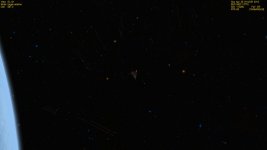
Pixel Artifacts? I think I have those too.

I was in the process of uploading my screenie of what I call "Runways In Space" when I saw this thread. I am not sure what they are.

Part of the Celestial Background on a clean install of Orbiter2010. Windows7HomePremium on a machine with ATI Radeon and a quad core. Celestial Background is set as Visible DSS2/Wikisky, intensity 0.5. I normally don't use this background or intensity, but am regression testing the app and add-ons. No add ons have been . . . added to this install.

Anyway, seems a bit odd to me.
 

Attachments

  • RunwaysInSpace.jpg
    RunwaysInSpace.jpg
    42.6 KB · Views: 50
I was in the process of uploading my screenie of what I call "Runways In Space" when I saw this thread. I am not sure what they are.

Part of the Celestial Background on a clean install of Orbiter2010. Windows7HomePremium on a machine with ATI Radeon and a quad core. Celestial Background is set as Visible DSS2/Wikisky, intensity 0.5. I normally don't use this background or intensity, but am regression testing the app and add-ons. No add ons have been . . . added to this install.

Anyway, seems a bit odd to me.

If they don't change or move around, I think that's just an artifact that exists in the celestial background image.
 
There's a bunch more. They look like runways from different angles. There's some other stuff too that doesn't look right.
 
There's a bunch more. They look like runways from different angles. There's some other stuff too that doesn't look right.

Again, pretty sure it's just the image. The original has loads of artifacts.
 
If you're talking about those long streaks, LTrotsky, those are satellite trails in the original image that were recorded while the images were being acquired.
 
Last edited:
If you're talking about those long streaks, LTrolsky, those are satellite trails in the original image that were recorded while the images were being acquired.

Geez. I hope I am not LTrolsky. That sounds bad.

Yes, I thought it might be something like this. When are we going to build that space telescope that's situated beyond all the Geosync sats? Just downloaded all the add-on textures for the solar system. Was using the "realistic background" texture add-on (which had none of this, but probably took a lot of work to 'fix').
 
A screenshot would be a very big help.
If it was just in Orbiter, I would say try VSYNC. But if it carries over to your desktop, I would really recommend you change graphics drivers. Update to the latest stable drivers for your card. If you have the latest drivers, then having to revert to an older driver is far from unheard of.

I have the latest graphics drivers, and I will try turning on VSYNC even though I usually don't, if that does nothing I shall post a screenshot shortly. Also the weird thing about all this is it's JUST KSC scenarios. If I start in orbit or docked to the ISS everything is fine. It seems the problem has escalated, now the KSC scenarios cause my PC to blue screen. Here's the log if it will help.

**** Creating simulation session
DirectDraw interface OK
Direct3D interface OK
Graphics: Viewport: Fullscreen 1920 x 1080 x 32
Graphics: Hardware T&L capability: Yes
Graphics: Z-buffer depth: 32 bit
Graphics: Active lights supported: 8
Loading 15382 records from star database
Joystick throttle: Z-AXIS
Joystick throttle control detected
Module Sun.dll ............... [Build 100830, API 100830]
VSOP87(E) Sun: Precision 1e-006, Terms 554/6634
Module Mercury.dll ........... [Build 100830, API 100830]
VSOP87(B) Mercury: Precision 1e-005, Terms 167/7123
Module Venus.dll ............. [Build 100830, API 100830]
Module VenusAtm2006.dll ...... [Build 100830, API 100830]
VSOP87(B) Venus: Precision 1e-005, Terms 79/1710
Module Earth.dll ............. [Build 100830, API 100830]
Module EarthAtmJ71G.dll ...... [Build 100830, API 100830]
VSOP87(B) Earth: Precision 1e-008, Terms 2564/2564
Module Moon.dll .............. [Build 100830, API 100830]
ELP82: Precision 1e-005, Terms 116/829
Module Mars.dll .............. [Build 100830, API 100830]
Module MarsAtm2006.dll ....... [Build 100830, API 100830]
VSOP87(B) Mars: Precision 1e-005, Terms 405/6400
Module Phobos.dll ............ [Build ******, API 060425]
Module Deimos.dll ............ [Build ******, API 060425]
Module Galsat.dll ............ [Build 100217, API 100215]
Module Jupiter.dll ........... [Build 100830, API 100830]
VSOP87(B) Jupiter: Precision 1e-006, Terms 1624/3625
Module Io.dll ................ [Build 100217, API 100215]
Module Europa.dll ............ [Build 100217, API 100215]
Module Ganymede.dll .......... [Build 100217, API 100215]
Module Callisto.dll .......... [Build 100217, API 100215]
Module Satsat.dll ............ [Build 100215, API 100212]
Module Saturn.dll ............ [Build 100830, API 100830]
VSOP87(B) Saturn: Precision 1e-006, Terms 2904/6365
Module Mimas.dll ............. [Build 100215, API 100212]
SATSAT Mimas: Terms 113
Module Enceladus.dll ......... [Build 100215, API 100212]
SATSAT Enceladus: Terms 33
Module Tethys.dll ............ [Build 100215, API 100212]
SATSAT Tethys: Terms 101
Module Dione.dll ............. [Build 100215, API 100212]
SATSAT Dione: Terms 59
Module Rhea.dll .............. [Build 100215, API 100212]
SATSAT Rhea: Terms 68
Module Titan.dll ............. [Build 100215, API 100212]
SATSAT Titan: Terms 100
Module Iapetus.dll ........... [Build 100215, API 100212]
SATSAT Iapetus: Terms 605
Module Uranus.dll ............ [Build 100830, API 100830]
VSOP87(B) Uranus: Precision 1e-006, Terms 1827/5269
Module Miranda.dll ........... [Build ******, API 060425]
Module Ariel.dll ............. [Build ******, API 060425]
Module Umbriel.dll ........... [Build ******, API 060425]
Module Titania.dll ........... [Build ******, API 060425]
Module Oberon.dll ............ [Build ******, API 060425]
Module Neptune.dll ........... [Build 100830, API 100830]
VSOP87(B) Neptune: Precision 1e-006, Terms 391/2024
Finished initialising world
Module DeltaGlider.dll ....... [Build 100830, API 100830]
Module ShuttleA.dll .......... [Build 100830, API 100830]
Finished initialising status
Finished initialising camera
Finished initialising panels
Finished setting up render state

 
Last edited:
Just change the celestial background. It's part of that image.
 
Poltergeist, that sounds like a hardware problem. Do other programs than Orbiter cause these issues?
 
Geez. I hope I am not LTrolsky. That sounds bad.

Sorry, fixed it.


LTrotsky said:
Yes, I thought it might be something like this. When are we going to build that space telescope that's situated beyond all the Geosync sats? Just downloaded all the add-on textures for the solar system. Was using the "realistic background" texture add-on (which had none of this, but probably took a lot of work to 'fix').

We already have some up there that are beyond geosynchronous orbit, but none of them are capable of acquiring a full sky image in the visual part of the spectrum.
 
the pixel artifacts TRANSFER OVER to everything else on my PC

Just a few ideas :

- Corrupted NVIDIA GFX drivers (av-scan, reinstall)
- Corrupted D3D drivers (av-scan, reinstall)
- RAM issues (check, replace)
- Damaged GFX card (check, replace)
 
Just a few ideas :

- Corrupted NVIDIA GFX drivers (av-scan, reinstall)
- Corrupted D3D drivers (av-scan, reinstall)
- RAM issues (check, replace)
- Damaged GFX card (check, replace)

Im pretty sure its a software problem, as I have said, only when I START at KSC do I get this issue. I can deorbit and land there just fine.
 
Im pretty sure its a software problem, as I have said, only when I START at KSC do I get this issue. I can deorbit and land there just fine.

If you blue screen, I side with N_Molson, including going through those possibilities in the order he listed them.
If you get a blue screen again, write down the error code.
 
Last edited:
If you blue screen, I side with N_Molson, including going through those possibilities in the order he listed them.
If you get a blue screen again, write down the error code.

How would you write down the error code? I try to read it but before I can read much it dumps the memory and begins rebooting.
 
How would you write down the error code? I try to read it but before I can read much it dumps the memory and begins rebooting.
A good tool for viewing saved Windows crash dumps is BlueScreenView. It allows you to see the BSOD again just as they looked when they happened.
 
My computer -> Advanced -> startup and recovery -> settings -> system failure -> UNTICK automatically reboot.
 
Back
Top