
SDK Question Question about Level 10 texture creation

ncc1701d

Member
Joined
Aug 9, 2009
Messages
204
Reaction score
6
Points
18
I was trying to make a level 10 texture of venus using beta build 30 march2009 v.090330
After running the pltex program it produced a Venus_tile.bin and a Venus_tile.tex. I put both these in the textures and texture2 folders.
It worked to some degree but only after I removed the Venus.tex file that was by default in the Textures folder that came with the beta version.
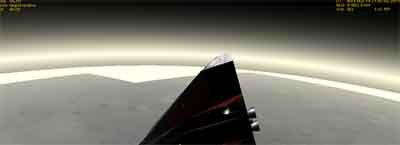
Now the picture I am showing is what my problem is.
Areas of planet off in the horizon show up white. Other areas are level 10 although not to obvious from this picture. Am I correct in assuming I need a lower resolution Venus.tex to help fill in white areas off on the horizon? This is my first attempt at making my own texture so I may be missing some part of the process.
Anyone have suggestions or help. I realize its a beta version.
It seems like the Venus.tex always override the higher version when its in the Textures folder and yet I need something to fill in the white untextured areas.
thanks
 

Attachments

  • forumpic.jpg
    forumpic.jpg
    16.4 KB · Views: 41
If you created a Level 10 texture, I believe the Venus_tile.bin and Venus_tile.tex need to go into the "Textures2" directory only. You then need to create a Level 8 Venus.tex from a 8192x4096 .bmp (preferably from the same source image) file to go into the "Textures" directory. I do believe that is why you are getting areas with no surface coverage on the distant horizon. Orbiter uses lower resolution textures to cover areas that are more distant from the observer. With that being said, would you be willing to share with me how you created Level 10? Specifically, have you figured out what resolution your source image must be to process in pltex? I've been trying to figure this out for awhile.

Cordially,
Nighthawke
 
I really don't want to start a whole new thread jsut for this, and the title pretty much corresponds with my request.

What I want to know is just what do I need to create planet textures? I downloaded the pltex program (took me a while to hunt it down, there was no such thing in the SDK I managed to find, only stuff for creating ships, and eventually found it in some remote part of the wiki), but that's where my endeavour came to a halt. I found no documentation about anything regarding planet texture editing. What format to use, what PS plugins to get, what potential problems to look out for, etc.

I decided to try and fill the gaps (and remove mirroring) on some of the already great planet/moon textures, but until I can get around to do the most important part of the process (making them usable in Orbiter), I see no point in continuing.

So any kind of help would be most welcome and appreciated.
 
Maybe a good spot to clear up some common misconceptions:

1. Textures or Textures2 folder?

You can put any texture files either in the Textures or the Textures2 folder. The only rule that applies is that Orbiter will search Textures2 before it searches Textures. So if Textures and Textures2 contain two files with the same name, the one in Textures2 takes precedence. This way, it is possible to replace a planetary texture by putting the files into Textures2, without a need to remove the default ones in Textures.

2. Why do planets revert to the default textures at large distances, even if I replaced the texture files?

The planet texturing mechanism distinguishes between lowres textures (seen at large distances) and highres textures (seen close-up). The lowres textures live in <planet>.tex (and <planet>_lmask.tex and <planet_lmask.bin>, if applicable). The highres textures live in <planet>_tile.tex, <planet>_tile.bin (and <planet>_tile_lmask.tex, if applicable).
A full highres texture set contains both the lowres and the highres files. If you replace only the highres files, the view will revert to the default textures when you zoom out.

3. How to generate a set of texture files with pltex

You need to run pltex twice to generate a full highres (L>8) texture set. Once for the lowres (level 1-8) textures, and once for the highres (level 9+) textures. Once you have generated them, you can dump all of them (including the lowres ones) in Textures2. This will overwrite any default textures in Textures.

Note that to make the highres textures work, the lowres set must contain all levels 1-8. You can not combine a L1-7 lowres texture set with a L9+ highres set.
 
Back
Top