RCS and DAP development

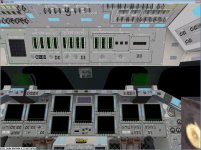
For 4. This is a screenshot of the problem that Donamy's talking about. Notice how the MDU labels are still there, even though the MDUs are powered off?
 

Attachments

  • MDU_MS2_bug.jpg
    MDU_MS2_bug.jpg
    165.9 KB · Views: 650
IMHO, as far as things look now, the MDU's, DAP, and CRTMFD, would be the only no go for a release. Is there anything else that would be a major show stopper ?
 
IMHO, as far as things look now, the MDU's, DAP, and CRTMFD, would be the only no go for a release. Is there anything else that would be a major show stopper ?

Would be good if we could also allow using OBSS and payloads from the payload bay.
 
Nice job, works fine.

If you want I can give you the center points on all the MFD buttons, if that will help line up the other CRTs.
 
And just to add, OPS201 is completely blank, no data display at all. Just a black screen. OPS202 and the entire OPS3 mode works fine however.
 
OPS 201 works fine for me. Try pressing RESUME on the keypad and see if that helps.
 
That worked for me, if I press OPS 2 0 1 PRO RESUME


-----Post Added-----


How would I fly the RPM in AUTO ?
 
Can you fly the RPM manuever in Auto, with the CRT in SSU?
 
Yes. The detailed procedures are in the Rendezvous Checklists.
Before the RPM is started, the UNIV PTG P (Pitch) value should be set to 145.0 and the rotation rates should be 0.75 deg/sec. The RPM is initiated by putting the DAP in AUTO. Once the rotation is started, the DAP is set to FREE and the P value set to 270.0. After the shuttle passes through the straight-down orientation, the DAP is set back to AUTO to terminate the RPM.
 
Thanks SC !!

I assume you need to enter item 19 execute to start the pitch ? When I do, the shuttle pitches nose down, the wrong direction. Something I'm doing wrong ?
 
ITEM 19 EXEC starts the pitch (you should put the DAP in AUTO after you enter ITEM 19).
I'm not sure why it's going the wrong way. The autopilot tries to minimize the rotation angle. I'm guessing the P value you entered was incorrect and the autopilot pitched down instead of up.
 
I've entered everything as it should be, I even tried to enter the P value as 80 and it still pitches down. Can anyone else confirm this ?
 
Can confirm the behavior, but I think I also found a possible origin of it: The entry

"ITEM 15 +145.0 EXEC" for MM 201 does not result in any change of Item 15.

Also, I miss the scratch pad line, the error line and the common DPS header line...
 
I've been entering ITEM 6 + 80.0 EXEC
 
UNIV PTG and OPS 201 are the same thing correct ?
 
Ah, it works when I do ITEM 14 + 3 EXEC
 
Back
Top