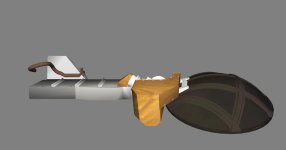
Space Shuttle Ultra 1.25 Revision B development

Is the angle being displayed anywhere? AFAIK, the only place where the actual pan/tilt angles show up is in the scenario file, so changing this could break existing scenario files. I don't think it's a big issue either way.
Yes, they're shown on the CCTV monitors on the aft flightdeck. The various FDFs that make use of the cameras includes pan/tilt settings and CG images of the correct view.

Another possible issue with the cameras is that a tilt positive angle will actually tilt the camera down (the PanelA7U switches work fine, this is just the angles in the scenario file). If this a bug, or correct behaviour?
I'm pretty sure that it works the same way as the RMS SINGLE JOINT switch.

---------- Post added at 02:44 AM ---------- Previous post was at 02:39 AM ----------

Here's a photo from STS-135 that shows the camera data on the aft flightdeck monitors: http://spaceflight.nasa.gov/gallery/images/shuttle/sts-135/hires/s135e006318.jpg
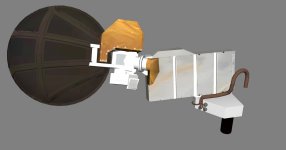
 
KU work.
 

Attachments

  • KUwork.jpg
    KUwork.jpg
    78.5 KB · Views: 454
Nice work! Could you post a shot of it from the above?

---------- Post added at 10:33 PM ---------- Previous post was at 10:29 PM ----------

Here's a photo from STS-135 that shows the camera data on the aft flightdeck monitors: http://spaceflight.nasa.gov/gallery/images/shuttle/sts-135/hires/s135e006318.jpg
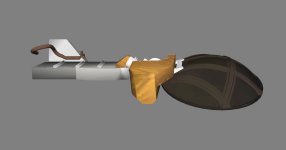
Here's a better shot from STS-131: http://spaceflight.nasa.gov/gallery/images/shuttle/sts-131/hires/s131e006074.jpg
 
From above.
 

Attachments

  • KUwork2.jpg
    KUwork2.jpg
    56.7 KB · Views: 446
From above.
I feared that the crease angle had been altered on the DEA. Dial it back to something below 45 so that it doesn't have the shading it does now.
 
Easily done, but it looks alittle boxy that way.
 
With shading at 44.
 

Attachments

  • KUwork3.jpg
    KUwork3.jpg
    64.9 KB · Views: 447
Easily done, but it looks alittle boxy that way.
It's supposed to. It's nothing than a rectangular metal box containing wires and circuit-boards. The Ku band system failure on STS-131 was traced to a broken transistor inside the DEA which required the DA to be R&R'ed.

---------- Post added at 10:54 PM ---------- Previous post was at 10:52 PM ----------

With shading at 44.
Less please. Right now the edges are invisible. The edges on the DEA are sharp edges, not smooth ones.
 
I don't believe the edges should be sharp, since it is wrapped with a mylar insulation, that forms around the edges. If anything, the edges should be rounded more.
 
I don't believe the edges should be sharp, since it is wrapped with a mylar insulation, that forms around the edges. If anything, the edges should be rounded more.
The DEA itself is not covered in mylar foil. The DEA is covered by with the same type of silvered Teflon insulation as the PLB radiator panels for thermal purposes.
 
Please point out which is the DEA.
 
Please point out which is the DEA.
The DEA (Deployed Electronics Assembly) is the main structure of the DA. It's the large rectangular box that supports the gimbal booms and the dish.
 
Oh okay, that has been set to 27.
 
Any more progress on the Ku band DA mesh?
 
It's done, I just have to put the animations into an .ini, then someone can code it.
 
It's done, I just have to put the animations into an .ini, then someone can code it.
Here's the current animation data:

Code:
  static UINT KuBand1Grp[3] = {GRP_DEA_KU, GRP_Hinge_connectors_KU, GRP_DEA_cable_rotating_KU};
  static MGROUP_ROTATE KuBand1 (kidx, KuBand1Grp, 3,
    _V(2.59,1.366,11.84), _V(0,1,0), (float)(-145*RAD));

  static UINT KuBand2Grp[1] = {GRP_Alpha_gimbal_KU};
  static MGROUP_ROTATE KuBand2 (kidx, KuBand2Grp, 1,
    _V(2.29,1.974,10.774), _V(0.500001, -0.002199, 0.866022), (float)(-116.5*RAD)); //Data from the Ku band System Workbook

  static UINT KuBand3Grp[4] = {GRP_Beta_gimbal_boom_KU, GRP_Gimbal_lock_structure_KU, GRP_Dish_KU, GRP_Dish_receiver_supports_KU};
  static MGROUP_ROTATE KuBand3 (kidx, KuBand3Grp, 4,
    _V(2.249,1.94,10.669), _V(-0.453277, 0.868994, 0.198469), (float)(23.25*RAD));//Data from the Ku band System Workbook

  anim_kubd = CreateAnimation (0);
  LogAnim("anim_kubd", anim_kubd);
  ANIMATIONCOMPONENT_HANDLE parent = AddAnimationComponent (anim_kubd, 0,     0.5, &KuBand1);

  anim_kualpha = CreateAnimation(0.0);
  LogAnim("anim_kualpha", anim_kualpha);
  parent = AddAnimationComponent (anim_kualpha, 0.81, 1, &KuBand2, parent);

  anim_kubeta = CreateAnimation(0.0);
  LogAnim("anim_kubeta", anim_kubeta);
  AddAnimationComponent (anim_kubeta, 0.61, 0.8, &KuBand3, parent);
To translate:

First animation component is the actual deployment. The second component is the rotation of the beta gimbal to the Master Index Pulse (MIP) position. The third and final component is the rotation of the alpha gimbal to the MIP position. Each animation component is a child of the previous component, except for the first one.

The MIP position is where the dish is in the 0/0 EL/AZ orientation. The MIP orientation really should be it's own separate animation that happens during KU-BD ANT ACTIVATION. KU-BD ANT DEPLOY only swings the DA outboard readying it for KU-BD ANT ACTIVATION.

Procedures can be found in ORBIT OPS 2-2 and 2-3.
 
Need a little help: the position of the ET vent and the LOX dump aren't correct anymore (mesh change?), so if somebody could get me the correct values for the SSMEs and the ET vent it would be very helpful. Thanks! :tiphat:
 
Back
Top