
You are using an out of date browser. It may not display this or other websites correctly.
You should upgrade or use an alternative browser.
You should upgrade or use an alternative browser.
Project XR2 Ravenstar - Mk II
- Thread starter Coolhand
- Start date
- Status
- Not open for further replies.


how do you work with textures? do you unwrap, then photoshop? or do you make a base texture and model around it?
any tips would be much appreciated... i find myself taking WAY too long to get good results with texturing, while you make it seem so easy :hmm:
cheers, man!
Ah well for anyone, textures take a long time if you're trying to get it right so dont be disheartened.
Theres no special trick to turning your model into a 2d projection... You should use any and all tricks you can think of... (baking lighting into a texture is a great, quick way to start a texture off btw)... but I think really unwrapping is not key to the final look of a texture, just makes a difference with how easy that surface and that texture is to work with... You could do it entirely automatically and have minimal stretching on the surfaces, but make a texture thats particularly impossible to work with. I think the new version of Z-brush has some great unwrapping options and every application has its own features.
But ya know for all the bells and whistles, they're all just ways of converting 3d data to 2d... some more painful than others... You'll probably always have to at some point get stuck in with a UV editor to tweak something out... they all do pretty much the same thing.
The more important factor here are your skills at painting, photo manipulation and using image editors, understanding how surfaces and lighting and materials work, and again the time you put into each individual texture.
Spend a lot of time in your bitmap editor/paint package... try and use photodata to add detail (never use a simple noise map), and custom paintbrushes to add shadow, dirt, highlights, scratches, etc. You want to be adding a certain shading to the surface. To help you, use lots of layers, the textures for this are over 300mb in some cases. have separate ones for lines and another for highlights and so on. use different blending modes and opacity for the layers and work out which mix works best in different situations. and check that the texture has a good contrast... you'll usually want to use nearly the full dynamic range of your image or it'll appear faded. learning about the finer points of photography such as exposure control and dynamic ranges also helps here.
Detail, you need lots of detail, get in close, like 400% zoom and paint in fine details, make every pixel count. If you can, it takes time, sure, but its worth it, no point having a 4k texture with no more detail than a 1k... the more time you take, and the more you work the image the better it'll become.
finally, to help you master this art, and its an artform in its own right, learn to paint... in as realistic a way as you can, still life, or portraits or concept vehicles, whatever. it'll help you a lot, and use a tablet for painting. I've been drawing and painting my whole life nearly so its something i've already put a lot of my time into and it still took me a long time to learn how to texture... Don't worry if you can't do it overnight, once you get a feel for it, it'll become easier...
Hope that helps.
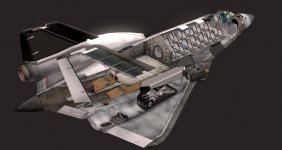
As i'm working on it, I randomly made a situation that might make a nice cutaway view, so here it is...
I love it... LOL, I'd hang it as a poster in my office if I had one.


man... i really gotta get my tablet drivers up to speed... i've lost my pressure sensitivity when i got Win7... it really does make a lot of difference :hmm:
thanks for the tips, they are most helpful! - i find i get the best results by working with a mix of photoreal and hand-painted techniques
covering the larger surfaces first, then moving on to the smaller ones also helps more than i antecipated.... 3dsmax 2011 has a number of new features that makes this process a lot more user-friendly too... i'm just now getting the hang of them :thumbup:
MK2 = PURE AWESOME! keep it up!
thanks for the tips, they are most helpful! - i find i get the best results by working with a mix of photoreal and hand-painted techniques
covering the larger surfaces first, then moving on to the smaller ones also helps more than i antecipated.... 3dsmax 2011 has a number of new features that makes this process a lot more user-friendly too... i'm just now getting the hang of them :thumbup:
MK2 = PURE AWESOME! keep it up!


- Joined
- Nov 4, 2009
- Messages
- 788
- Reaction score
- 4
- Points
- 33
Its great to see new screenshots! I have no doubt the MKII will be a standard to live up to in Orbiter addon development for years to come.

I'd hate to have to live up to that... I mean, between the code-wizard and the professional modeler...no one can compete. :thumbup:Its great to see new screebshots! I have no doubt the MKII will be a standard to live up to in Orbiter addon development for years to come.

Salun
Das Bluejay El DESTROY YOU ALL
- Joined
- Jan 4, 2009
- Messages
- 123
- Reaction score
- 0
- Points
- 16
Is it possible to get lighting in the cargo bay? Say on either a RMS arm or flood lamps? Something to use when over the terminator. I thing it would make EVA's and station activities SO much easier.
I'd hate to have to live up to that... I mean, between the code-wizard and the professional modeler...no one can compete. :thumbup:
You don't have to live up to that. Just give them suggestions and ideas. They'll do the rest!
now the last thing either of us want is for the xr2 to be an excuse to give up, if it makes someone try harder to broaden their skill sets, or team up with others then all the better.
It's not really even all that difficult to model something like this in most apps, a decent looking human face from scratch, now thats more of a tough challenge.:lol:
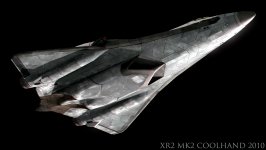
I've probably spent longer on the textures so far than the model, here's some work on the 3rd complete revision of the tps texture. It'll have a cleaner, more armored look this time. I'm thinking of relocating all the vtol engines to be inline and close to the current centre engine... basically a problem with the old design, which is now accentuated with the longer nose is that the vtol thrust is not distributed evenly enough
It's not really even all that difficult to model something like this in most apps, a decent looking human face from scratch, now thats more of a tough challenge.:lol:
I've probably spent longer on the textures so far than the model, here's some work on the 3rd complete revision of the tps texture. It'll have a cleaner, more armored look this time. I'm thinking of relocating all the vtol engines to be inline and close to the current centre engine... basically a problem with the old design, which is now accentuated with the longer nose is that the vtol thrust is not distributed evenly enough
Attachments
- Joined
- Nov 4, 2009
- Messages
- 788
- Reaction score
- 4
- Points
- 33
Looks beautiful. Once this is completed, you should seriously consider trying to get some posters of this available for sale in the Orbiter Store. I, for one, would buy one without hesitation. On a side note, how long have you been into modeling? I'm sure you said it back in this thread, but I don't want to look through 95 pages to find it. Your work never ceases to amaze me.
well for some time now, skills only come with time and practice and the will to keep learning new things, i didn't really have a clue when i first started. I used to try and model on an amiga 1200 back in 1993, with a free copy of imagine 3d which came with a magazine - amiga format iirc. great software for the time, but only so much i could do with 2mb of ram, i had a better time making animations and drawing in deluxepaint. I think the processor of that amiga ran at 12mhz or something, with its graphics chipset it was much better at 2d.
Anyway, years later i bought a pentium 3 pc, and started over with truespace (again, from a cover disk ) this was about 10-11 years ago after watching a TV programme about 3d animation and went on from there. It was much easier to learn at that point, not only were computers much faster than the amiga, the internet had lots of information about how to operate the complicated software and explain the concepts and techniques, the knowledge needed to make stuff. i've had to learn things about photography, optics, materials and even some coding among other things in order to make something work or look right.
Ten years ago i'd see stuff that seems easy to me today, but looked incredibly difficult and beyond my skills at the time so i hope no one becomes disheartened if they want to make models but fear that they can never learn how, just start simply and take your time. And be prepared to never know everything - I still see things today that are amazing and i know i still have things to learn. For an absolute beginner, the goalposts are further away than they were 10 years ago, far further, but you'll probably start your journey with a pretty awesome machine compared to the pentium 3 i started with, and a gigantic knowledge base, not to mention more refined, powerful and slightly easier to use and reliable software.
i will see what i can do regarding posters and other items if people are interested. I have a company lined up to produce a model kit also, since producing kits is a big part of my work, it'll probably in 144th scale.
Anyway, years later i bought a pentium 3 pc, and started over with truespace (again, from a cover disk
) this was about 10-11 years ago after watching a TV programme about 3d animation and went on from there. It was much easier to learn at that point, not only were computers much faster than the amiga, the internet had lots of information about how to operate the complicated software and explain the concepts and techniques, the knowledge needed to make stuff. i've had to learn things about photography, optics, materials and even some coding among other things in order to make something work or look right.Ten years ago i'd see stuff that seems easy to me today, but looked incredibly difficult and beyond my skills at the time so i hope no one becomes disheartened if they want to make models but fear that they can never learn how, just start simply and take your time. And be prepared to never know everything - I still see things today that are amazing and i know i still have things to learn. For an absolute beginner, the goalposts are further away than they were 10 years ago, far further, but you'll probably start your journey with a pretty awesome machine compared to the pentium 3 i started with, and a gigantic knowledge base, not to mention more refined, powerful and slightly easier to use and reliable software.
Looks beautiful. Once this is completed, you should seriously consider trying to get some posters of this available for sale in the Orbiter Store. I, for one, would buy one without hesitation.
i will see what i can do regarding posters and other items if people are interested. I have a company lined up to produce a model kit also, since producing kits is a big part of my work, it'll probably in 144th scale.
Last edited:

jinglesassy
New member
i will see what i can do regarding posters and other items if people are interested. I have a company lined up to produce a model kit also, since producing kits is a big part of my work, it'll probably in 144th scale.
Sales:1
How large would the 144th scale model be?
Just estimating the Mk.II's length at around 30m, maybe around 20cm?Sales:1
How large would the 144th scale model be?
Request for posters seconded (thirded?). That last image of the TPS is certainly frameworthy. :hail:
Always interesting to hear inspiration stories, too. If ever I get a copy of Blender in the mail, I'll be sure to hang on to it.

Maybe it's just the lighting, but, the underside seems a little blocky with the individual tiles looking larger. Also, there seems to be too much contrast between the gap and tiles. Or perhaps the gap is too big entirely! And the weathering/wear needs to be a little darker. Or less of it.
It has the feel of an armoured battle suit from a mech warrior. And for this ship that is wrong. I immediately thought 'gamerz' and 'fanboy' when I saw it. The wear looks like it is coming from a well-defined physical object instead of a stream of gasses and plasma.
The bottom side is looking way too busy in that rendering, especially the last 3 or 4 metres from the tailcone going forward. Way too busy. And the whole underside needs less contrast overall. Definitely the gaps and weathering look better on the original xr-2 that is available for download - where dirt collects around the gaps and bleeds out, and with the flat surfaces tending to be brushed and 'cleaned' by the plasma.
One other thing, what is the chromatic abberration between the two thermal tiles directly to the right and slightly forward of the rightside scram intake?
Is that an artifact of rendering or what??
On another note - it is GOOD to learn on mediocre and basic hardware. The skills I learned on my Apple ][+ with DazzleDraw and Blazing Paddles carry forth to today. I learned to control the cursor with a keyboard, paddles (like etch-a-sketch), joystick, lightpen, touch-screen, and graphics tablet. Yes all those methods on one system, from the 80's! In the Apple ][ days we got lucky to get a disk drive, so *any* filesystem was a godsend. I remember sending images back and forth across a 300baud modem. It would take hours!
I had a brief 4 year stint with the Amiga. It was great and taught me a whole new set of tools. But I never liked the Amiga's file system. It stunked to high heaven and the whole platform was unreliable overall. Migrating and upgrading was terrible! The Amiga turned out to be little more than another multi-media curiosity, thank god..
Then came the PC. I like the universal availability of the hardware and robust filing systems. My first 3d program was TrueSpace II. And it was fun to play with. Two key advancements in the industry really made my day, can you guess which ones? I will tell you in my next posting. Well today my tools of choice are a Nikon D3x and Photoshop. And smattering of other freeware utilities.
Anyways if you make a nice poster, and plastic model, and t-shirt I'm sure I'll get it all. I'd definitely like a t-shirt - as that would make great conversation throughout the day.
It has the feel of an armoured battle suit from a mech warrior. And for this ship that is wrong. I immediately thought 'gamerz' and 'fanboy' when I saw it. The wear looks like it is coming from a well-defined physical object instead of a stream of gasses and plasma.
The bottom side is looking way too busy in that rendering, especially the last 3 or 4 metres from the tailcone going forward. Way too busy. And the whole underside needs less contrast overall. Definitely the gaps and weathering look better on the original xr-2 that is available for download - where dirt collects around the gaps and bleeds out, and with the flat surfaces tending to be brushed and 'cleaned' by the plasma.
One other thing, what is the chromatic abberration between the two thermal tiles directly to the right and slightly forward of the rightside scram intake?
Is that an artifact of rendering or what??
On another note - it is GOOD to learn on mediocre and basic hardware. The skills I learned on my Apple ][+ with DazzleDraw and Blazing Paddles carry forth to today. I learned to control the cursor with a keyboard, paddles (like etch-a-sketch), joystick, lightpen, touch-screen, and graphics tablet. Yes all those methods on one system, from the 80's! In the Apple ][ days we got lucky to get a disk drive, so *any* filesystem was a godsend. I remember sending images back and forth across a 300baud modem. It would take hours!
I had a brief 4 year stint with the Amiga. It was great and taught me a whole new set of tools. But I never liked the Amiga's file system. It stunked to high heaven and the whole platform was unreliable overall. Migrating and upgrading was terrible! The Amiga turned out to be little more than another multi-media curiosity, thank god..
Then came the PC. I like the universal availability of the hardware and robust filing systems. My first 3d program was TrueSpace II. And it was fun to play with. Two key advancements in the industry really made my day, can you guess which ones? I will tell you in my next posting. Well today my tools of choice are a Nikon D3x and Photoshop. And smattering of other freeware utilities.
Anyways if you make a nice poster, and plastic model, and t-shirt I'm sure I'll get it all. I'd definitely like a t-shirt - as that would make great conversation throughout the day.
Last edited:
Not so much lighting, that image has had a lot of post adjustments that brings out the detail in the texture and give it a more photographic look, so i wouldn't worry about it - If you look closely there are aberations all over the image not just on one line.
Had there been a guess the length competition, izack would have cleaned up.
Sales:1
How large would the 144th scale model be?
Had there been a guess the length competition, izack would have cleaned up.
Last edited:
- Joined
- May 30, 2008
- Messages
- 5,580
- Reaction score
- 2
- Points
- 0
I'll agree with this--it looks like it's made a gear-up landing or twoIt has the feel of an armoured battle suit from a mech warrior. The wear looks like it is coming from a well-defined physical object instead of a stream of gasses and plasma.

Not so much lighting, that image has had a lot of post adjustments that brings out the detail in the texture and give it a more photographic look...
Would you post an unprocessed or minimally-processed image for us? Let's see what it will look like in Orbiter!

Lucy
in the sky, with diamonds.
Administrator
Moderator
Orbiter Contributor
Addon Developer
Webmaster
GFX Staff
Beta Tester
- Joined
- Aug 9, 2009
- Messages
- 7,110
- Reaction score
- 1,304
- Points
- 203
- Location
- 10.0.0.1
- Website
- www.orbiter-radio.co.uk
- Preferred Pronouns
- she/her
i will see what i can do regarding posters and other items if people are interested. I have a company lined up to produce a model kit also, since producing kits is a big part of my work, it'll probably in 144th scale.
Sold! My other half will wonder what I'm spending money on...
- Status
- Not open for further replies.
Similar threads

- Replies
- 17
- Views
- 6K


- Replies
- 137
- Views
- 22K


- Replies
- 1
- Views
- 2K
