General Question Dark side of the ISS

theoriginalchill

New member
Joined
Feb 15, 2011
Messages
12
Reaction score
0
Points
0
Location
My house, duh
So I'm moving in for my very first successful docking to the ISS after spending half an hour thrusting all around it. I'm just getting in line I'm just a little way out and BAM! we go in the shadow of the earth, and wow that made something already pretty hard to almost impossible.

I thought whoa wait I have lights on this bad boy, the ISS should have docking lights right? Switched over and wa-wa-waaaa nothing. I luckily docked with well a lot of luck. Thankfully I was pretty lined up (even though it wasn't the dock I wanted).

So my question is, is there a way or an addon that puts lights on the ISS docking stations?
 
There is a handy little instrument in Orbiter called Docking MFD which can get you secured without having to look outside at all...

There are no lit ISS addons out there, but the vanilla Deltaglider, XR2, and a few other vessels have navigation lights. You can add lights yourself using a custom module or through Lua scripting, but I can't tell you how to do that.
 
Local light sources can give the DG and XR2 etc. spotlights if they're activated.

Camera MFD has a "night vision" mode, like an infra-red view so you can see clearly in the dark.

[ame="http://www.orbithangar.com/searchid.php?ID=2645"]http://www.orbithangar.com/searchid.php?ID=2645[/ame]
 
Make sure that 'Local light sources' is active in the Orbiter launchpad, visual effects tab. Then (if you're using the DeltaGlider) press the 'Docking Lights' button in the panel. In the XR-2 this button is on the upper panel.
 
Heh, you sound like you're describing my first docking with the ISS. Luckily I had the NAV lights on and I was using the docking MFD to line but that still didn't help with my horrendous piloting skills. Every time I made a move it seems something would go wrong, I would start rotating, or moving too fast, or whatever.

The really ironic thing is that literally less than a minute after I'd docked, sunrise came up behind me, clearly illuminating the ISS. Oh, well. It made for a great photo-op nonetheless.
 
The texture on the ISS docking port is "emissive" so it will always be visible.
 
Make sure that 'Local light sources' is active in the Orbiter launchpad, visual effects tab. Then (if you're using the DeltaGlider) press the 'Docking Lights' button in the panel. In the XR-2 this button is on the upper panel.

Thats what i would reccomend. Here is an example of lights on the XR2 by ''Spacethingy''

picture.php
 
That picture isn't really suggesting. A wider area would seem to have more powerful lights. That's advertising! :lol:
 
Try the ISSR by Thornton, it features local lights.
 
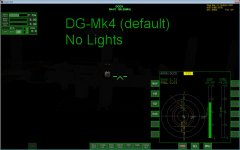
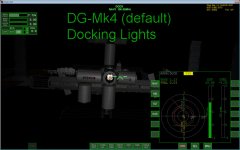
And from inside the DG it looks like:
Lights01.jpg Lights02.jpg

Notice how the port is visible without lights.
 
Oh, the lights have a wide enough range. :)

10_08_15_02-23-35_dg.jpg

(Sorry, I still love this image. No shame. :lol:)
 
Oh wow that was quick. Yeah I did have the lights on my DG on but my settings weren't set right so it was still dark. What's funny is I realized it looks like I parked upside down.

Well thanks for all the responses I'm gonna give it another go, I'm still trying to figure out the docking MFD because as of right now I think it works off of voodoo. I just lined up the little circle with the orbit HUD and rammed it in there. However I am trying to understand how it all works so eventually I can actually use all the cool instruments that make the whole thing easier. :tiphat:
 
With the docking MFD, you line up the X on the center to match the attitude of your docking port to the target. The yellow + shows whether your docking port is in line with the target. The circle around the center gets smaller as you get closer. Pitch and yaw to line up the X, translate to line up the +, then thrust forward and make corrections until you dock.

As for the lighting, just plan your rendezvous to take place on the day side. I wait until I've just passed into the night side, then make the burn to set up a rendezvous exactly opposite. That way I'm approaching the target just as I pass into the light, and I have the maximum amount of lit time to dock.
 
I always dock on the day side, but I often do not rendezvous there... sometimes I have to perform stationkeeping throughout the nightside phase of the orbit, so I can dock on the dayside.

Docking in the dark is possible if you use your instruments properly, but it's just something that makes me feel uneasy... I like to have an "analog" visual reference of where I am, spatially speaking.

Docking MFD doesn't tell you if you're flying through a solar panel...
 
Definitely easier to dock in daylight, especially in ships like the Shuttle that don't have a docking port on the front. Having a visual reference makes it easier to adapt to the different controls for the docking MFD.
 
With RPOP or Precession MFD's PROX page I always know whether I'm in the approach cone. Day or night, doesn't matter. Was a bit curious at the title of the thread, though.
 
With RPOP or Precession MFD's PROX page I always know whether I'm in the approach cone. Day or night, doesn't matter. Was a bit curious at the title of the thread, though.

Same with docking MFD. it took me a few goes to work out just what all the indicators meant but with that now clear I can dock during the day or night.

Real life procedures actually see the shuttle docking during orbital nighttime as the daylight is used for the RPM.

If you really want to dock in daylight then you can always hold position and wait. sometimes though, Docking in daylight can be worse than docking during orbital night-time depending on the position of the sun.
 
Back
Top