Question XR5 Lag

Artymaster

New member
Joined
Feb 21, 2009
Messages
42
Reaction score
0
Points
0
Would there be any particular reason why the XR5 would cause my computer lag on a massive scale whenever it is started, or input into a scene?

 
Ive never heard of that. Could you post some of your Computer specs? The only thing I could possibly think of, would be maybe its spawning with the Nav lights on, and you have local light sources enabled. I remember local light sources causing lag on lower-end PCs. But if all your other vessels work fine, maybe that is just a long shot.
 
Specs

Not sure why im catching any lag at all, this is a new laptop got it about 2 months ago. And in my semi-computer smarts opinion its pretty decent.

Sure:


1
2nd generation Intel Core i7-2630QM processor 2.00 GHz with Turbo Boost 2.0 up to 2.90 GHz


1
4GB,DDR3,2 DIMM


1
15.6HD TLF WLED LCD L50xX


1
NVIDIA GeForce GT540M 2GB graphics with Optimus


1
500GB 7200 RPM SATA Hard Drive
 
Last edited:
I wouldnt think youd be getting much lag with that setup. Do you have many Addons? Maybe try the XR5 with a Clean orbiter install just to see if it still causes the same lag.
Also, depending on what addons you do use, maybe try the d3d9 client (if your using vista / 7)
 
Tried on an orbiter install 2010 version with just ummu still catching massive random lag immediately upon start up.

What is the d3d9 client by the way?

I'm running windows 7 Home edition
 
Tried on an orbiter install 2010 version with just ummu still catching massive random lag immediately upon start up.

What is the d3d9 client by the way?

I'm running windows 7 Home edition

Hmm im not sure what else would cause it.

D3D9 is an external graphics client for orbiter using directX9 vs inline directX7.
http://www.orbiter-forum.com/showthread.php?t=18431
The performance increase is amazing (something like 800% increase in FPS for me) However it does not work with all addons. But it DOES work with the XR fleet perfectly, which is what I use it for mainly.
 
Not really any difference. I have about 55 FPS when inside the cockpit, drops to around 10 when I view outside the cockpit. Not sure what the problem is still.
 
I get a little lag when I first load the XR5 as I do with other vessels, but it seems to run ok after a moment of rotateing around it. Before my updated computer arrived, I had to watch how much cargo I loaded in the XR5 because of the hi-res cargo tex's I had. The less I carried, the better FPS I got.
Sometimes, I do understand why people still use 256x256 dds files. But I'm greedy on the graphics and fairly confident it isn't the graphical updates on the XR5 as the only increase resolution size is on the new CargoBay release, which isn't included in the recently updated XR5 release.

But I'll be watching this thread and I hope you cure your lagg Artymaster, I dispise it myself.
 
I'm not as graphics greedy heh. Even though i believe my computer should be able to handle anything at all, Orbiter itself is slightly more laggy then im used to. On my old laptop which was not meant for anything but word and was essentially crap....... Orbiter ran fine. I am not sure what is happening.


Is there a low res download i can get of the XR5?
 
No. I would imagine all the dds files are the same in size in the 1.7 version as in the older version and wouldn't make a difference. There is no low res version, I think the only version available is the updated version. I don't know about other matters in relation to your problem, but if you ran Orbiter well on your last machine, it does indicate that the new machine has the issue.
 
That sounds like you might have selected a non T&L 3D device.
In any case, posting the log is always the right thing to do.
 
How can i tell if my device is T&L 3D capable?
The Orbiter.log would tell it.

It is, if you have "... T&L HAL" on list of graphics devices on Video tab.
 
One thing I've noticed is my antivirus (the MS basics one) eats the box alive when Orbiter's recording playback, with anything more than a handful of vessels it's a slide show. Shut off the "realtime monitoring" and the problem goes away.
 
One thing I've noticed is my antivirus (the MS basics one) eats the box alive when Orbiter's recording playback, with anything more than a handful of vessels it's a slide show. Shut off the "realtime monitoring" and the problem goes away.

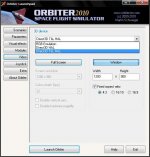
A more secure way would be to exclude the Flights folder from the realtime monitoring.
 
I do not think it is the anti-virus. I use "Avast!" which i believe is an orbiter friendly AV
 
Back
Top