Request UMMU Compatible Helicopter?

Not sure what is next. I can put all of them except the Bell47 together. Any issues?. I am still working on it.

Now you should be able to transport Ummu's or cargo lift items with the Copters.
 
Not sure what is next.

That is next then. :cheers::lol:

Maquette_NH_90.jpg


Just kidding. :tiphat:
 
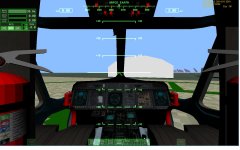
Isn't that the cockpit from a NH90? So maybe a 2d panel of the cockpit? Never done one. Place MFD where the screens are

this is what I have right now
 

Attachments

  • nh90cockpit.jpg
    nh90cockpit.jpg
    122.8 KB · Views: 22
Last edited:
Isn't that the cockpit from a NH90? So maybe a 2d panel of the cockpit? Never done one. Place MFD where the screens are

this is what I have right now

Yeah, it is one. But I am more a fan of VCs than Panel2D. Though the coloration of the sticks could also be corrected. The displays are standard PFD/EICAS.
 
Last edited:
I can change the colors of the sticks to a gray color. I can just cut the front off an then you would have a VC mesh. But coding it is another thing. I not sure how you would deal with a rear view. Or would you use the same mesh minus thing like the gear in wish you can't see.

I think I could animate the sticks. gear lever,... Not sure about the mfd in the front. though
 
I can change the colors of the sticks to a gray color. I can just cut the front off an then you would have a VC mesh. But coding it is another thing. I not sure how you would deal with a rear view. Or would you use the same mesh minus thing like the gear in wish you can't see.

I think I could animate the sticks. gear lever,... Not sure about the mfd in the front. though

Well, without a manual, it would be pretty hard making a full VC for it. A simple basic VC would be the maximum currently. Not sure if removing the mesh is actually needed. You could also just add a VC mesh over the existing cockpit mesh.
 
Ok. I'll see what I can throw together. Where should the point of view?
 
Ok. I'll see what I can throw together. Where should the point of view?

At the pilot would be good. The copilot view could be downward for helping during landing.
 
As far as a VC and subsystems modeling is concerned I still have my old Sikorsky NFMs, unfortunatly they're hard copies not .PDFs but I can do my best to answer questions.
 
As far as a VC and subsystems modeling is concerned I still have my old Sikorsky NFMs, unfortunatly they're hard copies not .PDFs but I can do my best to answer questions.

For which helicopter? For the start, it would always be good to have a drawing of the cockpit as reference.
 
For which helicopter? For the start, it would always be good to have a drawing of the cockpit as reference.

H-3H (Seaking) and H-60 (Blackhawk/Knighthawk) models (B, F, H, and S)

I did my initial Crewchief's qualification (approx 20 hrs) on the H-3H but was a H-60 guy by trade (approx 1800 hrs across the versions listed above).

ETA: I'll need to barrow a scanner or bring 'em to school, but I'll see what I can do.

---------- Post added at 06:27 PM ---------- Previous post was at 06:13 PM ----------

Wohoo!

It's amazing what you can find on the internet when you know what search terms to use. (publication numbers/dates are powerful tools)

http://publicintelligence.net/sikorsky-uh-3h-executive-transport-natops-flight-manual/

http://publicintelligence.net/u-s-navy-natops-sh-60b-seahawk-helicopter-flight-manual/

---------- Post added at 06:34 PM ---------- Previous post was at 06:27 PM ----------

These aren't available for export and will cost you but...

http://www.eflightmanuals.com/detail/itemList.asp?cID=4808
 
Last edited:
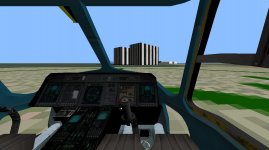
Try this new mesh and DLL. Fixed the colors. They were a multiple material item. Animated sticks, collective, pedals. Not sure on the direction. Added an extra view in the left seat.
 

Attachments

  • nh90cockpit2.jpg
    nh90cockpit2.jpg
    90.1 KB · Views: 12
Last edited:
Doesn't the pilot sit in the left seat and the copilot in the right seat in Helicopters? I know that the SH-60s have their pilot in the left seat and the [ame="http://en.wikipedia.org/wiki/TACCO"]TACCO[/ame] in the right one.
 
Last edited:
I think I'll cut the door out. On the VC I am using the same mesh. So I doubled all animations so the rotos turn on the vc and external mesh.

I have the main mesh set to always.

I might could fit a mfd into the screen but not sure if you would be able to read any info off of them.
 
Back
Top