Well I was originally focusing on stage 1 of my Dragons of the Middle Kingdom project (updating the CZ-2F launch vehicle and its launch site at Jiuquan) for deployment just in time to offer it to Don for his Shenzhou/Tiangong project. Unfortunately I hit a snag on how to do textures and UV mapping: for some reason the textures either just disappears or got its position/scale all wrong. This, combined with problems with doing complex meshes, led me to find something not been produced for Orbiter that I can do with a short development schedule with just modifying meshes/textures and matching different components, so that I can gain experience in texture making and UV mapping, mesh modification, training for using anim8or and Blender, as well as methods to improve rocket guidance for orbital injection.
And I found this:

The Epsilon rocket is JAXA's answer for a cheaper replacement for the very-long running Mu-series of small all-solid rockets that powered quite a few interesting and amazingly capable small probes (the most famous of which is the amazingly tough Hayabusa). The price of it was so high (I believe that by the mid-2000s, the last of the series, the M-V rocket, has a price comparable to the much larger Delta II 7900 series, for a Vega-class launch capability!), and the troublesome launch preparation process (stacking multi-segment solids on a rail launch track!), that JAXA gave up it in 2006. But that leaves the Japanese without a small satellite launcher (currently the H-IIA is as small as they have), so they decided to build one that re-uses other components from the rockets they have, and tries to slim down the processing needed for the new rocket. The result is the Epsilon LV, now scheduled for its first launch in August 2013.
The first stage of the rocket re-uses the solid rocket booster used on the H-IIA/B, while the two upper stages are improved versions of the 3rd and 4th stages of the M-V rocket. The payload capability is 1.2 tonnes to a low-inclination 200 x 500 km orbit. With the use of a small liquid trim stage, it can launch satellites up to 450 kg to a 500 km circular sun-synchronous polar orbit. This put its capability roughly between Orbital's Taurus and Minotaur IV rockets(or ESA's Vega).
What makes it different is the claimed extremely light launch operations processing: firstly the rocket has AI(!), err actually that means flight software will automatically inspect the conditions of the different portions of the rocket before launch, without the actual need for human interference; and that means the launch control can be put outside of the launch site - in fact it could be done anywhere from the world with a few laptops (!) connected to the data network! The launch processing is also rather short - the typical pad flow from rocket arrival at launch site to launch is just two weeks, comparable with the Minotaurs and Taurus and much shorter than the others. This should save quite a bit of money from keeping the pads flowing, and might even attract commercial customers for the rockets (never seen before in Japanese spaceflight!).
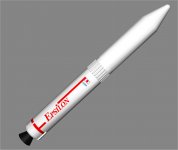
With that in mind, here are the early development screen-shots: (notice that I am using a modified H-IIB SRB from Donamy's HTV add-on for the first stage, and the fairing/upper stages are from BrianJ's excellent MV missions add-on; hopefully I can grant permission to "license build" them soon)


Unfortunately I still have serious problems with UV mapping and texture wrapping on meshes, but that is a question for another day, after I got enough sleep for tonight.... :goodnight:
References:
https://en.wikipedia.org/wiki/Epsilon_(rocket)
http://www.b14643.de/Spacerockets_1/Japan/ASR-Epsilon/Description/Frame.htm
http://www.jaxa.jp/projects/rockets/epsilon/index_e.html
http://www.jaxa.jp/pr/brochure/pdf/01/rocket07.pdf
http://www.jaxa.jp/article/interview/vol58/index_e.html
http://archive.ists.or.jp/upload_pdf/2009-g-18.pdf
http://archive.ists.or.jp/upload_pdf/2009-g-21.pdf
http://archive.ists.or.jp/upload_pdf/2008-g-01.pdf

And I found this:
The Epsilon rocket is JAXA's answer for a cheaper replacement for the very-long running Mu-series of small all-solid rockets that powered quite a few interesting and amazingly capable small probes (the most famous of which is the amazingly tough Hayabusa). The price of it was so high (I believe that by the mid-2000s, the last of the series, the M-V rocket, has a price comparable to the much larger Delta II 7900 series, for a Vega-class launch capability!), and the troublesome launch preparation process (stacking multi-segment solids on a rail launch track!), that JAXA gave up it in 2006. But that leaves the Japanese without a small satellite launcher (currently the H-IIA is as small as they have), so they decided to build one that re-uses other components from the rockets they have, and tries to slim down the processing needed for the new rocket. The result is the Epsilon LV, now scheduled for its first launch in August 2013.
The first stage of the rocket re-uses the solid rocket booster used on the H-IIA/B, while the two upper stages are improved versions of the 3rd and 4th stages of the M-V rocket. The payload capability is 1.2 tonnes to a low-inclination 200 x 500 km orbit. With the use of a small liquid trim stage, it can launch satellites up to 450 kg to a 500 km circular sun-synchronous polar orbit. This put its capability roughly between Orbital's Taurus and Minotaur IV rockets(or ESA's Vega).
What makes it different is the claimed extremely light launch operations processing: firstly the rocket has AI(!), err actually that means flight software will automatically inspect the conditions of the different portions of the rocket before launch, without the actual need for human interference; and that means the launch control can be put outside of the launch site - in fact it could be done anywhere from the world with a few laptops (!) connected to the data network! The launch processing is also rather short - the typical pad flow from rocket arrival at launch site to launch is just two weeks, comparable with the Minotaurs and Taurus and much shorter than the others. This should save quite a bit of money from keeping the pads flowing, and might even attract commercial customers for the rockets (never seen before in Japanese spaceflight!).
With that in mind, here are the early development screen-shots: (notice that I am using a modified H-IIB SRB from Donamy's HTV add-on for the first stage, and the fairing/upper stages are from BrianJ's excellent MV missions add-on; hopefully I can grant permission to "license build" them soon)
Unfortunately I still have serious problems with UV mapping and texture wrapping on meshes, but that is a question for another day, after I got enough sleep for tonight.... :goodnight:
References:
https://en.wikipedia.org/wiki/Epsilon_(rocket)
http://www.b14643.de/Spacerockets_1/Japan/ASR-Epsilon/Description/Frame.htm
http://www.jaxa.jp/projects/rockets/epsilon/index_e.html
http://www.jaxa.jp/pr/brochure/pdf/01/rocket07.pdf
http://www.jaxa.jp/article/interview/vol58/index_e.html
http://archive.ists.or.jp/upload_pdf/2009-g-18.pdf
http://archive.ists.or.jp/upload_pdf/2009-g-21.pdf
http://archive.ists.or.jp/upload_pdf/2008-g-01.pdf