Question Ranger (and other ships) from Interstellar?

yes. from this page.:
http://interstellarfilm.wikia.com/wiki/Lander

"The Lander's heat shield is located on its upper surface, thus performs atmospheric entry inverted, protecting the belly-mounted payload. The seats can rotate around the craft's forward axis. This maintains a comfortable upright position for its passengers and pilots while rotating and listing. To maintain visibility in any orientation, the lander has windows both top and bottom. The windows on its upper surface are made of sapphire to withstand the heat of reentry. The windows on the nose and sides of the Lander are protected by thermal insulation tiles that slide on top of the windows like a closet door. "

I think the flight dynamics might be hard. But basically you are flying upside down. and then rotate around in atmosphere

I guess I need to rotate the seats and view also, ugh
 
Ah, I remember that now. Ok, carry on. :)
 
Yes the front and top windows will animate that will be easy compared to animation the view/camera to match the seats,....
 
Yes the front and top windows will animate that will be easy compared to animation the view/camera to match the seats,....

Yeah...
6nyefhk1.jpg


Perhaps a better approach would be just flipping the view axis, and implement the VC rotating in a second phase...
 
nice shot. Funny that is the inside of the ranger. My chairs don't rotate I think they could.

But the lander interior is different
 
nice shot. Funny that is the inside of the ranger. My chairs don't rotate I think they could.

But the lander interior is different

That was the Ranger? :blink: I didn't knew her chairs rotate also...

It would make some sense to this kind of rotation o Ranger to make bearable a heavy burning, but to this make some sense in the photo I posted, that burning should happen on the retro-thrusters - what it would make no sense at all on Ranger, as she is agile enough to make a quick turn and use the main thrusters for that (why waste weight on heavy thrusting also in the nose?)
 
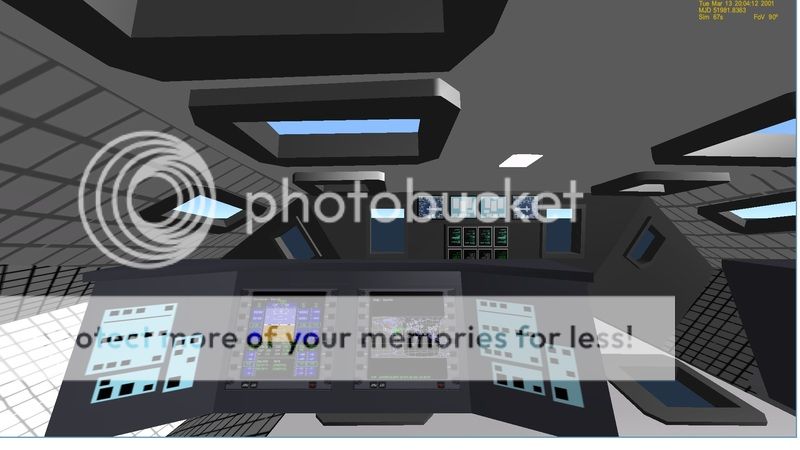
Well. This is what my interior looks like. I can add more gauges,... if needed.
RANGERINTERIOR6_zps35n9kim3.jpg

This from the pilot's view and VC
RANGERINTERIOR7_zpsb5pi40dv.jpg

The "real" one didn't have a hud so might remove that part and update the vc /display mesh.

Now on the rotating seats:
RANGERINTERIOR5A_zpsdjhbsbdo.png


If We want the seats to rotate back I will need to resize them slightly.

The ranger height's is going to prohibit the chairs rotating.

On the lander the chairs can rotate 180 degrees.
LANDERINTERIOR5_zpsyjarmv9j.jpg


LANDERINTEIORBOTTOM_zpskcwfchbg.jpg


So if someone what to help with the textures, I welcome it.
 
Last edited:
I was thinking... These vessels (Lander and Ranger) are futuristics devices, it should be feasible but not necessarily limited by our current vision and/or technology.

So, about the HUD, why don't you just paint it directly on the vessel's front window? The whole windows will be HUD. On the Lander, you can paint the HUD on both up and down pilot window, and do not bother with the matter again - when the pilot's seat rotates, the other HUD will be there.

Another possibility is drawing the HUD floating on the pilot's view, simulating a retina projector (as seem in the movie Lost In Space).

There's nothing on the Interstellar movie that hints such a HUD is used, but I don't recall anything that hints is IS NOT used either, so I think you have some slack to adapt a solution that best suits you.
 
Thanks. I can add a mesh for the hud in the vc

On the lander. I can add a mesh for the hud also. The chairs rotate as does the vc.
LANDERVC1_zps4bveg8fg.jpg


But I have run into a odd issue. The camera follows the chair animation. But when the chair goes straight up the camera flips.

here the chair is straight down and you can see the camera is at -1 for the y
landerchairdown_zps6jnezj2e.jpg

But as you move the chair up notice the hud indicator
landerchairup_zpstejjy5ww.jpg


chair in the middle
landerchairmiddle_zps5hiepsur.jpg

LANDERCHAIRS_zpsjwrtlpd0.jpg


Code:
static UINT CHAIRGrp[2] = { 50,43};
	static MGROUP_ROTATE CHAIR(0, CHAIRGrp, 2, _V(0, 2.134207,  4.982801), _V(1, 0, 0), (float)(180 * RAD));

	static UINT CHAIRVCGrp[2] = { 0,1 };
	static MGROUP_ROTATE CHAIRVC(1, CHAIRVCGrp, 2, _V(0, 2.134207, 4.982801), _V(1, 0, 0), (float)(180 * RAD));
	
	CHAIR_anim[0] = new MGROUP_ROTATE(LOCALVERTEXLIST, MAKEGROUPARRAY(arm0_tip), 3,
		_V(0, 2.134207, 4.982801), _V(1, 0, 0), (float)(180 * RAD)); // -447 .. +447
	anim_CHAIR = CreateAnimation(0.5);
	hAC_arm0 = AddAnimationComponent(anim_CHAIR, 0, 1, CHAIR_anim[0]);
	
	
	AddAnimationComponent(anim_CHAIR, 0, 1, &CHAIR);
	AddAnimationComponent(anim_CHAIR, 0, 1, &CHAIRVC);

Code:
CAM_pos.x = (arm0_tip[0].x);
	CAM_pos.z = (arm0_tip[0].z);
	CAM_pos.y = (arm0_tip[0].y);


	xp0 = arm0_tip[1] - arm0_tip[0]; normalise(xp0);
	xr0 = arm0_tip[2] - arm0_tip[0]; normalise(xr0);


{
		SetCameraDefaultDirection((0, xp0, xr0));
		SetCameraOffset((CAM_pos));
		oapiCameraSetCockpitDir(0, 0);
	}

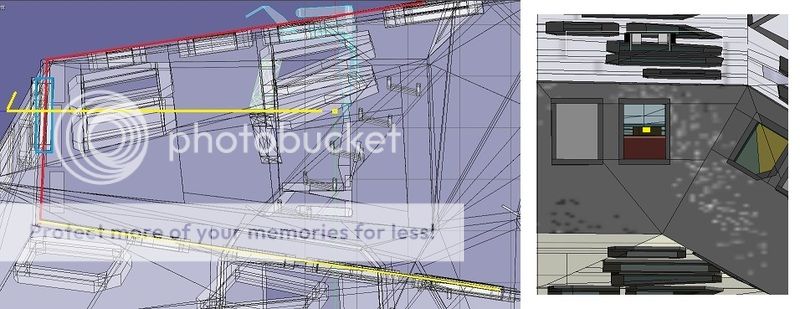
I may need to move the chairs so you can see from the top/bottom windows.

The easy solution is to animate the chairs but just have a set camera looking thru the top and bottom windows.
 
Last edited:
Thanks. I can add a mesh for the hud in the vc

On the lander. I can add a mesh for the hud also. The chairs rotate as does the vc.
LANDERVC1_zps4bveg8fg.jpg


But I have run into a odd issue. The camera follows the chair animation. But when the chair goes straight up the camera flips.

It looks like the same problem I saw on another vessel, [ame="http://www.orbithangar.com/searchid.php?ID=3042"]Interra[/ame]. The developer didn't fixed the issue (perhaps a Orbiter bug?), but hitting HOME normalizes the camera.

Try hitting HOME to see what happens.
 
No change and since the camera is changed with in the program. You can't look around using ALt and arrows.

So I think just animate the chairs and VC but just have a front and top and bottom camera.

But I don't think you can see the VC and look out the windows.

---------- Post added 08-09-15 at 05:56 AM ---------- Previous post was 08-08-15 at 08:03 PM ----------

OK looked at the video and the chairs rotate along the x axis. But I don't see the value? Also you may not be able to see out the front window.

landerchairs1_zpspy2edv5i.jpg
 
OK looked at the video and the chairs rotate along the x axis. But I don't see the value? Also you may not be able to see out the front window.

landerchairs1_zpspy2edv5i.jpg

Yes, I didn't understood it neither. Rotating on the Z axis is straightforward, but on the X axis didn't made sense to me. I only give this matter to your attention because... well, it was shown in the movie.

I think it's time to watch it again...

About the HUD, I was meaning the TOP/BOTTOM front window, not the nose ones. The whole window would be the HUD.

I did a mockup here:
Proposal%2Bfor%2BHUD%2Bon%2BLander.png
 
That is possible on the ranger. Although I haven't done that. I can make a mesh for the HUD that will rotate on the lander

On the lander I docked with the ISS. I think she maybe too small. So I think I will scale the lander so the docking ring on the ISS matches the diameter on the lander.
landerdocked_zpsjq3dmb7t.jpg
 
Last edited:
If I can add my two cents worth--

When there is a discrepancy between inner and outer dimensions in reference to a fictional craft, my preference is to make the interior match the sets and scale the exterior accordingly. It just seems to suit the feel of the vessel better, in my opinion.

Thanks for taking on this project Gattispilot. I'm looking forward to flying these ships around, whatever the final scale.
 
If I can add my two cents worth--

When there is a discrepancy between inner and outer dimensions in reference to a fictional craft, my preference is to make the interior match the sets and scale the exterior accordingly. It just seems to suit the feel of the vessel better, in my opinion.

I'm running out of pennies here! :)

Another approach that I think it's acceptable is to scale the interior and the exterior differently to suit aesthetic needs.

There's a point where an entertaining hobby became a tedious unpaid duty, and we must be careful to avoid trespassing this frontier.

You can always fix this in a posterior release. ;)
 
Thanks. I think the scale is fine.

On the rotating chairs. Here is what you get.
LANDERHUD1_zpszsgi1i0v.jpg

LANDERHUD2_zpsjwiil2sy.jpg


The problem is because the camera is set dynamically. It moves with the chair. You can not use ALT and arrows to look arrow.

I can add another camera that should be able to move around.


Really not sure what the inside should look like.

Like this for the HUD/VC on both vessels
hudidea_zpsat3mhuqm.jpg
 
Last edited:
For the ranger vc I have this:
rangerhud3_zpsery13req.jpg


I can make it rotate back. Not sure if needed though. Might run into that issue of it being flipped.
 
Back
Top