SSU Development thread (4.0 to 5.0) [DEVELOPMENT HALTED DUE TIME REQUIREMENTS!]

Status
Not open for further replies.
This is what i do:

1) 8192 .psd textures converted into .jpg (to allow later dds conversion)

2) .jpg resized to 2048

3) .jpeg 2048 saved in .dds


Outcome with DX7: no textures
Same if I use 8192
If not even 2048x2048 work then something else besides the resolution of the textures is afoot.

---------- Post added at 09:57 PM ---------- Previous post was at 08:39 PM ----------

One item I'm not sure I asked about: the drive angle for the RSB animation and mesh don't appear to match. Don't know which one (if any) is correct.
The vertical stabilizer mesh itself should be correct. Measuring the angle from the OV-103 Recordation Package drawings, the rudder/speedbrake angle comes out to 34.5°.


BTW: any solution for the tickets?
Which ones?
 
Last edited:
The vertical stabilizer mesh itself should be correct. Measuring the angle from the OV-103 Recordation Package drawings, the rudder/speedbrake angle comes out to 34.5°.
The animation angle is about 33º, so there is the difference. Also, the code has 2 axis, one for each panel, but I think they hinge on the same axis.


Which ones?
The overall ticket situation... should they go anywhere, or should we keep them in SF?
 
So is anybody else having issues running my textures at 2048x2048 with DX7?
If I am not the only one then there is no point in releasing those as the default SSU textures.
BTW I am still not sure I am happy with that anyway
 
GLS said:
The overall ticket situation... should they go anywhere, or should we keep them in SF?
For now I think they're good where they are. We have gotten the critical stuff away from SF and the tickets can stay until there's a pressing need to move them.

---------- Post added at 12:50 AM ---------- Previous post was at 12:45 AM ----------

So is anybody else having issues running my textures at 2048x2048 with DX7?
If I am not the only one then there is no point in releasing those as the default SSU textures.
BTW I am still not sure I am happy with that anyway
Not me as evidenced by my earlier screenshot. I'm starting to think there's something else going on here and that MOGE is on its last legs. One more update from MS and the show is over.


Could you maybe try to resize them directly in your image manipulation program and save them at 2048x2048 with no mip-maps with DXT-5 compression? This is to rule out that the conversion to jpg has something to do with the issues. If you're using PhotoShop then there should be a way to save directly to DDS considering that is an official DirectX texture format.
 
Could you maybe try to resize them directly in your image manipulation program and save them at 2048x2048 with no mip-maps with DXT-5 compression? This is to rule out that the conversion to jpg has something to do with the issues. If you're using PhotoShop then there should be a way to save directly to DDS considering that is an official DirectX texture format.


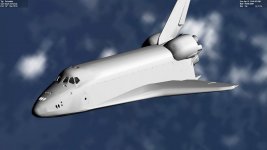
Done: beatiful vanilla Shuttle
0002.jpg
 
Done: beatiful vanilla Shuttle
View attachment 15931
What bothers me is the missing texture on the SSMEs. They use a completely separate texture so they shouldn't be affected by the main texture being somehow incompatible. And they're standard 1024x1024 DXT-1 and that's well within the guidelines for MOGE. What about the payload bay? It too uses a separate texture which is 2048x2048 DXT-1.
 
For me only the textures in question didn't show up.
 
For me only the textures in question didn't show up.
You mean Wolf's high resolution textures or the payload/SSME textures?
 
What bothers me is the missing texture on the SSMEs. They use a completely separate texture so they shouldn't be affected by the main texture being somehow incompatible. And they're standard 1024x1024 DXT-1 and that's well within the guidelines for MOGE. What about the payload bay? It too uses a separate texture which is 2048x2048 DXT-1.

Sorry my bad, don’t bother about the SSME textures since I ve temporarily loaded a modified version I am working on at hiher resolution
 
Wolf said:
Sorry my bad, don’t bother about the SSME textures since I ve temporarily loaded a modified version I am working on at hiher resolution
OK, that explains the SSME textures but what about the payload bay? Are those elements also texture-less?
 
You mean Wolf's high resolution textures or the payload/SSME textures?

Only Wolf's big textures didn't show up, the rest (SSME, PLB) was loaded as usual.
 
I can see seams in the model. Looks like some vertices need to be welded.
 
I can see seams in the model. Looks like some vertices need to be welded.
That's the current mesh, not the new and improved one. That one is still in the works until this whole texture mess have been sorted out.
 
That's the current mesh, not the new and improved one. That one is still in the works until this whole texture mess have been sorted out.

If the XYZ part is done, you could commit the mesh and then work the UV part. The trunk is already broken anyway... :shrug:

Not only it serves as a backup on large work (although this whole OV texture business should have been done in a branch), and also serves to isolate changes, breaking them into smaller ones.
 
Last edited:
If the XYZ part is done, you could commit the mesh and then work the UV part. The trunk is already broken anyway... :shrug:
The new mesh and code files have been checked in.
 
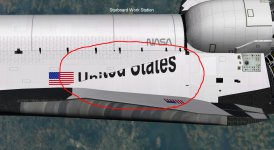
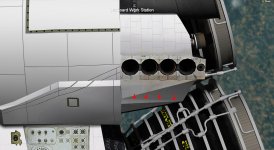
Latest mesh results:


mid fuselage issue

624.jpg


Is this sharp seam correct?

625.jpg

I am afraid the yellow labels on the SSME are not usable. I thought they needed resizing only but then realized the label is inverted on engine n.2 (is there a way to fix this?)
 
Last edited:
Could you try this version of your high resolution Atlantis texture? I simply saved it in DXT-5 with no mip-maps, this is to check if your DDS exporter is doing something funny: https://www.dropbox.com/s/9mht638312p52if/Atlantis_5thmod.dds?dl=0


It works! so there must be something weird with my .dds files...
Could it be related to Photoshop?

Maybe I found the reason: I have two different format to choose from the menu: one is D3D/DDS and another one is DDS. I have always used the latter, now I have tried the first one and the textures work with DX7
 
Last edited:
It works! so there must be something weird with my .dds files...
Could it be related to Photoshop?

I used GIMP (with a dds plugin from somewhere).
 
Status
Not open for further replies.
Back
Top