Space Shuttle Ultra 4.0 PRESS TO MECO

Which dependency is marked as missing?

And ...

" Error: Modules with different CPU types were found."

Did somebody compile for 64 bit?
I get that too, Win 7 x64. I think it's because it's loading a blended architecture (x86 and x64).

---------- Post added at 03:13 PM ---------- Previous post was at 03:10 PM ----------

Cougar: Could you in DependencyWalker if MSVCR120.DLL and MSVCP120.DLL have question mark icons in the left pane?
 
Which dependency is marked as missing?

And ...

" Error: Modules with different CPU types were found."

Did somebody compile for 64 bit?

All projects are compiling to MACHINEX86. I'm running W7 X64.
About the Dependency Walker, when using the 32b version it can't find some DLLs way way down the line (it works so it shouldn't be a problem), but all the direct ones are available. With the 64b version, it can't find anything... because for example, there is no 64b version of USER32.DLL.
I think it's either a corrupt runtime file (uninstall and reinstall seems a good idea) or W10 issue. If the problem appeared with SSU 3.0, and 2.0 works, that means this is related to our switch to VS2013 and its dependencies. If I had money, I'd bet on the runtimes....
 
@DaveS

Cougar: Could you in DependencyWalker if MSVCR120.DLL and MSVCP120.DLL have question mark icons in the left pane?

Yes, i get a lot of question marks with MSVCR120.DLL and MSVCP120.DLL checked in Dependency Walker.

Code:
MSVCR120.DLL:

API-MS-WIN-CORE-APIQUERY-L1-1-0.DLL
API-MS-WIN-CORE-APPCOMPAT-L1-1-1.DLL
API-MS-WIN-CORE-COMM-L1-1-0.DLL
API-MS-WIN-CORE-CONSOLE-L1-1-0.DLL
API-MS-WIN-CORE-CONSOLE-L2-1-0.DLL
API-MS-WIN-CORE-DATETIME-L1-1-1.DLL
API-MS-WIN-CORE-DATETIME-L1-1-2.DLL
API-MS-WIN-CORE-DEBUG-L1-1-1.DLL
API-MS-WIN-CORE-DELAYLOAD-L1-1-1.DLL
API-MS-WIN-CORE-ENCLAVE-L1-1-0.DLL
API-MS-WIN-CORE-ERRORHANDLING-L1-1-1.DLL
API-MS-WIN-CORE-ERRORHANDLING-L1-1-3.DLL
API-MS-WIN-CORE-FIBERS-L1-1-1.DLL
API-MS-WIN-CORE-FIBERS-L2-1-1.DLL
API-MS-WIN-CORE-FILE-L1-2-1.DLL
API-MS-WIN-CORE-FILE-L1-2-2.DLL
API-MS-WIN-CORE-FILE-L2-1-1.DLL
API-MS-WIN-CORE-FILE-L2-1-2.DLL
API-MS-WIN-CORE-HANDLE-L1-1-0.DLL
API-MS-WIN-CORE-HEAP-L1-2-0.DLL
API-MS-WIN-CORE-HEAP-L2-1-0.DLL
API-MS-WIN-CORE-IO-L1-1-1.DLL
API-MS-WIN-CORE-JOB-L1-1-0.DLL
API-MS-WIN-CORE-LIBRARYLOADER-L1-2-0.DLL
API-MS-WIN-CORE-LIBRARYLOADER-L1-2-2.DLL
API-MS-WIN-CORE-LIBRARYLOADER-L2-1-0.DLL
API-MS-WIN-CORE-LOCALIZATION-L1-2-1.DLL
API-MS-WIN-CORE-LOCALIZATION-L2-1-0.DLL
API-MS-WIN-CORE-LOCALIZATION-PRIVATE-L1-1-0.DLL
API-MS-WIN-CORE-MEMORY-L1-1-2.DLL
API-MS-WIN-CORE-NAMEDPIPE-L1-2-0.DLL
API-MS-WIN-CORE-NAMEDPIPE-L1-2-2.DLL
API-MS-WIN-CORE-NAMESPACE-L1-1-0.DLL
API-MS-WIN-CORE-NORMALIZATION-L1-1-0.DLL
API-MS-WIN-CORE-PROCESSENVIRONMENT-L1-2-0.DLL
API-MS-WIN-CORE-PROCESSSNAPSHOT-L1-1-0.DLL
API-MS-WIN-CORE-PROCESSTHREADS-L1-1-2.DLL
API-MS-WIN-CORE-PROCESSTHREADS-L1-1-3.DLL
API-MS-WIN-CORE-PROCESSTOPOLOGY-L1-2-0.DLL
API-MS-WIN-CORE-PROFILE-L1-1-0.DLL
API-MS-WIN-CORE-PSAPI-ANSI-L1-1-0.DLL
API-MS-WIN-CORE-PSAPI-L1-1-0.DLL
API-MS-WIN-CORE-REALTIME-L1-1-0.DLL
API-MS-WIN-CORE-REGISTRY-L1-1-0.DLL
API-MS-WIN-CORE-RTLSUPPORT-L1-2-0.DLL
API-MS-WIN-CORE-SIDEBYSIDE-L1-1-0.DLL
API-MS-WIN-CORE-STRING-L1-1-0.DLL
API-MS-WIN-CORE-SYNCH-L1-1-0
API-MS-WIN-CORE-SYNCH-L1-2-1.DLL
API-MS-WIN-CORE-SYSINFO-L1-2-1.DLL
API-MS-WIN-CORE-SYSINFO-L1-2-3.DLL
API-MS-WIN-CORE-THREADPOOL-LEGACY-L1-1-0.DLL
API-MS-WIN-CORE-THREADPOOL-PRIVATE-L1-1-0.DLL
API-MS-WIN-CORE-WINDOWSERRORREPORTING-L1-1-0.DLL
API-MS-WIN-CORE-WOW64-L1-1-0.DLL
API-MS-WIN-CORE-WOW64-L1-1-1.DLL
API-MS-WIN-EVENTING-PROVIDER-L1-1-0.DLL
API-MS-WIN-SECURITY-APPCONTAINER-L1-1-0.DLL
API-MS-WIN-SECURITY-BASE-L1-2-0.DLL
EXT-MS-WIN-ADVAPI32-NPUSERNAME-L1-1-0.DLL
EXT-MS-WIN-ADVAPI32-NTMARTA-L1-1-0.DLL
EXT-MS-WIN-ADVAPI32-REGISTRY-L1-1-0.DLL
EXT-MS-WIN-APPMODEL-DAXCORE-L1-1-0.DLL
EXT-MS-WIN-APPXDEPLOYMENTCLIENT-APPXDEPLOY-L1-1-0.DLL
EXT-MS-WIN-APPXDEPLOYMENTCLIENT-APPXDEPLOYONECORE-L1-1-0.DLL
EXT-MS-WIN-COM-PSMREGISTER-L1-2-1.DLL
EXT-MS-WIN-FECLIENT-ENCRYPTEDFILE-L1-1-0.DLL
EXT-MS-WIN-GPAPI-GROUPPOLICY-L1-1-0.DLL
EXT-MS-WIN-KERNEL32-APPCOMPAT-L1-1-0.DLL
EXT-MS-WIN-KERNEL32-DATETIME-L1-1-0.DLL
EXT-MS-WIN-KERNEL32-ERRORHANDLING-L1-1-0.DLL
EXT-MS-WIN-KERNEL32-FILE-L1-1-0.DLL
EXT-MS-WIN-KERNEL32-QUIRKS-L1-1-0.DLL
EXT-MS-WIN-KERNEL32-QUIRKS-L1-1-1.DLL
EXT-MS-WIN-KERNEL32-REGISTRY-L1-1-0.DLL
EXT-MS-WIN-KERNEL32-SIDEBYSIDE-L1-1-0.DLL
EXT-MS-WIN-KERNEL32-WINDOWSERRORREPORTING-L1-1-0.DLL
EXT-MS-WIN-KERNEL32-WINDOWSERRORREPORTING-L1-1-1.DLL
EXT-MS-WIN-KERNELBASE-PROCESSTHREAD-L1-1-0.DLL
EXT-MS-WIN-MRMCORER-RESMANAGER-L1-1-0.DLL
EXT-MS-WIN-NTDSAPI-ACTIVEDIRECTORYCLIENT-L1-1-0.DLL
EXT-MS-WIN-NTDSAPI-ACTIVEDIRECTORYCLIENT-L1-1-1.DLL
EXT-MS-WIN-NTUSER-STRING-L1-1-0.DLL
EXT-MS-WIN-SECURITY-CAPAUTHZ-L1-1-0.DLL
EXT-MS-WIN-SECURITY-EFSWRT-L1-1-1.DLL
EXT-MS-WIN-SHELL32-SHELLCOM-L1-1-0.DLL
API-MS-WIN-CORE-SYNCH-L1-2-0.DLL
API-MS-WIN-CORE-TIMEZONE-L1-1-0.DLL
API-MS-WIN-CORE-XSTATE-L2-1-0.DLL
KERNEL32.DLL
KERNELBASE.DLL
MSVCR120.DLL
NTDLL.DLL

Error: At least one required implicit or forwarded dependency was not found.
Error: At least one module has an unresolved import due to a missing export function in an implicitly dependent module.
Warning: At least one delay-load dependency module was not found.


MSVCP120.DLL:

API-MS-WIN-CORE-DATETIME-L1-1-2.DLL
API-MS-WIN-CORE-DEBUG-L1-1-1.DLL
API-MS-WIN-CORE-DELAYLOAD-L1-1-1.DLL
API-MS-WIN-CORE-ENCLAVE-L1-1-0.DLL
API-MS-WIN-CORE-ERRORHANDLING-L1-1-1.DLL
API-MS-WIN-CORE-ERRORHANDLING-L1-1-3.DLL
API-MS-WIN-CORE-FIBERS-L1-1-1.DLL
API-MS-WIN-CORE-FIBERS-L2-1-1.DLL
API-MS-WIN-CORE-FILE-L1-2-1.DLL
API-MS-WIN-CORE-FILE-L1-2-2.DLL
API-MS-WIN-CORE-FILE-L2-1-1.DLL
API-MS-WIN-CORE-FILE-L2-1-2.DLL
API-MS-WIN-CORE-HANDLE-L1-1-0.DLL
API-MS-WIN-CORE-HEAP-L1-2-0.DLL
API-MS-WIN-CORE-HEAP-L2-1-0.DLL
API-MS-WIN-CORE-IO-L1-1-1.DLL
API-MS-WIN-CORE-JOB-L1-1-0.DLL
API-MS-WIN-CORE-LIBRARYLOADER-L1-2-0.DLL
API-MS-WIN-CORE-LIBRARYLOADER-L1-2-2.DLL
API-MS-WIN-CORE-LIBRARYLOADER-L2-1-0.DLL
API-MS-WIN-CORE-LOCALIZATION-L1-2-1.DLL
API-MS-WIN-CORE-LOCALIZATION-L2-1-0.DLL
API-MS-WIN-CORE-LOCALIZATION-PRIVATE-L1-1-0.DLL
API-MS-WIN-CORE-MEMORY-L1-1-2.DLL
API-MS-WIN-CORE-NAMEDPIPE-L1-2-0.DLL
API-MS-WIN-CORE-NAMEDPIPE-L1-2-2.DLL
API-MS-WIN-CORE-NAMESPACE-L1-1-0.DLL
API-MS-WIN-CORE-NORMALIZATION-L1-1-0.DLL
API-MS-WIN-CORE-PROCESSENVIRONMENT-L1-2-0.DLL
API-MS-WIN-CORE-PROCESSSNAPSHOT-L1-1-0.DLL
API-MS-WIN-CORE-PROCESSTHREADS-L1-1-2.DLL
API-MS-WIN-CORE-PROCESSTHREADS-L1-1-3.DLL
API-MS-WIN-CORE-PROCESSTOPOLOGY-L1-2-0.DLL
API-MS-WIN-CORE-PROFILE-L1-1-0.DLL
API-MS-WIN-CORE-PSAPI-ANSI-L1-1-0.DLL
API-MS-WIN-CORE-PSAPI-L1-1-0.DLL
API-MS-WIN-CORE-REALTIME-L1-1-0.DLL
API-MS-WIN-CORE-REGISTRY-L1-1-0.DLL
API-MS-WIN-CORE-RTLSUPPORT-L1-2-0.DLL
API-MS-WIN-CORE-SIDEBYSIDE-L1-1-0.DLL
API-MS-WIN-CORE-STRING-L1-1-0.DLL
API-MS-WIN-CORE-SYNCH-L1-1-0
API-MS-WIN-CORE-SYNCH-L1-2-1.DLL
API-MS-WIN-CORE-SYSINFO-L1-2-1.DLL
API-MS-WIN-CORE-SYSINFO-L1-2-3.DLL
API-MS-WIN-CORE-THREADPOOL-LEGACY-L1-1-0.DLL
API-MS-WIN-CORE-THREADPOOL-PRIVATE-L1-1-0.DLL
API-MS-WIN-CORE-WINDOWSERRORREPORTING-L1-1-0.DLL
API-MS-WIN-CORE-WOW64-L1-1-0.DLL
API-MS-WIN-CORE-WOW64-L1-1-1.DLL
API-MS-WIN-EVENTING-PROVIDER-L1-1-0.DLL
API-MS-WIN-SECURITY-APPCONTAINER-L1-1-0.DLL
API-MS-WIN-SECURITY-BASE-L1-2-0.DLL
EXT-MS-WIN-ADVAPI32-NPUSERNAME-L1-1-0.DLL
EXT-MS-WIN-ADVAPI32-NTMARTA-L1-1-0.DLL
EXT-MS-WIN-ADVAPI32-REGISTRY-L1-1-0.DLL
EXT-MS-WIN-APPMODEL-DAXCORE-L1-1-0.DLL
EXT-MS-WIN-APPXDEPLOYMENTCLIENT-APPXDEPLOY-L1-1-0.DLL
EXT-MS-WIN-APPXDEPLOYMENTCLIENT-APPXDEPLOYONECORE-L1-1-0.DLL
EXT-MS-WIN-COM-PSMREGISTER-L1-2-1.DLL
EXT-MS-WIN-FECLIENT-ENCRYPTEDFILE-L1-1-0.DLL
EXT-MS-WIN-GPAPI-GROUPPOLICY-L1-1-0.DLL
EXT-MS-WIN-KERNEL32-APPCOMPAT-L1-1-0.DLL
EXT-MS-WIN-KERNEL32-DATETIME-L1-1-0.DLL
EXT-MS-WIN-KERNEL32-ERRORHANDLING-L1-1-0.DLL
EXT-MS-WIN-KERNEL32-FILE-L1-1-0.DLL
EXT-MS-WIN-KERNEL32-QUIRKS-L1-1-0.DLL
EXT-MS-WIN-KERNEL32-QUIRKS-L1-1-1.DLL
EXT-MS-WIN-KERNEL32-REGISTRY-L1-1-0.DLL
EXT-MS-WIN-KERNEL32-SIDEBYSIDE-L1-1-0.DLL
EXT-MS-WIN-KERNEL32-WINDOWSERRORREPORTING-L1-1-0.DLL
EXT-MS-WIN-KERNEL32-WINDOWSERRORREPORTING-L1-1-1.DLL
EXT-MS-WIN-KERNELBASE-PROCESSTHREAD-L1-1-0.DLL
EXT-MS-WIN-MRMCORER-RESMANAGER-L1-1-0.DLL
EXT-MS-WIN-NTDSAPI-ACTIVEDIRECTORYCLIENT-L1-1-0.DLL
EXT-MS-WIN-NTDSAPI-ACTIVEDIRECTORYCLIENT-L1-1-1.DLL
EXT-MS-WIN-NTUSER-STRING-L1-1-0.DLL
EXT-MS-WIN-SECURITY-CAPAUTHZ-L1-1-0.DLL
EXT-MS-WIN-SECURITY-EFSWRT-L1-1-1.DLL
EXT-MS-WIN-SHELL32-SHELLCOM-L1-1-0.DLL
API-MS-WIN-CORE-SYNCH-L1-2-0.DLL
API-MS-WIN-CORE-TIMEZONE-L1-1-0.DLL
API-MS-WIN-CORE-XSTATE-L2-1-0.DLL
KERNEL32.DLL
KERNELBASE.DLL
MSVCP120.DLL
MSVCR120.DLL
NTDLL.DLL

Error: At least one required implicit or forwarded dependency was not found.
Error: At least one module has an unresolved import due to a missing export function in an implicitly dependent module.
Warning: At least one delay-load dependency module was not found.


That´s all cryptically for me - i don´t understand what Dependency Walker tries to tell me with that.
 
Last edited by a moderator:
Question Marks mean "missing" or "unknown". So I would bet there is a runtime issue for you.
 
Question Marks mean "missing" or "unknown". So I would bet there is a runtime issue for you.
Yes. I would just uninstall everything reinstall them. It is possible that something has been corrupted and needs to be reinstalled.
 
@Urwumpe and DaveS:

Yes, i will try to deinstall all VC++ Runtimes and reinstall them.
Hopefully that helps...

Thank you all!!!
 
@Urwumpe and DaveS:

Yes, i will try to deinstall all VC++ Runtimes and reinstall them.
Hopefully that helps...

Thank you all!!!

I'd start with just the 2013 ones.
 
@Urwumpe and DaveS:

Yes, i will try to deinstall all VC++ Runtimes and reinstall them.
Hopefully that helps...

Thank you all!!!

I would be _very_ careful about uninstalling runtimes. It could leave you with a corrupt system. Runtimes are not just used by Orbiter, but by every executable with dynamic dependencies on your system, including OS components. Adding new ones without uninstalling the old ones is ok, they can live side by side.

Note that just because you have VC2013 installed does not guarantee that you have the correct runtimes. (There may have been intermediate updates due to new service packs or security bug fixes). Make sure you have _exactly_ the runtimes that SSU requires, in addition to your own VC2013 ones.
 
The doors seem like they are sunk in a bit, and on the port side the forward end of the wheel well doesn't meet the bottom of the orbiter.
Checked in the definite fix for this. I can't spot anymore issues with either the doors or the wheel wells themselves. Everything is nice and smooth as they should be.
 
Oh, Mr. Schweiger it´s an honor and a pleasure talking to you, Sir!!!

Thank you sooooo much for your heavenly software Orbiter. Since years I spend so much time flying with Orbiter that my wife has already quit beeing jealous at it.

Unfortunetly i have had seen your post too late. I already had deinstalled all VC++ Runtimes. But in future i will be more carefully, i promise!

But the good news is: after deinstalling all of the runtimes and reinstalling them via an "All-in-One-Runtimes Installer" (aio-runtimes_v2.3.9_cb-dl-manager.exe) Space Shuttle Ultra v4.0 runs perfectly in a clean Orbiter 2010 environment. I will try it next in one of my customised Orbiter folders (surely first making a backup of the folder).

@GLS, DaveS and Urwumpe: You were so right with your assumption that my runtimes must have been corrupted. I could have spent hours, days and weeks figuring out different orbiter setups without any sucess. Your suggestion solved my problems and saved my day. Now i can, and right away will, try out your fabulous add-on SSU 4.0. Thank you very very much for your help - big time!!!

Gentlemen, it has been an honor and a pleasure talking to all of you!
Thank you all for your precious time you have shared with me helping me to solve my problem with your tremendous expertise! I am grateful and proud that i had the chance to talk to you.

I wish you all and your families a quiet and contemplative christmas time, healthiness and all the best.

God bless you all, my friends!
Rick

 
Now that the 2 big issues of the day are solved, there are 2 other things we could also include in 4.1: the SSME animation coordinates (ticket 151), and something I just noticed now which is the ET umbilical door animation which is a bit off.
Sadly I don't have enough info to do any of those :(
 
SSME TVC animation coordinates have been updated rev. 2558. I can't do anything about the ET umbilical doors as I can't make heads or tails of the code.
 
SSME TVC animation coordinates have been updated rev. 2558. I can't do anything about the ET umbilical doors as I can't make heads or tails of the code.

Let me go back to an older revision to see it I can figure out where exactly are those points.

---------- Post added at 08:36 PM ---------- Previous post was at 07:55 PM ----------

Let me go back to an older revision to see it I can figure out where exactly are those points.

I think I can crack this one... I just need to have dinner before I do it. :lol:

---------- Post added at 11:45 PM ---------- Previous post was at 08:36 PM ----------

I think I can crack this one... I just need to have dinner before I do it. :lol:

I can, but not now... :facepalm:
I thought I'd made sense of the coordinates but it doesn't work... :uhh: On the positive side, this is a 4-bar linkage system similar to the CISS stuff, so I can make this run as smooth as the CISS, but it will take time to square things away. For now I just corrected the axis of the movement of the doors and it looks much better (but not perfect), and I'll create a ticket for future work.

Are we go for 4.1 then?

---------- Post added 12-08-16 at 12:28 AM ---------- Previous post was 12-07-16 at 11:45 PM ----------

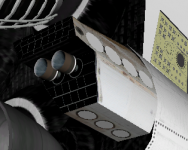
During "final testing" I found that the up- and side-firing ARCS jets appear covered in white. Both clients have this. In the beta branch, which uses the same textures and meshes there is no issue.
 
[/COLOR]During "final testing" I found that the up- and side-firing ARCS jets appear covered in white. Both clients have this. In the beta branch, which uses the same textures and meshes there is no issue.
What do you mean by "covered in white"? I can't see anything wrong with the ARCS.
 

Attachments

  • white_arcs.PNG
    white_arcs.PNG
    115.3 KB · Views: 530
Looks correct to me... should we be prelaunch. Tyvek covers, remember.

Yeah, that's what I thought first, but then I realized I was in orbit firing RCS, so that couldn't be right....
 
Yeah, that's what I thought first, but then I realized I was in orbit firing RCS, so that couldn't be right....
Fixed. It was due to a material issue that had worked itself in during the MLG issues.
 
So, any dev wants the package before it goes out?
 
Back
Top