Advanced Question View from inside a vessel not in focus

fred18

Addon Developer
Addon Developer
Donator
Joined
Feb 2, 2012
Messages
1,664
Reaction score
115
Points
78
Hi guys,

I know that this is a non common question, and I don't know if it's possible but here's the point:

I'd like to save a screenshot of a cockpit view but not from the focus vessel, from another one. Is it possible?

I know there was a camera MFD once that did something like that, and I know that D3D9 enviroment maps use custom cameras, so in theory is possible, but I really don't know how to do it and how difficult it is. If it is crazyness then I'll leave it, if instead is reasonable I'll try, but I need a hint of where to start from.

Thanks in advance :tiphat:
 
I know there was a camera MFD once that did something like that, and I know that D3D9 enviroment maps use custom cameras, so in theory is possible, but I really don't know how to do it and how difficult it is.

D3D9client can of course do that since it has all the scene data. Telescope MFD employed a hack as far as I know, but I don't know its exact nature. Probably drilling down to the DX context and rendering the scene from a different perspective or somesuch. Never used camera MFD, so no idea. There's nothing in the regular API that would allow anythig like that, in any case.

If the only goal is making a screenshot, the easiest way might be to switch focus, enter cockpit mode, take the shot, then switch it all back.
 
If the only goal is making a screenshot, the easiest way might be to switch focus, enter cockpit mode, take the shot, then switch it all back.

Yep, I gave it a thought but I don't know if it will mess up the system I'm developing, and I since the scene must be rendered to get a screenshot I'm afraid it will be noticeable by users. I don't think that can be done, or at least not easily, so I'll probably leave this idea.
 
It would be wonderful if it could be done - it would make planning imaging from robotic probes a LOT more interesting. I have no idea how to code it though.
Cheers,
Brian
 
It would be wonderful if it could be done - it would make planning imaging from robotic probes a LOT more interesting. I have no idea how to code it though.
Cheers,
Brian

that's exactly the point, i'm making the space network and that would be a super plus... Imagine of being inside some vessel, could be the MCC, could be the ISS, or whatever you want, and you're receiving and viewing images broadcasted by some probe around the system... I'd love it... but I have the strong suspect that is much difficult...
 
that's exactly the point, i'm making the space network and that would be a super plus... Imagine of being inside some vessel, could be the MCC, could be the ISS, or whatever you want, and you're receiving and viewing images broadcasted by some probe around the system... I'd love it... but I have the strong suspect that is much difficult...

I think it would be possible to implement that feature into the D3D9Client and expose it via the gcAPI. If it's not there already, that is. MOGE users would not be able to use it, though.

EDIT: Well, pretty much thought so: gcAPI already offers gcSetupCustomCamera(), which allows to define a camera rendering into a surface. It could be that it is not fully implemented, but it's a start.
 
Last edited:
Definitively a cool idea for :probe: missions ! And a B&W filter with some grain would look awesome for 60's stuff :cool:
 
I remember someone made exactly that for the Luna E3, but I can't find it now. I'm not sure it was ever publicly released.
 
I think you're right. Actually I probably reacted to that post because it triggered some add-on memory. But like years ago... We're not getting younger, amazing to see the same people around and living through their lives. Earth achieved a good dozen of orbits since I first came around there. Lots and lots of miles in deep space, I guess we are all experienced star travelers now. Amazing. :cheers:
 
I believe this is The Probe you're looking for: https://www.orbithangar.com/searchid.php?ID=3761

It was made for the 2006 edition of Orbiter so using it in later versions may not work.

From the code it looks like this is switching focus, orienting the internal cam view, then uses standard windows PRINT keys to do a screenshot, then load the clipboard picture and draw some crosses over it.

That should work in 2016 as well.
 
Yes, that's basically what also jedidia was suggesting. I'll give it a run to test if that messes up too much with my application.

Actually, since I can simply attach the camera (I'm already using that for the various space network items) I could prevent issues due to the change of the focus vessel.

EDIT: It works, but of course in order to save the image I need to render the frame, therefore the screen is flickering. But I think there's no other way to do it, at least with my knowledge of course.
 
Last edited:
EDIT: It works, but of course in order to save the image I need to render the frame, therefore the screen is flickering. But I think there's no other way to do it, at least with my knowledge of course.

Did you try the gcAPI command? You could do a two-way approach: use gcAPI for flicker-free snapshots with OVP clients, and use the flicker method with MOGE.
 
I believe this is The Probe you're looking for: https://www.orbithangar.com/searchid.php?ID=3761

It was made for the 2006 edition of Orbiter so using it in later versions may not work.

I haven't used that mod so I can't comment on it.

But the one I remember was using the mesh from this, and I remember using it to snap images of the far side of the Moon.

It's slightly off-topic because this used the view from the focused vessel. I just wanted to point out that a similar thing has been done, and it might jog the mind of someone that was involved in that effort.
 
Did you try the gcAPI command? You could do a two-way approach: use gcAPI for flicker-free snapshots with OVP clients, and use the flicker method with MOGE.

it could be a good idea, i'm a bit scared by this:

Code:
Note
Camera count is unlimited. 
[B]Only a cameras attached to currently active vessel are operational and recodring. 
[/B]Having multible cameras active at the same time doesn't impact in a frame rate, however, camera refresh rates are reduced.

Since I'm not at all confident in this matter, I'm scared of diving into this and then it's not working :hmm:

Edit: in the meantime does anybody know how to get the Orbiter Window handle? opcRenderViewPort is not called if an oapi::Module is used, and I have the full class defined as an oapi::Module (as it is suggested to do), so I don't know how to get the handle of orbiter window
 
Last edited:
Edit: in the meantime does anybody know how to get the Orbiter Window handle? opcRenderViewPort is not called if an oapi::Module is used, and I have the full class defined as an oapi::Module (as it is suggested to do), so I don't know how to get the handle of orbiter window

OMP also searches for the Orbiter window: http://omp.ddns.net/hg/omp/file/tip/Orbitersdk/samples/OMP/OMPClient/OMPClient.cpp#l1224

Code:
BOOL CALLBACK ScanForOrbiter(HWND hWnd, LPARAM lparam)
{
	DWORD hinstance;	
	long *conf_long=(long *)lparam;
	GetWindowThreadProcessId(hWnd, &hinstance);
	if (((HINSTANCE)hinstance)==((HINSTANCE)conf_long[0]))
		if (IsWindowVisible(hWnd))
		{
			SetLastError(ERROR_APPLICATION);
			conf_long[0]=(long)hWnd;
			return FALSE;
		}	
	return TRUE;
}

//Find Orbiter's main windows
conf_long=(long)GetCurrentProcessId();
if (EnumWindows(ScanForOrbiter, (LPARAM)&conf_long))
{
	sprintf (logger, "Unable to locate Orbiter window!");
	logging(-1, logger);
	exit (-1);
}
if ((conf_long2=GetLastError())!=ERROR_APPLICATION)
{
	sprintf (logger, "Unable to locate Orbiter window (Error %X)!", conf_long2);
	logging(-1, logger);
	exit (-1);
}
sprintf (logger, "Located Orbiter window handle: %X", conf_long);
logging(0, logger);

The code might be GPL and therefore not fully compatible with your usual "Fred18 license", but you can hardly call it derived work if you use those 2 standard calls :lol: .

However, it is a bit strange that opcRenderViewPort is not called for you, because it is called in OMP, which is also derived from Module. Perhaps it is because I've left out the StartSimulation declaration in the class definition. AFAIK, Orbiter will only then call the opc-thingies.
 
I was using a more dirty approach:
Code:
HWND _orbiter_window;

BOOL CALLBACK EnumWindowsProc(HWND hwnd, LPARAM lParam)
{

	char class_name[80];
	GetClassName(hwnd, class_name, sizeof(class_name));
	string classname(class_name);
	string nameorb;
	nameorb.assign(classname.substr(0, 7));
	if (nameorb.compare("Orbiter") == 0) {
		_orbiter_window = hwnd;
		return FALSE;
	}


	return TRUE;
}

looking at yours, will this work?
Code:
...
GetWindowThreadProcessId(hWnd, &hinstance);
	if (((HINSTANCE)hinstance)==oapiGetOrbiterInstance()))
...

work?

EDIT:
that no, but this is working fine:
Code:
BOOL CALLBACK EnumWindowsProc(HWND hwnd, LPARAM lParam)
{
	HINSTANCE hinstance= (HINSTANCE)GetWindowLong(hwnd, GWL_HINSTANCE);
	if (hinstance == oapiGetOrbiterInstance()) {
		_orbiter_window = hwnd;
		return FALSE;
	}
	
	return TRUE;
}


---------- Post added at 18:33 ---------- Previous post was at 16:47 ----------

Sorry, I was wrong!

Here's the correct function, it works quite well, hope helps others with the same issue:
Code:
HWND _orbiter_window;

BOOL CALLBACK EnumWindowsProc(HWND hwnd, LPARAM lParam)
{
	DWORD lpdwProcessId;
	GetWindowThreadProcessId(hwnd, &lpdwProcessId);
	if (lpdwProcessId == lParam)
	{
		_orbiter_window= hwnd;
		return FALSE;
	}
	
	return TRUE;
}

...
void SpaceNetwork::clbkSimulationStart(RenderMode mode) {
	EnumWindows(EnumWindowsProc, GetCurrentProcessId());
	orbiter_window = _orbiter_window;	// store the orbiter window also inside my class
		return;

}
 
Last edited:
What about the opcRenderViewPort still functioning if StartSimulation is not declared?
 
A few notes regarding the topic.

- If a vessel isn't in a visual range it doesn't have a visual loaded to render. Of course, the visual range could be set to infinity to remove the issue.

- gcAPI CustomCameras are currently working only with vessel exteriors. VC's not supported at a moment but could be added if there is a need to.

- Surface mesh and texture loading would be a problem when taking snapshots from a surface of an other planet. That's mostly the reason why CustomCameras are active only in a focus vessel.
 
What about the opcRenderViewPort still functioning if StartSimulation is not declared?

yep, it should, but I have a couple of routines called in simulation start, and anyway since it is clearly stated that it's been deprecated I don't want to use it.

The latest hint of code I posted works perfectly anyway!

I'm already in the process of sending pix around the sim and it's quite funny. Flickering due to the rapid change of camera is unavoidable, but nothing we can do about it. Also I found the oapiSetCameraMode to accept only CameraMode class as parameter (on the contrary the GetCameraMode returns an int), but it's not documented neither easy to get, so it's possible that sometime when tacking pix the camera won't return in the exact mode as it was before, but I really think it's not a big deal comparing to the rest.

Also, I will need to save the bmp file of the screenshots and reload them when "ground control" checks signals received, because otherwise the image got from various devicecontext, hbitmap etc will be lost (pointers not valid anymore, dc released etc).

---------- Post added at 23:04 ---------- Previous post was at 19:38 ----------

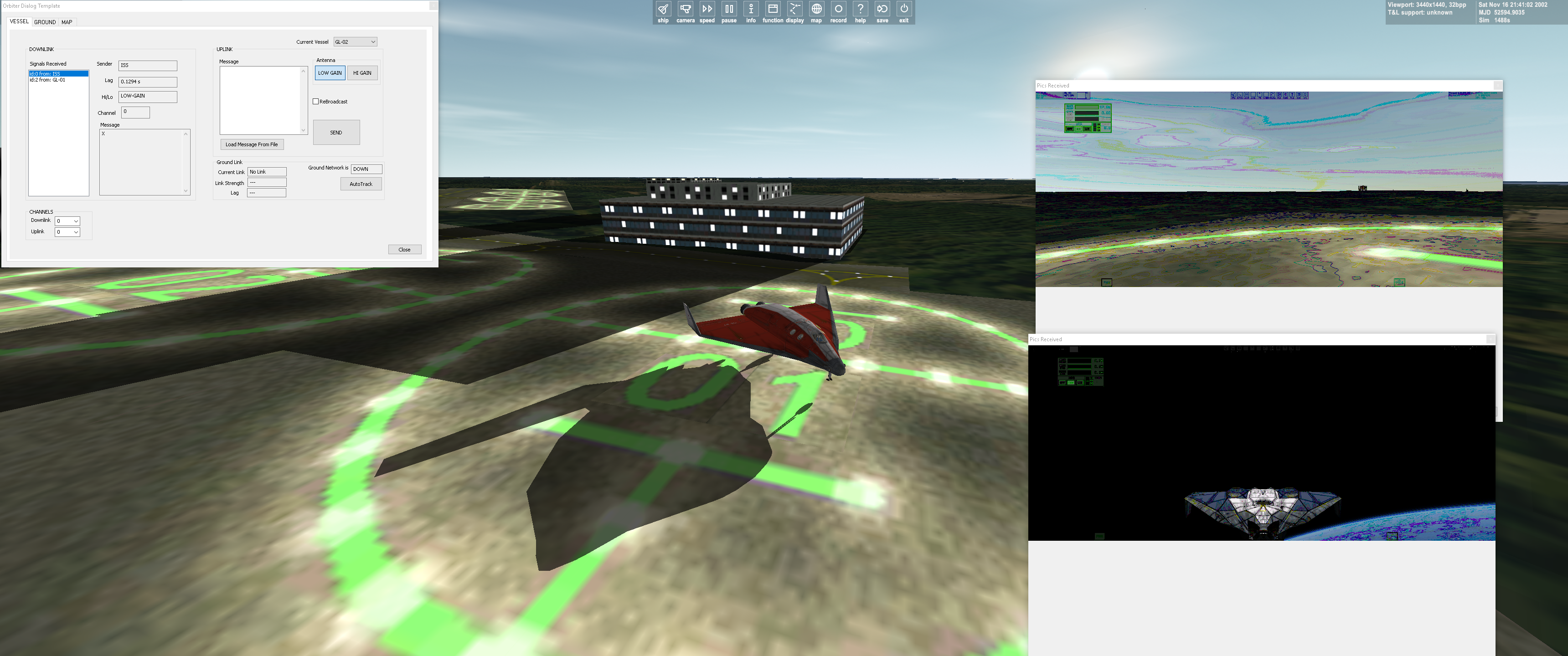
Did it!

it's a very difficult overall implementation, but it works!!!

here's the pic of a couple of pics taken and sent, shown from the space network dialog.
spacenetwork_sendscreenshot.png
 
Back
Top