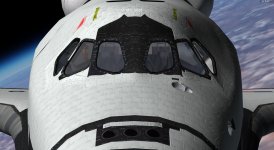
Project SSU HI RES Textures

There is: Just don't apply normal mapping to the labels, just the tile gaps. See what I did with the OMS pods.

How can I exclude the labels and map the gaps at the same time? they are not separate textures

 
How can I exclude the labels and map the gaps at the same time? they are not separate textures
Just apply the normal-neutral color to areas of the tiles where the labels are. Then the renderer will ignore those areas.
 
Just apply the normal-neutral color to areas of the tiles where the labels are. Then the renderer will ignore those areas.

Can you explain how to do that?
 
Can you explain how to do that?
In the normal map texture, you just paint over the labels of each tile with the appropriate tool, set with a color of 127,127,255 or hex 7F7FFF. Any areas painted with this particular color is assumed to be neutral in terms of normal mapping and is ignored by the renderer.
 
In the normal map texture, you just paint over the labels of each tile with the appropriate tool, set with a color of 127,127,255 or hex 7F7FFF. Any areas painted with this particular color is assumed to be neutral in terms of normal mapping and is ignored by the renderer.

That would take forever.. paint over each label :rolleyes:

---------- Post added at 10:30 AM ---------- Previous post was at 10:28 AM ----------

IMHO. The printing on the white tiles, should be smaller and lighter

I checked that again and you are right: the printings should be shorter
 
That would take forever.. paint over each label :rolleyes:
I'm afraid that's the only solution at this time. There's is one other that might work though, and that is to use some sort of tool that replicates the pattern of the tiles to create the tile gaps in the normal map texture. This should give the clean mapping required.
 
Last edited:
That would take forever.. paint over each label :rolleyes:

How about using the normal map from the "clean" texture? If the tiles match it should work... :shrug:

 
How about using the normal map from the "clean" texture? If the tiles match it should work... :shrug:

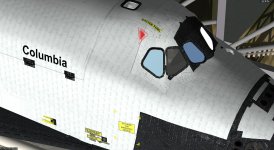
The tiles won't match unfortunately, not precisely.
Best thing maybe is to create two separate layers, one with plain tiles and another with numbered tiles, I ll see if I can do that
 
Last edited:
I came up with this solution: I have generated two separate layers for the white tiles, one with plain tiles only (no serial numbers printings) and another one with the tiles+serial numbers on top of it. This fixes the "engraved text" problem and also gives me the chance to test different solutions for the tiles serial numbers appearance by adjusting the layer transparency:the numbers can now be faded as much as we like. This fading appears also evident looking at the orbiter pictures at time of delivery compared to post mission (where some tiles either show faded numbers or they are totally erased. I also noticed that for some reason if you check the rudder you can see very few numbers compared to the fuselage tiles (don't know if that is due to plasma trail hitting the rudder and wearing the surface more than in other areas during re entry or to any other reason..)

This is OV-102 after STS-1 landing
STS-1 OV-102 Aft Fuselage 01.jpg


@Donamy: the printings have been resized according to the real ones


Here is an example with the numbers layer set at 50%
0022.jpg
 
Last edited:
Better ! Could you try 40%? The tiles around the windows look great, but to me the tiles on the sides have the seams reversed, making them look above the tiles. I hope I'm being clear.
 
Better ! Could you try 40%? The tiles around the windows look great, but to me the tiles on the sides have the seams reversed, making them look above the tiles. I hope I'm being clear.

I know it looks weird. That s because the seams are brighter than the tiles. NM filter turns dark into lower and bright into higher.
I tried to fix that by inverting X/Y or Z in the settings window but the result is the same.
Any suggestion on how to fix it (apart from painting the seams darker)?
 
Why do the tiles around the windows look correct ? Is it the way the shadow direction is ?
 
Why do the tiles around the windows look correct ? Is it the way the shadow direction is ?
Yes. One thing that I found out when I made the normal/specular maps for the OMS pods is that the boundaries between the different parts have to be well defined. So for the tiles that is to establish nice and hard gaps. Really amp it up if you have to. This is the color version of the OMS pod normal map I use for the SSU OMS pods: https://www.dropbox.com/s/wc6plkmgo7xhjc2/SSU_OMS_pod_norm_map_color.jpg?dl=0

Note the well defined tile gaps. The better defined the edges are, the better it will show up in-game. Think of the edges as the third dimension in a two-dimensional bitmap. The the darker and more defined the edges are, the deeper the gap is which produces a harder and more noticeable shadow.

---------- Post added at 12:45 AM ---------- Previous post was at 12:18 AM ----------

I think you have too many tiles on the PLBDs. According to these STS-1 photos of Columbia, the tiles barely reach beyond the bend of the PLBDs:

https://www.dropbox.com/s/vq1hhlcgnyjllam/STS1-0286-A800104-X-27C-1.4.80.jpg?dl=0

https://www.dropbox.com/s/icsi0n089mi5tjt/STS1-0601-80PC-741-12.29.80.jpg?dl=0
 
Last edited:
Why do the tiles around the windows look correct ? Is it the way the shadow direction is ?

As DaveS said above. It depends on the difference between tiles and their seams. The seams around the flight deck area are darker than the tiles themselves, hence the filter generates the indent effect. The opposite happens to the other areas where the seams are brighter and they appear like they are emerging from the tiles surface
 
Unfortunately it kills the illusion. Better to just have lightened lines, instead of raised ridges. And you don't have indented printing. IMHO
 
Unfortunately it kills the illusion. Better to just have lightened lines, instead of raised ridges. And you don't have indented printing. IMHO
The right effect can be gotten but it unfortunately requires a bit of trial&error and playing around.
 
That's up to you Wolf. If you're up to it. Your choice!
 
Ok, white tiles re drawn with dark seams. Now the NM filter works fine.
The LRSI layer over the PB has also been reduced according to the OV-102 early configuration

0040.jpg

0042.jpg

Please disregard the thumbnail attached below (shows old tiles)
 

Attachments

  • NM invert X.jpg
    NM invert X.jpg
    194.9 KB · Views: 10
Last edited:
Ok, white tiles re drawn with dark seams. Now the NM filter works fine.
The LRSI layer over the PB has also been reduced according to the OV-102 early configuration

View attachment 15714

View attachment 15716

Please disregard the thumbnail attached below (shows old tiles)
The normal map looks good now but the PLBD tiles need to be reduced even further. The cut-off line is just below the windows when viewed from the side.
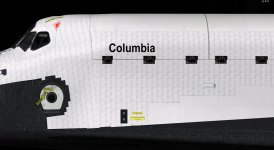
 
The normal map looks good now but the PLBD tiles need to be reduced even further. The cut-off line is just below the windows when viewed from the side.


I thought the LRSI ended right where the PBD "yellow crane" attachment points start
0043.jpg

but I had a look art some pictures and actually it stops some 15/20 cm below that line.
STS1-0286-A800104-X-27C-1.4.80_preview.jpeg

I'll fix it
 
Back
Top