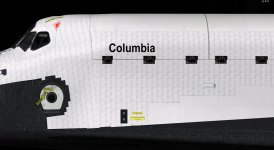
There is: Just don't apply normal mapping to the labels, just the tile gaps. See what I did with the OMS pods.
How can I exclude the labels and map the gaps at the same time? they are not separate textures

There is: Just don't apply normal mapping to the labels, just the tile gaps. See what I did with the OMS pods.
Just apply the normal-neutral color to areas of the tiles where the labels are. Then the renderer will ignore those areas.How can I exclude the labels and map the gaps at the same time? they are not separate textures
Just apply the normal-neutral color to areas of the tiles where the labels are. Then the renderer will ignore those areas.
In the normal map texture, you just paint over the labels of each tile with the appropriate tool, set with a color of 127,127,255 or hex 7F7FFF. Any areas painted with this particular color is assumed to be neutral in terms of normal mapping and is ignored by the renderer.Can you explain how to do that?
In the normal map texture, you just paint over the labels of each tile with the appropriate tool, set with a color of 127,127,255 or hex 7F7FFF. Any areas painted with this particular color is assumed to be neutral in terms of normal mapping and is ignored by the renderer.

IMHO. The printing on the white tiles, should be smaller and lighter
I'm afraid that's the only solution at this time. There's is one other that might work though, and that is to use some sort of tool that replicates the pattern of the tiles to create the tile gaps in the normal map texture. This should give the clean mapping required.That would take forever.. paint over each label

That would take forever.. paint over each label
How about using the normal map from the "clean" texture? If the tiles match it should work... :shrug:


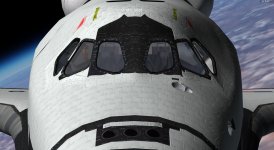
Better ! Could you try 40%? The tiles around the windows look great, but to me the tiles on the sides have the seams reversed, making them look above the tiles. I hope I'm being clear.
Yes. One thing that I found out when I made the normal/specular maps for the OMS pods is that the boundaries between the different parts have to be well defined. So for the tiles that is to establish nice and hard gaps. Really amp it up if you have to. This is the color version of the OMS pod normal map I use for the SSU OMS pods: https://www.dropbox.com/s/wc6plkmgo7xhjc2/SSU_OMS_pod_norm_map_color.jpg?dl=0Why do the tiles around the windows look correct ? Is it the way the shadow direction is ?
Why do the tiles around the windows look correct ? Is it the way the shadow direction is ?
The right effect can be gotten but it unfortunately requires a bit of trial&error and playing around.Unfortunately it kills the illusion. Better to just have lightened lines, instead of raised ridges. And you don't have indented printing. IMHO
The normal map looks good now but the PLBD tiles need to be reduced even further. The cut-off line is just below the windows when viewed from the side.Ok, white tiles re drawn with dark seams. Now the NM filter works fine.
The LRSI layer over the PB has also been reduced according to the OV-102 early configuration
View attachment 15714
View attachment 15716
Please disregard the thumbnail attached below (shows old tiles)
The normal map looks good now but the PLBD tiles need to be reduced even further. The cut-off line is just below the windows when viewed from the side.