
Project Energia 5V Heavy Launch Vehicle

I think the bigger challenge here is having all engines gimbal in the intended direction.

So I worked on the core stage and it works ! Another quick drawing as a reference :
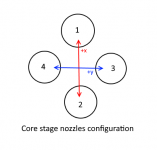
NozzleAnims.png

Pitch : nozzles 3 & 4 rotate on the x axis
Yaw : nozzles 1 & 2 rotate on the y axis
Roll : nozzles 3 +x ; 4 -x (and vice versa) *

* The roll channel is most tricky, because it can't have "dedicated" nozzles. I choosed nozzles 3 & 4, but it would work with 1 & 2 on the y axis as well. So the way I see it, pitch & yaw channels should have priority over roll channel. The roll channel has to be "opportunistic" and execute commands when there are no pitch (or yaw) inputs. Maybe the best way to have this working is to assign both "couples" (1&2 ; 3&4) to the roll channels, with a rule "if any roll input, perform it if (or as soon as) the pitch or yaw channels (or both) are "free"". It sounds a bit complex and won't be easy to code, but I think it can be done.

Another thing is how to implement a "smooth" nozzle animation and assign a max transition speed. I found that code sample from the HST.cpp from OrbiterSDK, but I'm not very happy with it, because it describes a "switch" animation. I need something more dynamic, and I care little about stuff like "DOOR_CLOSING, DOOR_CLOSED" because I don't want to save that data to a scenario file (saving the simulation state in the middle of a rocket launch is not something I do, and even if I want to implement that there's no need for saving the position of the nozzles, they will be loaded in "neutral" position, then the player or AP takes control and resume the flight).

Code:
// Animate hi-gain antenna
    if (ant_status >= DOOR_CLOSING) {
        double da = simdt * ANTENNA_OPERATING_SPEED;
        if (ant_status == DOOR_CLOSING) {
            if (ant_proc > 0.0) ant_proc = max (0.0, ant_proc-da);
            else                ant_status = DOOR_CLOSED;
        } else {
            if (ant_proc < 1.0) ant_proc = min (1.0, ant_proc+da);
            else                ant_status = DOOR_OPEN;
        }
        SetAnimation (anim_ant, ant_proc);
    }
 
Last edited:
So I worked on the core stage and it works ! Another quick drawing as a reference :

View attachment 23571

Pitch : nozzles 3 & 4 rotate on the x axis
Yaw : nozzles 1 & 2 rotate on the y axis
Roll : nozzles 3 +x ; 4 -x (and vice versa) *

* The roll channel is most tricky, because it can't have "dedicated" nozzles. I choosed nozzles 3 & 4, but it would work with 1 & 2 on the y axis as well. So the way I see it, pitch & yaw channels should have priority over roll channel. The roll channel has to be "opportunistic" and execute commands when there are no pitch (or yaw) inputs. Maybe the best way to have this working is to assign both "couples" (1&2 ; 3&4) to the roll channels, with a rule "if any roll input, perform it if (or as soon as) the pitch or yaw channels (or both) are "free"". It sounds a bit complex and won't be easy to code, but I think it can be done.
First you should know/define how much gimballing can happen (e.g. +/-3º) and how fast it is (3º/s), so you know what you have to play with.
Then you have to define what the nozzles do for a command in a certain axis, which you have done above. You should probably have roll with all 4 nozzles as it will be the axis with the largest moment... or inertia... or something... ?‍♂️

In terms of control, you can have an open-loop system where the user inputs something and that adds to the nozzle angle in that axis, and when the user stops the nozzle moves back to 0, which is simple but stopping the rates isn't easy, or you can do a closed-loop system to null angular velocity. The user commands are a certain angular velocity and when no command is present the system always nulls the rates.
Next those "rate errors" need to be converted to nozzle deflection, so they need to be multiplied by gains.
In the end, you have to mix the commands for each actuator, and adding them is an easy way to do that, and then apply the limits I mentioned in the first sentence.
With the nozzle angles, all that remains is to animate the mesh.

With boosters, you need to have the core talk to them to command the gimbals, and you need 2 sets of gains: core+boosters and core alone.

The code in the SSU Centaur should help you with the closed-loop system.

It sounds a lot of work (and maybe it is), but in the end, the logic is pretty much the same for the 3 channels, only the gains and axis change, so starting with pitch in the core only is a nice way of "divide and conquer".
 
The code in the SSU Centaur should help you with the closed-loop system.

Could you find that code sample and post it there ? Many thanks.

Right now I'm try to get the "time" factor into the vector that describes the nozzle movement, but I'm failing miserably. This is more an issue related to my poor maths/physics skills, so maybe someone else would find an obvious see I can't see :


Code:
VECTOR3 vector = _V((-RATE * Y), (-RATE * P), 1);
normalise(vector)

SetThrusterDir(th_main[0], vector);

SetAnimation(RD171_1_rot, RD171_GIMBAL_SPEED*simdt*P);
SetAnimation(RD171_2_rot, RD171_GIMBAL_SPEED*simdt*P);
SetAnimation(RD171_1_rot, RD171_GIMBAL_SPEED*simdt*Y);
SetAnimation(RD171_2_rot, RD171_GIMBAL_SPEED*simdt*Y);
;
where Y is Yaw input (-1 to 1) and P Pitch input (-1 to 1)

I know I have to insert the time factor somewhere with simt or simtdt, but how ? With that code I have the nozzles reacting correctly to the user input, but they "teleport". I want to add some inertia into the system (and that will work for the thrust vector and the animation).
 
Last edited:
Could you find that code sample and post it there ? Many thanks.
Maybe tonight I can post what I have in SSV (which should still be the same as in SSU).
But the SSU code should still be public (and the link should be somewhere), so you can look at SSU_Centaur.cpp file in the Centaur folder.
 
Maybe tonight I can post what I have in SSV (which should still be the same as in SSU).
But the SSU code should still be public (and the link should be somewhere), so you can look at SSU_Centaur.cpp file in the Centaur folder.
SSU SVN repository (requires TortoiseSVN or similar SVN client): svn://orbiter-radio.co.uk/shuttleultra/trunk
 
Thanks I got the file.

So the raw formula seems to be there :

VECTOR3 tv0 = _V( -sin( range( -RL10_GIMBAL_RANGE, RL10_Y + RL10_R, RL10_GIMBAL_RANGE ) * RAD ), sin( range( -RL10_GIMBAL_RANGE, RL10_P, RL10_GIMBAL_RANGE ) * RAD ), 1 );
VECTOR3 tv1 = _V( -sin( range( -RL10_GIMBAL_RANGE, RL10_Y - RL10_R, RL10_GIMBAL_RANGE ) * RAD ), sin( range( -RL10_GIMBAL_RANGE, RL10_P, RL10_GIMBAL_RANGE ) * RAD ), 1 );
normalise( tv0 );
normalise( tv1 );
SetThrusterDir( thRL10[0], tv0 );
SetThrusterDir( thRL10[1], tv1 );

but I still don't see where the "time" dimension is present there... :unsure:
 
Well, practically, it is a fast linear motion that you see with hydraulic servoactuators, the time for those to move the control spindle or accelerate the chamber is too short to really matter in Orbiter (But you can sure try to find out how much it matters ;) )

What you could try for avoiding solving differential functions is chaining some fuzzy logic functions together: First calculate the new unconstrained target position of the nozzle in one second. Then limit the output by soft-stops and hard-stops and finally scale the output to the actual length of the timestep.

Otherwise, you could setup a suitable differential function and approximate it in realtime by a Runge-Kutta scheme.
 
Thanks I got the file.

So the raw formula seems to be there :


but I still don't see where the "time" dimension is present there... :unsure:
It should be upstream of that, where the RL10_<axis> variables are calculated.

BTW: In there you can see the mixing of the roll and the yaw commands (the 2 RL10s are one on top of the other, so roll mixes with yaw, while pitch is independent).

BTW2: I hope you put a bit more math than I did into the thruster directions calculations... that is not accurate... ? Something to improve when I add animations to the RL10s. ?‍♂️
 
BTW2: I hope you put a bit more math than I did into the thruster directions calculations... that is not accurate... ? Something to improve when I add animations to the RL10s. ?‍♂️

Should be easier for him, since there is only one actuator per chamber, not two interacting.
 
Should be easier for him, since there is only one actuator per chamber, not two interacting.
I thought the was a mix of RD-170s and 171, but no.
But even with one actuator, given that the orientation of the engine in the core is 45º away from the ones in the boosters, there is still the need to calculate in 3D for either the core or the boosters (depends on what the vehicle axis are).
 
I thought the was a mix of RD-170s and 171, but no.
But even with one actuator, given that the orientation of the engine in the core is 45º away from the ones in the boosters, there is still the need to calculate in 3D for either the core or the boosters (depends on what the vehicle axis are).

Actually - this could be simple rotations in 90° steps, if the engine configuration remains like that. The engine might be rotated by 45° to the body axis of the booster, but the booster is installed in 45° steps to the core engines...

So, the onboard computer for the whole launcher might have to rotate its output commands to the boosters (only pitch and yaw needed). But the booster engines would not need to know about how they are installed relative to the launch vehicle stack, you just need a booster coordinate system that is rotated relative to the launch vehicle... And on separation, each booster would just need to know how to fly away from the core.
 
Should be easier for him, since there is only one actuator per chamber, not two interacting.

And I guess it is a good reason why they removed 1 axis for the RD171... It makes things much easier, even from an engineering standpoint.
 
And I guess it is a good reason why they removed 1 axis for the RD171... It makes things much easier, even from an engineering standpoint.
Less moving parts is always better.
 
Eureka ! :hailprobe:

Here is the crucial piece of code :

PitchTarget = P * simdt;
NewPitch = PitchTarget + NewPitch;

Now there's still a lot of work, but at least I know where I'm going !

Yes ! I got the animation working ! Now the nozzles "follow" the pitch target and get back to neutral if no input, with a bit of inertia.
 
Last edited:
As promised:
Code:
VECTOR3 avel;
GetAngularVel( avel );

// pitch
// command rate
double newP = ctrlRL10_P.Step( (avel.x * DEG) - manP, simdt );
// nozzle rate limit
if ((newP - RL10_P) > RL10_MAX_GIMBAL_RATE) newP = RL10_P + RL10_MAX_GIMBAL_RATE;
else if ((newP - RL10_P) < -RL10_MAX_GIMBAL_RATE) newP = RL10_P - RL10_MAX_GIMBAL_RATE;
RL10_P = newP;

//.......

// output
VECTOR3 tv0 = _V( -sin( range( -RL10_GIMBAL_RANGE, RL10_Y + RL10_R, RL10_GIMBAL_RANGE ) * RAD ), sin( range( -RL10_GIMBAL_RANGE, RL10_P, RL10_GIMBAL_RANGE ) * RAD ), 1 );
VECTOR3 tv1 = _V( -sin( range( -RL10_GIMBAL_RANGE, RL10_Y - RL10_R, RL10_GIMBAL_RANGE ) * RAD ), sin( range( -RL10_GIMBAL_RANGE, RL10_P, RL10_GIMBAL_RANGE ) * RAD ), 1 );
normalise( tv0 );
normalise( tv1 );
SetThrusterDir( thRL10[0], tv0 );
SetThrusterDir( thRL10[1], tv1 );
So, this uses a PID controller (ctrlRL10_P) to null the angular velocity. It takes in the control variable (angular velocity) and the time step. Notice that manual control is done by biasing the input by whatever is being commanded (manP). It outputs a target deflection, which then is rate-limited, and then position-limited (all clobbered together with the cr***y vector math).
The angle is now ready for use in the animations. As for the thruster direction, the new thrust vector needs to be calculated... and the correct way to do it would be to rotate a "base vector" (pointing straight up) by whatever deflection was previously calculated, instead of the simplification I made above... ?


This is for a single set of engines. With boosters you have to share the value of newP with all 5 engines. The most fair way would be multiply newP by 0.2 before using it. Other gains can be used to give more control authority to the boosters or the core (or you can go bananas and do like the Shuttle, which had gains changing almost continuosly for the first 2 minutes o_O).
Further complicating matters is the rotation of the engines in the core vs the boosters, and their single actuator, so those details need to be taken into account.
In the end, the boosters need to get their commands from the core.
 
Thanks,

I'm really not good at maths but what seems to work :

_V3(sin(yourvalue), 0, cos(yourvalue)

so when the value is equal to 0 (no input) you have cos 0 which is equal to 1. It seems to work very well. What you want to watch are the force vectors in "planetarium/forces mode", as you gimbal the engine the direction should change but not the value displayed in newtons. If that value drops significantly, there is an issue with your vector maths. And it will lead to the spacecraft to loose a significant amount of Delta-V.

Now this is for 1 axis only, of course.
 
  • Like
Reactions: GLS
Thanks,

I'm really not good at maths but what seems to work :

_V3(sin(yourvalue), 0, cos(yourvalue)

so when the value is equal to 0 (no input) you have cos 0 which is equal to 1. It seems to work very well. What you want to watch are the force vectors in "planetarium/forces mode", as you gimbal the engine the direction should change but not the value displayed in newtons. If that value drops significantly, there is an issue with your vector maths. And it will lead to the spacecraft to loose a significant amount of Delta-V.

Now this is for 1 axis only, of course.
Yes, that's why I have the normalise() call in there, to make sure I'm feeding an unit vector to Orbiter. It shouldn't be needed if your math is correct, but it's not a bad investment (in my case it was really needed).

For the 2 axis you could probably use the RotateX(), RotateY() and RotateZ() functions to rotate the "base thrust vector".
 
Because it's bitten me a few times recently, I thought I'd warn you.

If you're using a controller to control the angular rate of engines/antennas/etc, be careful of these https://en.wikipedia.org/wiki/Stiff_equation

They can cause a big mess if the timestep gets too big (time acceleration, frame-rate drop).
 
Yes, that's why I have the normalise() call in there, to make sure I'm feeding an unit vector to Orbiter. It shouldn't be needed if your math is correct, but it's not a bad investment (in my case it was really needed).

Well I used normalise and still had weird vector behavior in some cases (when my math was very wrong). So I'd say be careful with it, it certainly helps feeding the sim with consistent data, which is good but it can't do magic and can't guess what you want to do.

OK I'm seeing the light at the end of the tunnel, now I need to fix some issues with axis sometimes conflicting each others (probably a couple of typos and inadequate conditional statements).
 
Well I used normalise and still had weird vector behavior in some cases (when my math was very wrong). So I'd say be careful with it, it certainly helps feeding the sim with consistent data, which is good but it can't do magic and can't guess what you want to do.
I don't know what the function outputs when it gets (0,0,0), but other than that it should output an unit vector with the same direction as the input.
 
Back
Top