Software How to setup and name mesh groups in Blender for use in Vinka's Spacecraft ...

llarian

Donator
Donator
Joined
Apr 1, 2009
Messages
643
Reaction score
225
Points
58
Location
Ottawa
I am modelling a vessel in Blender. This vessel will have an airlock and I intend to animate the airlock doors (translation fore and aft) and use Vinka's Spacecraft when I have transferred the model to Orbiter (using Blake's tools). How do I setup and name the animation mesh groups to correctly animate the doors in Orbiter?
 
1779048587501.png

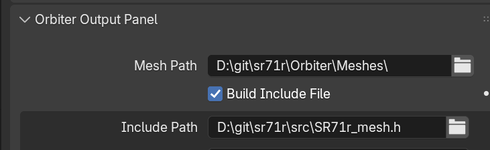
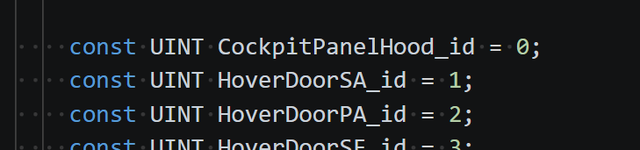
If you check Build Include File, it will write a c++ include file. In that file will be the mesh id's, which is the position of that object in the mesh file.

1779048714653.png

Spacecraft won't read that file, but those should be the group numbers you need.

In the exporter you can format the name. So from above, 'CockpitPanelHood' is the name of the group in Blender. The exporter adds the _id (which you can control).

The include file may at least be a useful reference.
 
I think I need a little more explanation on that one. "transparent last"?
 
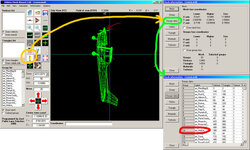
To find the group number I want to animate, I use MeshWizard.

It's a basic and simple program, but I can't do without it...
exemple.jpg

Let's say you want to animate the airplane's propeller:
Press Info => Group Data
and there you have all the group numbers. (propeller is N# 14)

So yes, as Gattispilot said, the transparent "groups" (or elements) like a windshield must always be at the end of the list. (Otherwise, there's a transparency issue.)

And just one last thing: why vinka's Spacecraft ? You should use Fred18's Vesselbuilder instead.
The principle is the same, but it's compatible with Orbiter 2016 and 2024 and, above all, much more powerful...

I know this module very very well (a long time ago I even corresponded with Vinka and I think I'm the only one to have a beta version of Spacecraft 5...) :hailprobe:
but honestly Fred18 has made an exceptional and amazing module !!!

 
Last edited:
Back
Top