Project TrajectoryOptimizerMFD open for testing

Hi all,

I've attached here a public beta of TrajectoryOptimizer, an MFD that searches for
interplanetary transfer trajectories — departure/arrival dates and the ΔV to
fly them — using Orbiter's own ephemerides. It's a planning tool: it finds the
trajectory, you fly it.

This is a major new version. Highlights:

- Faster, and far more consistent — the same plan returns the same quality
result run to run.
- Any body with at least two orbiting children can be the reference body, so
Sun-centred interplanetary transfers AND moon-to-moon transfers around a
planet both work.
- No more BSP files — body positions come straight from Orbiter's own models.
Nothing to generate, nothing to install.
- Custom solar systems supported out of the box — custom stars, fictional
systems, any scale, zero configuration.
  • Export a solved plan straight to TransX or InterplanetaryMFD.
  • Deep-space maneuvers (DSMs) supported, for Cassini-style gravity-assist tours.
  • Press H on any page for context-sensitive help.
  • A work-in-progress manual is included in the download.

Install: unzip into your Orbiter root folder, tick TrajectoryOptimizer in
Launchpad → Modules, then bring up any MFD, press SEL, and choose TrajectoryOptimizer from the list.

Please test and report back here. I'd especially like to hear:

  • Any impact on Orbiter's frame rate?
  • Any unexpected behaviour?
  • Suggestions, comments, or bugs?

Thanks in advance for trying it and for your feedback.

EDIT: zip file reuploaded to fix a dependency issue reported by @Buck Rogers
 

Attachments

Last edited:
This looks seriously impressive!:)

Quick lunchbreak test, O16/24, Win10, default DG

The Doc looks good, sounds like you've tried to cover any possible loopholes/loose ends- very comprehensive.(y)
Installation ok...
BUT I'm not getting past the start!

"Open any MFD, press SHIFT and the MFD's select key, then press T." - This is a little ambiguous?

If I start the MFD I get a CTD, log attached.
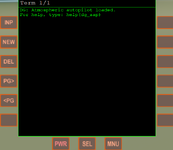
If I open the left MFD, press SEL, and left-shift hold + "T" it opens the DG atmo autopilot?
Holding the left-shift and the MFD's select key just cycles through SEL options?

Edit: Tried the above with 2 other vessels, no luck.

Not sure where the error is?

Module TrajectoryOptimizer.dll [Build 260723, API 160828]
TrajectoryOptimizer: version 2.5.0-beta1 (built Jul 23 2026), MFD mode registered on key T.
============================ ERROR: ===========================
Failed loading module Modules\Plugin\TrajectoryOptimizer.dll (code 1114)
 

Attachments

Last edited:
This looks seriously impressive!:)

Quick lunchbreak test, O16/24, Win10, default DG

The Doc looks good, sounds like you've tried to cover any possible loopholes/loose ends- very comprehensive.(y)
Installation ok...
BUT I'm not getting past the start!

"Open any MFD, press SHIFT and the MFD's select key, then press T." - This is a little ambiguous?

If I start the MFD I get a CTD, log attached.
If I open the left MFD, press SEL, and left-shift hold + "T" it opens the DG atmo autopilot?
Holding the left-shift and the MFD's select key just cycles through SEL options?

Edit: Tried the above with 2 other vessels, no luck.

Not sure where the error is?

Module TrajectoryOptimizer.dll [Build 260723, API 160828]
TrajectoryOptimizer: version 2.5.0-beta1 (built Jul 23 2026), MFD mode registered on key T.
============================ ERROR: ===========================
Failed loading module Modules\Plugin\TrajectoryOptimizer.dll (code 1114)
@Buck Rogers — thank you, genuinely.

That log line was the entire diagnosis, and without your lunch-break test this would have gone straight out to everyone unnoticed.
Exactly what a beta is for. 🙏

What went wrong: the plugin is built with Visual Studio 2022 and was relying on the machine already having the Microsoft Visual C++ 2015–2022 (x86) runtime.
Yours didn't have a matching one, so Windows aborted the load before the MFD could start — that's the "code 1114" (DLL initialization failed) in your log.
Nothing wrong with your install; my packaging left a dependency out. (And with the module half-loaded, the "T" key fell through to the DeltaGlider — hence the atmo autopilot.)

Two ways forward:
• Right now: You can unzip the attached file directly into your Orbiter root folder (where orbiter.exe lives)

• Properly: I'm bundling the runtime into the download so there's nothing to install at all. The zip file in post #22 has been updated.

Also, my start-up instruction was clumsy — sorry. The simple version: once it loads, bring up any MFD, press SEL, and choose TrajectoryOptimizer from the list.

Thanks again — first report in and it's already made the release better.
:hailprobe:
 

Attachments

I'd like to try this MFD, but I don't have much experience in interplanetary flights yet (although I'm familiar with Orbiter since the 2006 version). I only know how to fly from Eeath to Moon and back, and it seems like I once flew to Mars. So I'm not sure I can understand how to use this MFD for various flighs. Is the documentation attached with the MFD enough to understand it? Like checklists/examples (I seen the only one - from Earth to Mars). Could you write in the future more basic examples of using this MFD (after release) for flying: Earth <-> Venus, Earth <-> Mars, Venus <->Saturn, Jupiter <-> Europa, etc?
(And with the module half-loaded, the "T" key fell through to the DeltaGlider — hence the atmo autopilot.)
Sorry for my off-topic, but what is the "DG atmo autopilot"? How to use it? I didn't know DG has the default autopilt that can be controled with key buttons.
By the way, does anyone know any autopilot add-ons (MFD) with pitch hold function (using control surfaces)? So you can set, for example, pitch 30 degrees and a vessel holds it. And it allows setting various angles during the flight. And it can use RCS thrusters for flying in the upper layers of the atmosphere.
 
That log line was the entire diagnosis, and without your lunch-break test this would have gone straight out to everyone unnoticed.
Exactly what a beta is for. 🙏

What went wrong: the plugin is built with Visual Studio 2022 and was relying on the machine already having the Microsoft Visual C++ 2015–2022 (x86) runtime.
Yours didn't have a matching one, so Windows aborted the load before the MFD could start — that's the "code 1114" (DLL initialization failed) in your log.
Nothing wrong with your install; my packaging left a dependency out. (And with the module half-loaded, the "T" key fell through to the DeltaGlider — hence the atmo autopilot.)
Good news! Wasn't sure if I was just "being stupid" (generally No1 on the options list;)).
What had me a bit stumped was that the MFD was registered and listed under SEL, haven't seen a half-loaded module before!o_O
Glad to be of help.:)
Will test/confirm that it's working and Earh-Mars, would love to give it a thorough run through but it might be a while before I have time...
By the way, does anyone know any autopilot add-ons (MFD) with pitch hold function (using control surfaces)? So you can set, for example, pitch 30 degrees and a vessel holds it. And it allows setting various angles during the flight. And it can use RCS thrusters for flying in the upper layers of the atmosphere.
Check Orbiter2024/Config/MFD/Attitude.cfg, a lua autopilot that can be activated, might be useful? Otherwise I don't know of a universal AP that does all that.🤷‍♂️
 
Sorry.:( Still getting the same error message! (did also de-activate before re-installing).
Note: Orb24 ships with these files pre-installed (different sizes).
I don't think they are being blocked?

@misha.physics Can you confirm it runs your end? Might be isolated (my system).
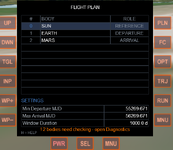
P.S. the older version ran fine.🤷‍♂️
 
Last edited:
Hi @dgatsoulis
many thanks for this!
Had a quick test and the MFD works fine for me even without the additional MSVCP140.dll VCRUNTIME140.dll.
I ran the Earth-Mars initial screen and it gave me a selection of solutions :)
Using default Orbiter2016 and also with D3D9 GC 4.26.
Windows8.1 with Visual Studio2010 Express compiler installed, ancient PC with Intel chip.

:cheers:
 
@misha.physics Can you confirm it runs your end? Might be isolated (my system).
It runs on my laptop with Orbiter 2024 and Windows 10 (but I haven't experimented further yet (other functions)):

1784923424341.png

Also, I didn't copy those two DLL files, since they're already presented in my Orbiter directory.
 
Had a quick test and the MFD works fine for me even without the additional MSVCP140.dll VCRUNTIME140.dll.
It runs on my laptop with Orbiter 2024 and Windows 10
@dgatsoulis Looks like it's my end, maybe another missing dependency? I do have an outdated dotnetfx (couldn't update), maybe the problem?
No need to go down a rabbit-hole just for me.(y)
 
Hi @dgatsoulis
many thanks for this!
Had a quick test and the MFD works fine for me even without the additional MSVCP140.dll VCRUNTIME140.dll.
I ran the Earth-Mars initial screen and it gave me a selection of solutions :)
Using default Orbiter2016 and also with D3D9 GC 4.26.
Windows8.1 with Visual Studio2010 Express compiler installed, ancient PC with Intel chip.

:cheers:
Thanks for testing BrianJ !

It's nice to hear that it runs on your end. The additional runtimes are probably not needed since you already have setup a development environment.
It runs on my laptop with Orbiter 2024 and Windows 10 (but I haven't experimented further yet (other functions)):

View attachment 50754

Also, I didn't copy those two DLL files, since they're already presented in my Orbiter directory.

Thanks misha! Good to hear that it also runs on Orbiter 2024. The additional runtimes are not needed there, because they already exist in the root folder.
@dgatsoulis Looks like it's my end, maybe another missing dependency? I do have an outdated dotnetfx (couldn't update), maybe the problem?
No need to go down a rabbit-hole just for me.(y)

Try one last thing:
install the x86 (32-bit) runtime — https://aka.ms/vs/17/release/vc_redist.x86.exe
(x86 even on 64-bit Windows, since Orbiter is 32-bit.)

If it still doesn't work; Open the Config\TrajectoryOptimizer\TrajectoryOptimizer.cfg file with a text editor, find the line
VERBOSE_LOG = false and change it to VERBOSE_LOG = true
Save and exit. Run any working Orbiter scenario once more with the TrajectoryOptimizer checked in the launchpad\modules tab and try to open it in an MFD.
Exit and send over the log. It would be useful to also have your PC specs.

I'd like to try this MFD, but I don't have much experience in interplanetary flights yet (although I'm familiar with Orbiter since the 2006 version). I only know how to fly from Eeath to Moon and back, and it seems like I once flew to Mars. So I'm not sure I can understand how to use this MFD for various flighs. Is the documentation attached with the MFD enough to understand it? Like checklists/examples (I seen the only one - from Earth to Mars). Could you write in the future more basic examples of using this MFD (after release) for flying: Earth <-> Venus, Earth <-> Mars, Venus <->Saturn, Jupiter <-> Europa, etc?
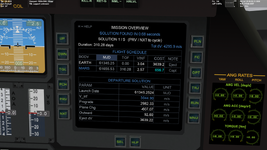
As I've mentioned before in this thread, this is a mission planning tool and not a dedicated "flight" MFD. Its purpose is to answer the following question:
"I want to get to [there] from [here], [optional: via [there] and [there] and...] . When is the best time to leave within the [window duration] and what delta-v will I need?"
Example: I want to get to Mars from Earth. When is the best time to leave within the next 1000 days and what delta-v will I need?
(this is the default plan you get when you run it.)

1784968144509.png

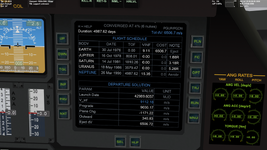
You press the RUN button and the MFD replies:
(You actually get a series of solutions ranked according to their score)

1784968281522.png

You can set up much more interesting plans. For example the Grand tour:

1784968567387.png

The solution tells you when to leave, how much delta-v you will need to eject from the Earth parking orbit and when and how close to fly by the planets.

You also have the option to save the plan and reload it, either as standalone or as a TransX or IMFD plan (recommended IMFD for direct body-to-body, TransX for multi-slings).

If you've only flown to Mars once, I recommend David Courtney's tutorials and "fly with me" videos on YouTube, (you can even watch them in an Orbiter MFD! (Shameless plug)). There is also a very good manual for Interplanetary MFD with several examples. Those will help you to actually fly the missions you setup for yourself.

I will be posting a video showcasing the MFD's capabilities, but pretty much everything is covered in the manual (WIP) and the MFD context help ('H' button shortcut wherever you are in the MFD). I will not show how to actually fly a mission in that video, as it is out of this MFD's scope. The sources I mentioned above are more than adequate to help you in that part.

Thanks again for testing!
 
@dgatsoulis, thanks for the explanations. So, both TransX and IMFD can be used with your MFD for interplanetary flights, isn't it? I'll try such the combination someday.
I recommend David Courtney's tutorials and "fly with me" videos on YouTube
Thanks, I'm already watching his "Orbiter 2010 - Absolute Beginner Guide" in order for some time and I like it. I didn't know about his "Orbiter 2010 - Fly With Me" playlist. I'll watch it after the previous playlist. I take a look at the manual you mentioned as well.
 
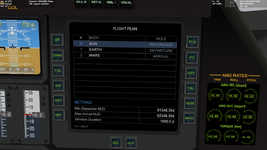
1 button press later- "! 2 bodies need checking-open diagnostics". I have a lot installed.* will check it out later. :)

"32 bodies: 27 modules, 5 cfg, 2 to check"- Uranus and Neptune!?- Orb24

*I have a lot installed (in Orb16- will also check that later).
 
Last edited:
1 button press later- "! 2 bodies need checking-open diagnostics". I have a lot installed.* will check it out later. :)

"32 bodies: 27 modules, 5 cfg, 2 to check"- Uranus and Neptune!?- Orb24

*I have a lot installed (in Orb16- will also check that later).
This is completely normal. Main Menu->Ephemeris Diagnostics->ACC (button top right). The HLP button on that page explains what you are seeing.
(Uranus and Neptune keep a tiny barycenter velocity residual). The setting will be saved and this is the only time you have to do this.
 
This is completely normal. Main Menu->Ephemeris Diagnostics->ACC (button top right). The HLP button on that page explains what you are seeing.
(Uranus and Neptune keep a tiny barycenter velocity residual). The setting will be saved and this is the only time you have to do this.
The inline help is more detailed than the Doc (is WIP- my bad). Yes all well explained- is normal behaviour. Might be worth adding to the startup procedure (Doc) if it will be on every first initilisation.
All looking good so far!:)
 
Very fast! Blink an eye and you'll miss it!:D
Very minimal fps loss when active (~2%), old pc. maybe very minimal loss when calculating but it hardly registers because it's too quick!:cool: Tested Earth-Venus-Jupiter.
Visualisation is really nice:love:
Getting some txt overlap on the porkchop.
0035.jpg

Really nice MFD, from visualisation to calculation. Can (really!) quickly set up a flight and choose what duration and max DV suits best.:giggle:

Q. "still improving at end"?- mission overview?
 
Back
Top