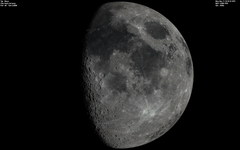
A global Moon surface texture for use in Orbiter (2016) without "fixed" shadows and in color derived from the CGI Moon kit released in 2019.
The standard moon surface texture in Orbiter uses a high resolution global map with a sun at a western azimuth. While it has a very high resolution, it has its weakness as it is monochrome only and the shadows of course do not align with variable sun azimuths and altitudes when travelling to and orbiting the moon in Orbiter simulation. These shadows also represent local afternoon and not local morning which was the case for all Apollo lunar mission landing scenarios. The surface of the moon includes color variation in the greys, while very subtle, it is not monochrome. This new global surface texture depticts the surface/albedo with its subtle colors and with the sun at a highest elevation, at local noon (except for the higher/lower latitudes towards the poles where of course shadows are always present). Combined with the hi-resolution elevation tree file available for the Moon in orbiter this texture provides a much more realistic visual experience during your lunar mission.
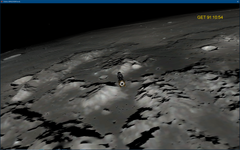
The screenhot shows the Apollo 17 mission in Orbiter, after DOI, before undocking, passing over its landing site, the Taurus-Littrow valley. You can see the 3d terrain shows nicely the effect of the sun during lunar morning (sun in the east, shining from behind in the screenshot) and the corresponding shadowing of the terrain (The D3D9 Client does not render terrain self-shadowing yet, hopefully this is possible in future client versions).
It is recommended to further finetune the texture saturation and brightness in the D3D9 Client graphics tools on the fly, you can achieve stunning realisticly looking surface properties.
The source files of the CGI Moon kit allowed creating a Level 9 surface texture. Place the unzipped files in your Orbiter\Textures\Moon\Surf folder. Backup your old/existing files before!
Enjoy your Moon trips!