3D ORBITER Pic Discussion (Old 3D Pic Store)

nasakid

Space Nut
Joined
Jun 9, 2008
Messages
112
Reaction score
0
Points
0
Location
Where I Live Is Where I Live!
Website
www.freewebs.com
Hi. I Just Got A 3D Pictue Maker! Just Post ScreenShots, Sigs, Avvys, Whatever!!!! and i will make them 3D. You Must Have Red/Cyan Glasses To Veiw Them. But I Tried This Out On Some Test Pics and It Works GOOD!!!!!!!!!!!
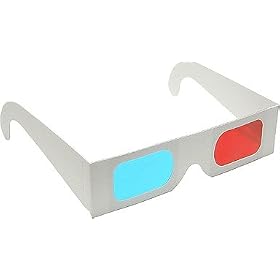


31ulTYfnOYL._SL500_AA280_.jpg


And How To Make Your Own Glasses!

http://paperproject.org/3dglasses.html


Here's A Sample:

test3dqt4.png


-----Double Post Auto-Merged 2/8/2008 at 09 : 33 : 54-----


If Nobody orders one i am closing the store
 
Last edited:
Does it actually give depth perception, or just a pop-out feel? As in, if I had a screenie of two DGs, one in the foreground, and one in the background, would the one in the foreground seem closer?
 
Does it actually give depth perception

No, you would need a stereo pair for that. presumably it just uniformally offsets every part of the image by moving the green channel of the image to the left and the red channel to the right. A more subtle tweaking of images in this way is sometimes used by 3d artists in post production, to immitate chromatic aberation in a lens, but in a fairly crappy way.
 
I don't understand, are you trying to make money by using this forum via selling 3D screen shots to the members or is this being done for free?

I think I along with several others would have an issue with someone using the site to make money as this site is provided to the community for free and is funded by those who donate, but if you're doing this for free then it could be a fun idea!
 
free. like a request and trades thing. i do it all the tim eon other forums


-----Double Post Auto-Merged 3/8/2008 at 11 : 07 : 56-----


No, you would need a stereo pair for that. presumably it just uniformally offsets every part of the image by moving the green channel of the image to the left and the red channel to the right. A more subtle tweaking of images in this way is sometimes used by 3d artists in post production, to immitate chromatic aberation in a lens, but in a fairly crappy way.

i Have Real3D Glasses and i am experimenting with that.
 
By stereo pair i'm not talking about a pair of glasses.

There's no way you can get a true 3d effect by uniformally manipulating a 2D image... it doesnt matter what glasses you use.

For a true 3D effect which gives you some depth of field you need a stereo pair of images, so in real life you would mount 2 cameras apart from each other and take a photo of the same scene from 2 different angles. you can use this to create an image with some proper 3d depth rather than the fake way that you process a 2d image. you could actually do this with orbiter by taking a screen shot, or even a video from 2 different cameras and manipulating them in the same way.:)
 
For a true 3D effect which gives you some depth of field you need a stereo pair of images, so in real life you would mount 2 cameras apart from each other and take a photo of the same scene from 2 different angles. you can use this to create an image with some proper 3d depth rather than the fake way that you process a 2d image. you could actually do this with orbiter by taking a screen shot, or even a video from 2 different cameras and manipulating them in the same way.:)
And for a still image you don't even need special software. GIMP (or Photoshop or similar) can do the trick:
http://graphicssoft.about.com/od/gimp/ht/3danaglyph.htm
 
yep, thats what i mentioned in my first post, it's just a uniform offset of the red and green channels, i do it sometimes in photoshop for a quick and nasty chromatic aberration effect but we're only talking about a pixel or so offset.
 
By stereo pair i'm not talking about a pair of glasses.

There's no way you can get a true 3d effect by uniformally manipulating a 2D image... it doesnt matter what glasses you use.

For a true 3D effect which gives you some depth of field you need a stereo pair of images, so in real life you would mount 2 cameras apart from each other and take a photo of the same scene from 2 different angles. you can use this to create an image with some proper 3d depth rather than the fake way that you process a 2d image. you could actually do this with orbiter by taking a screen shot, or even a video from 2 different cameras and manipulating them in the same way.:)


I am trying that out soon. Just ned a better camera. Untill then. Oh well.
 
a better camera is always, err, better.

you can get your source images with any old camera though, just take a pic, move it a bit to the left or right and take another pic. just as long as nothing has moved in the scene - otherwise you'd need 2 cameras triggered at the same time. How you process those images though and make your 3d image out of them i've no idea, at least in terms of keeping it full colour, which would need some special glasses too... might look into that sometime. otherwise i guess you'd make your left image green and your right image red and overlay them?
 
I am trying that out soon. Just ned a better camera. Untill then. Oh well.

A better camera? You need to shift the viewpoint within Orbiter between taking screen shots (PrtScrn). If you use a program such as MGrab (Google it), you can take both shots without having to leave Orbiter.

Hmmm... does anybody know of, or care to create, a good vessel to use as a camera base that'll permit moving the viewpoint six or a hundred centimeters to the left and right... or maybe a plug-in module...

Actually... I think if a person pauses the simulation, takes the first shot from the external view, taps the right arrow key while holding down the Ctrl key (in other words, moves the camera around the vessel a teeny bit), then takes the second shot, that should produce a usable image pair, in which the vessel is at the depth of the screen surface.

Come to think of it, though... you'd have to have the camera lined up in the plane of the vessel's X and Z axes (in other words "level" with the vessel)...

That's not really very handy... Back to the question about a camera vessel or plug-in...


-----Double Post Auto-Merged 3/8/2008 at 09 : 27 : 41-----


a better camera is always, err, better.

you can get your source images with any old camera though, just take a pic, move it a bit to the left or right and take another pic.

Hmm... Oh, yeah... for real world pics... :whistle:
 
Last edited:
Ah, heck, I just had to try a quick test of a real-world pic with my camera phone before it got dark out:

Edit: Oops... looks like attachments interfere with auto-merge...
 

Attachments

  • 3dtest.jpg
    3dtest.jpg
    53.8 KB · Views: 37
Here's a one true anaglyph orbiter screenshot I created (see below). You only need one of those red-cyan glasses to see it in 3d.
The procedure to make them is quite simple. Take two images centered on the same spot, only seperated by a small amount in the horizontal direction. Replace the red color channel of the "right eye" view by the one of the "left eye" view image. Voila! :)

 
Last edited:
Here's a one true anaglyph orbiter screenshot I created (see below). You only need one of those red-cyan glasses to see it in 3d.
The procedure to make them is quite simple. Take two images centered on the same spot, only seperated by a small amount in the horizontal direction. Replace the red color channel of the "right eye" view by the one of the "left eye" view image. Voila! :)


Great shot! The thumbnail wasn't working though so I fixed it for you. ;)

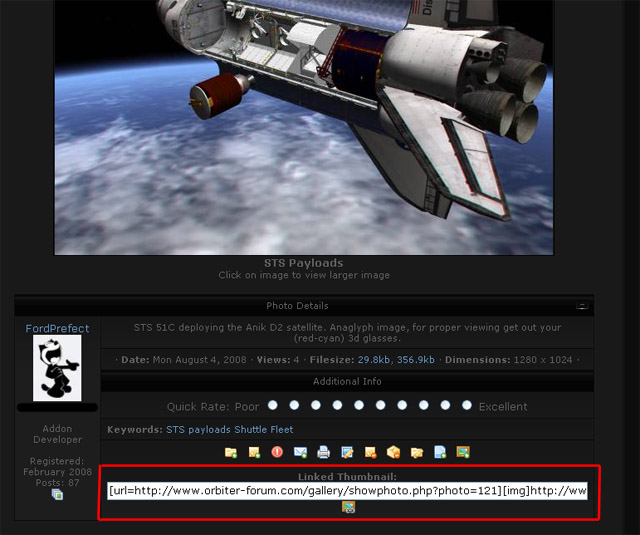
When viewing the image in the gallery you want to post in a thread, simply left click on the link circled in the screen shot below highlighting it, then right click with the mouse and choose copy. Come to the thread and paste it and you get a clickable thumbnail. If you would like to post the full size image click on the little button under the link in the gallery for more link options. :speakcool:

gallery_imglink.jpg
 
The easiest way I've found for making true stereo images from orbiter or other 3d programs is to use nVidia stereo drivers.
http://www.nvidia.com/object/3d_stereo.html#drivers
Naturally this requires you to use an nVidia graphics card. The effect is spectacular and you can even use anagylph glasses in realtime. Just press alt-F1 to take a stereo screenshot. Personally I use LCD shutter glasses for stereoviewing as red/blue gives me a headache. I can post some example anaglyph images later though.
 
A better camera? You need to shift the viewpoint within Orbiter between taking screen shots (PrtScrn). If you use a program such as MGrab (Google it), you can take both shots without having to leave Orbiter.

Hmmm... does anybody know of, or care to create, a good vessel to use as a camera base that'll permit moving the viewpoint six or a hundred centimeters to the left and right... or maybe a plug-in module...

Actually... I think if a person pauses the simulation, takes the first shot from the external view, taps the right arrow key while holding down the Ctrl key (in other words, moves the camera around the vessel a teeny bit), then takes the second shot, that should produce a usable image pair, in which the vessel is at the depth of the screen surface.

Come to think of it, though... you'd have to have the camera lined up in the plane of the vessel's X and Z axes (in other words "level" with the vessel)...

That's not really very handy... Back to the question about a camera vessel or plug-in...


-----Double Post Auto-Merged 3/8/2008 at 09 : 27 : 41-----


Hmm... Oh, yeah... for real world pics... :whistle:

The easiest way I've found for making true stereo images from orbiter or other 3d programs is to use nVidia stereo drivers.
http://www.nvidia.com/object/3d_stereo.html#drivers
Naturally this requires you to use an nVidia graphics card. The effect is spectacular and you can even use anagylph glasses in realtime. Just press alt-F1 to take a stereo screenshot. Personally I use LCD shutter glasses for stereoviewing as red/blue gives me a headache. I can post some example anaglyph images later though.


I cant find MGrab on Google. and i dont have a NVida Graphics Card

Plus I changed the name of this thread to 3D Orbiter Pic Discussion

I would Like a Link For M Grab.


-----Post Added 4/8/2008 at 05 : 48 : 59-----


Ok I tried angle adjustments and that didnt work. any thoughts?
 
I cant find MGrab on Google. and i dont have a NVida

Oops... sorry... I was tired... the full name is MultiGrab, from MW Graphics. You can find it at: http://www.mnwright.btinternet.co.uk/

(Oh... dang frames... there's sites that still use those things?! You could use the above address, find the program from there, and check out their other utilities, most of which is for MSFS & CFS, or you could go to http://www.mnwright.btinternet.co.uk/programs/mgrab.htm for the page specifically for MultiGrab.)

It's handy for screen shots you want to take for whatever reason.

Thanks to Messierhunter, for giving those of us who do have nVidia cards the heads up on that program. Apparently the one the page he linked to is just for Wingdows Vicious, but I downloaded the last legacy driver listed (and downgraded my display driver to match), and finally got it to work. (Note: The stereo controls seem to be on the "classic" control panel.)
 
So, if you want to see actual 3d images while you play in orbiter, in realtime, or whatever other game, exactly what do you need?
 
I tried the two-pics from a similar angle method, and it worked pretty well.


I might go ahead and try it without lining up with the x-z plane... The more I think of it, the more I think it'd probably just give an exaggerated 3d effect to the vessel itself. Might be cool.
 
Back
Top