OHM Attack Vector Tactical: Daixing

OrbitHangar

Addon Comments
Joined
Apr 9, 2008
Messages
3,832
Reaction score
18
Points
0

Author: stevopistolero

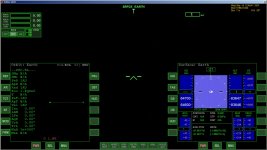
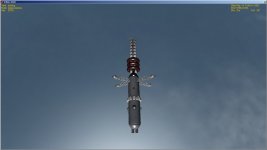
Attack Vector: Tactical is a boardgame by Ken Burnside.  It is hyper-realistic in its description of various fictional spacecraft.  Here is the LP-13 with its patrol tender, the Daixing. In theory up to four LP-13s can dock with the patrol tender at a time.

edit:

2-20-2015 Corrected center of mass and "size" parameter

2-14-2015 ISP adjusted from "tactical" settings to "transit" settings.  Much better, but still realistic fuel efficeincies.

docking working without crash to desktop

mesh right-side-up

main thruster now functional on Daixing


DOWNLOAD
 
You need to fix the rotation vectors of the 4 docking ports of daixing.ini. You have them set to (0,0,0); anything that tries to dock to the daixing ship will cause a CTD.
The rotation vectors need to be perpendicular to the direction vectors.
For example:

Code:
[DOCK_0]
POS=(60,25,-40) // position: 60 meters to the "right", 25 meters "up", 40 meters "back". 
DIR=(0,0,-1) //direction: front to back
ROT=(0,1,0) // up or
ROT=(0,-1,0) //down or
ROT=(1,0,0) left to right or
ROT=(-1,0,0) right to left
Any of these ROT vectors will work, which one you choose depends on the orientation you want to give to the docked vessel.
As a rule of thumb, since you are using direction vectors that are aligned with the x,y,z axis, you can look at the DIR vector axis and then give a value of 1 or -1 to one of the other axis for the ROT vector.
 
Thrusters

Anyone have any advice on the thrusters? Is there a way to make the ship more nimble, so I can reduce the thrust on the thrusters, saving fuel? Right now the thrusters rip through the ship's fuel reserves.

---------- Post added at 05:11 PM ---------- Previous post was at 05:05 PM ----------

You need to fix the rotation vectors of the 4 docking ports of daixing.ini. You have them set to (0,0,0); anything that tries to dock to the daixing ship will cause a CTD.
The rotation vectors need to be perpendicular to the direction vectors.
For example:

Thank you so much! Bug fixed.
 
Is there a way to make the ship more nimble, so I can reduce the thrust on the thrusters, saving fuel? Right now the thrusters rip through the ship's fuel reserves.

two possibilities come to mind:
a) reduce the mass of the vessel
b) increase the Isp of the thrusters
 
two possibilities come to mind:
a) reduce the mass of the vessel
b) increase the Isp of the thrusters

In Attack Vector: Tactical, higher thrust reduces ISp in the fusion engines. I was going by the "tactical" thrust mode, but the result is short range. I couldn't even get to Jupiter! So instead I used Ken's "transit" dV instead of the "tactical" total dV. This seems more realistic for Orbiter, and more pleasant to fly.

I also made several other edits to the ships today. If you downloaded a previous version, please update for a much better experience.
 
Thanks for making this ship in Orbiter! Though I never played the ATV board game, I read a lot of interesting stuff about it. The mesh looks very detailed!

Suggestions on the agility of the vessel:
Reduce the PMI. Shipedit assumes an even distribution of mass. This does not very well suit to ships with a lot of lightweight girders.

The vessel rotates around a forward point and behaves somewhat erratically with the AutoNav modes (prograde, etc.). Shift the center-of-gravity to the ships center.
Also the size parameter refers to the mean vessel radius (not length or diameter).
 
Suggestions on the agility of the vessel:
Reduce the PMI. Shipedit assumes an even distribution of mass. This does not very well suit to ships with a lot of lightweight girders.

The vessel rotates around a forward point and behaves somewhat erratically with the AutoNav modes (prograde, etc.). Shift the center-of-gravity to the ships center.
Also the size parameter refers to the mean vessel radius (not length or diameter).

I did not change the PMI, but I did change the center of gravity and the mean vessel radius (ship size). Thanks for the feedback!
 
Hi Stevo,

nice to have the tender for the LP13 now as well.

I've discovered a couple of problems with the Daixing and LP13:

1. When loading the Daixing in a scenario, the ship is not visible and the orbital elements are screwed (see attached screenshot).
I've checked the config and isolated the problem to be this section:
Code:
[AERODYNAMICS]
MODEL="capsule"
When the AERODYNAMICS section is removed from the config, the ship's model is displayed and stays in its orbit assigned in the scenario file.

2. After applying the above fix, the engine of the Daixing's model is not displayed (see attached screenshot)

3. Viewing the Daixing in external view drops the frame rate significantly - is this due to the texture used? I noticed that the Meshes and Textures folder for the addons seem quite large (67 MB and 57 MB).

4. Same as 1. above but for the LP13, caused by the same AERODYNAMICS section in the config file. (the issue had already been reported in the LP13 thread, but I did not know what was causing it back then)

Since no one else reported similar issues my local setup might be the problem - it also happens with no other addons but the Daixing and LP13 loaded though.
 

Attachments

  • daixing_orbit_screwed.jpg
    daixing_orbit_screwed.jpg
    172.6 KB · Views: 7
  • Daixing_missing_engine.jpg
    Daixing_missing_engine.jpg
    88.5 KB · Views: 11
Hi Stevo,

nice to have the tender for the LP13 now as well.

I've discovered a couple of problems with the Daixing and LP13:

1. When loading the Daixing in a scenario, the ship is not visible and the orbital elements are screwed (see attached screenshot).
I've checked the config and isolated the problem to be this section:
Code:
[AERODYNAMICS]
MODEL="capsule"
When the AERODYNAMICS section is removed from the config, the ship's model is displayed and stays in its orbit assigned in the scenario file.

2. After applying the above fix, the engine of the Daixing's model is not displayed (see attached screenshot)

3. Viewing the Daixing in external view drops the frame rate significantly - is this due to the texture used? I noticed that the Meshes and Textures folder for the addons seem quite large (67 MB and 57 MB).

4. Same as 1. above but for the LP13, caused by the same AERODYNAMICS section in the config file. (the issue had already been reported in the LP13 thread, but I did not know what was causing it back then)

Since no one else reported similar issues my local setup might be the problem - it also happens with no other addons but the Daixing and LP13 loaded though.

Did you download the latest version of the Daixing? It has newer versions of the LP13 and Daixing, and you shouldn't have a problem with the strange orbital behavior. However, the texture sizes are very large and might run slow on an older machine. Sorry!
 
I did download the addon yesterday and removed all of the previous versions of Daixing and LP13 completely before unpacking.

It's strange that no one else has problems with the config file.

Could the missing engine of the Daixing be caused by not using a 3d client?
 
Back
Top