

Hmuda
Member
An idea that poped into my mind just now, that I was boosting the XR2 into orbit: is it possible to add a thin, black outline around the HUD elements? Changing colours is fine to an extent, but always having to change the default green to a more visible one in the light-blue environment gets old fast.
Here's what I mean:

This should make it clear what I mean. The antialiased HUD looks brilliant and I love it, but it makes reading it a bit harder than it used to during atmospheric flight.
So, is it possible?
Here's what I mean:
This should make it clear what I mean. The antialiased HUD looks brilliant and I love it, but it makes reading it a bit harder than it used to during atmospheric flight.
So, is it possible?
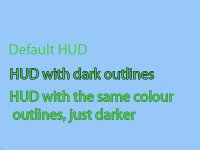


 .) The third example in the image looks great: not too imposing but easily visible.


