
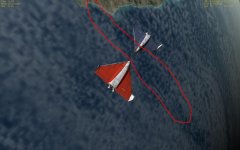
Problem Big seam across earth even with hi-res earth textures? (image attached)

Timez

New member
Joined
May 1, 2009
Messages
11
Reaction score
0
Points
0
Hi, I hope someone can help me with this - Whenever you can see the earth from space (on any mission (default or add ons)) there is a big line (or seam) across the earth - almost like the earth was joined together and its the line where it was joined.

I have this on every earth texture - even the add on ones

Is there any way I can get rid of this? because it kills the sense of realism

Thank you

Timez

p.s. I have attached an image of what I mean...
 

Attachments

  • pic2.JPG
    pic2.JPG
    107.3 KB · Views: 169
According to your comments on IRC you have an ati radeon 9550, this card is quite old and I think you'll do better with a much more up to date one.
Also, you should try Seth Edens L10 textures.
 
it is very noticble to me - i would go as far as to say the whole simulator is perfect except for that one part.

I understand it is a very old card - but I cannot afford a newer one at the moment - also I have the same seam on other pc's with up to date cards.

Is there no way I can do anything about it then? :( I would even have a go at fixing it myself if i knew how to - i mean if i could get the texture as a image i could edit on the fly i might be able to merge the 2 sides next to it together so it wasnt such a sharp cut

Timez

p.s. - I have tried steph edens L10 landsat textures but same problem
 
What do you have "Max Resolution Level" under the "Visual Effects" tab set to?
 
It's not really that noticble.

Obviously it's noticeable for him, why the heck would he create a thread otherwise?

According to your comments on IRC you have an ati radeon 9550, this card is quite old and I think you'll do better with a much more up to date one.

WTF does his card have to do with this problem?

What do you have "Max Resolution Level" under the "Visual Effects" tab set to?

By default it's set to level 10. By looking at the texture in the picture, it looks like level 9+ textures, probably level 10.

Timez - The best thing you can do is I think to fix the seam yourself. I don't know how to convert level ten textures to a bitmap, however you can use this tool to convert 1-9 to bitmaps: http://orbithangar.com/searchid.php?ID=4114
 
WTF does his card have to do with this problem?

Interesting way of phrasing a question, however I won't take offence at the profanity this time and in answer to your question, the newer cards have better abilities have parameters tweaked thus rendering the problem less noticable. Additionally, newer cards can better display Seth Edens L10 textures whereas the older cards will struggle somewhat.

But then that is obvious to anyone who knows a little about hardware.
 
the newer cards have better abilities have parameters tweaked thus rendering the problem less noticable.

No. You will have the same problem no matter what card you are using. This is a problem with the textures themselves, it has nothing whatsoever to do with the card. Saying that a newer card will make the problem 'less noticeable' is synonymous to saying that the white line in the image below will disappear:

wtl.png


The problem is that the edges of the cylindrical map aren't blended with each other, and when they fold across the sphere it causes that very noticeable seam.

Additionally, newer cards can better display Seth Edens L10 textures whereas the older cards will struggle somewhat.

Again, the problem here is about the seam that appears in the textures. What the heck does that have to do with Seth's textures? We don't even know for sure weather Timez is even using level ten textures. Unless Seth blended the edges of the map, those textures will have the same problem.
 
Again, the problem here is about the seam that appears in the textures. What the heck does that have to do with Seth's textures? We don't even know for sure weather Timez is even using level ten textures. Unless Seth blended the edges of the map, those textures will have the same problem.

Read his post then. It states quite clearly that he has tried them.

And I know about the wrap around issue. My point of the newer cards allowing more tweaks to make it less noticable stands.
 
I always assumed this was a cloud texture problem. Try disabling cloud layers in visual effects - no seams. I think the cloud microtextures on OH improve the appearance, but don't completely sort it.
 
Read his post then. It states quite clearly that he has tried them.

It doesn't say anything about him using level ten textures in his first post, the only one I bothered to read. I missed it in the second because it was a post script ;).

And I know about the wrap around issue. My point of the newer cards allowing more tweaks to make it less noticable stands.

I wonder if you can show us an example of that.
(ps. It's spelled 'noticeable', not 'noticable')
 
:)

omg omg omg - taking cloud layers off has removed the seam!!!

but now i have to clouds at all...

if it is a choice between having no clouds or no seam i will choose no seam.

but...

is there a way to have clouds without the cloud layer checkbox ticked?

Timez
 
I wonder if the clouds in Orbiter are just another cylindrical map and nothing more fancy, because then the problem could be fixed by simply rebuilding the cloud texture with the corrections ! :D Clouds aren't typically higher then level 9, so the tool mentioned above should be able to extract them.
 
well i will certainlly look into that (and in my last post to clouds should have said no clouds) if i manage to do it I will release a patch or whatever they are called

Timez
 
I wonder if the clouds in Orbiter are just another cylindrical map and nothing more fancy, because then the problem could be fixed by simply rebuilding the cloud texture with the corrections ! :D Clouds aren't typically higher then level 9, so the tool mentioned above should be able to extract them.
I made a new cloud texture using pltex, [ame="http://www.orbithangar.com/searchid.php?ID=3271"]as described here[/ame], but the seams still appeared. I'm guessing it is something to do with the way pltex works because the seams were definitely not in the source image.
 
I made a new cloud texture using pltex, as described here
as described here
, but the seams still appeared. I'm guessing it is something to do with the way pltex works because the seams were definitely not in the source image.
Yes, I tried that too with the same result. Not sure if it's to do with the way the cloud texture is mapped (and because of its rotation) or pltex/max resolution. I tried (as described in the tutorial) resampling to 8192 x 4096 but seams are still visible.
 
Back
Top