Problem Blank MFD Displays

EliNaut

New member
Joined
Aug 27, 2008
Messages
115
Reaction score
0
Points
0
Location
Boston area
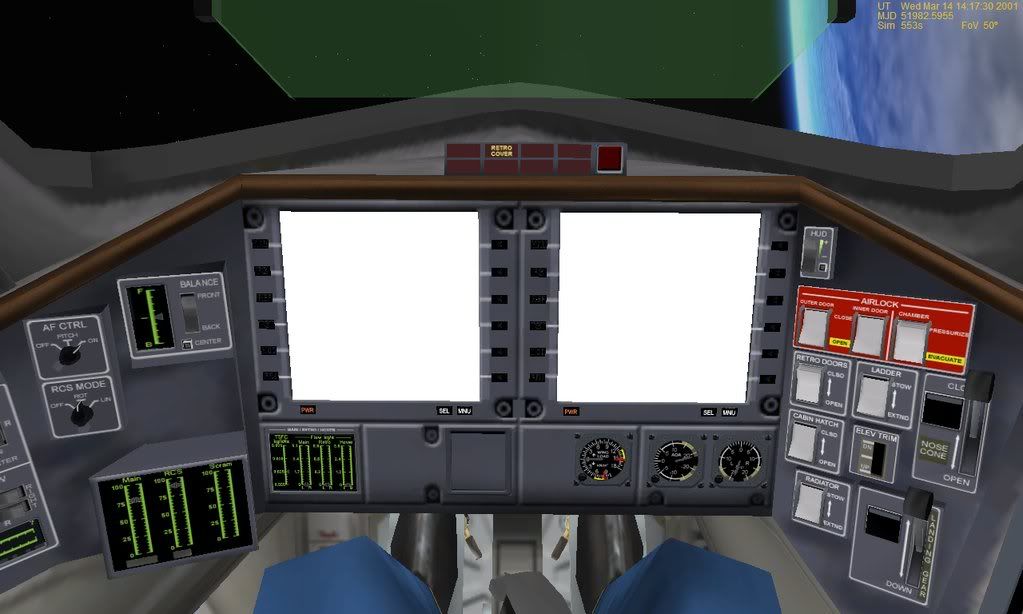
For quite awhile now, I've suffered the loss of my mfd displays whenever I enter any sort of VC. Normally, I'm not concerned about this since not alot of my usual craft have functional VCs. But oh, how I do love my XR2 :rofl:
I am aware that the next big update will contain a functional VC and I would love to be able to use everything. But I won't be able to since my MFDs don't do squat. 2d and the generic cockpits work fine, no problems there. Also, the green display does not work.

Any ideas? :(

Snapshot:
MFDBug.jpg
 
Does this happen with all ships? Some ships have "inactive" VC's, and the MFD's don't always work in those. Try it with the stock DG.

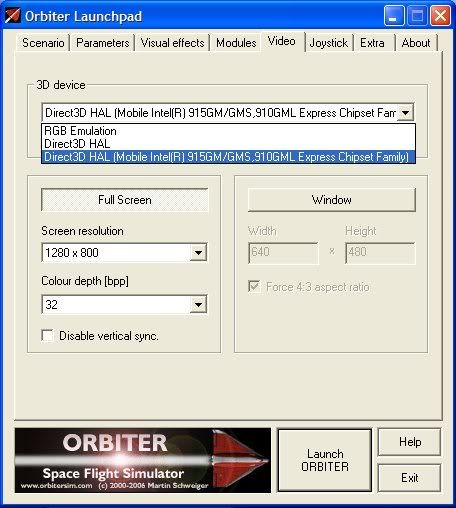
If the problem persists, I'd guess something to do with your graphics adapter. Ensure you have the latest drivers, and are using the "Hardware T&L" option and have "always enumerate devices" enabled in the launchpad.
 
Go into the Video tab of the Launchpad and if the color depth there is set to 16, change it to 32. If it's 32, change it to 16. One of those 2 settings should make things work right. (don't ask me why ;))
 
Yes this does happen with all ships - and that picture is the stock DG.

The thing is I know switching it to 16 will work. Its just my simulators quality goes down a few notches. I.e., when on the dark side of a planet, faint lines appear across it that make it feel like a tv with bad reception.

So thats something I'd rather not do.

Also, "Harware T&L" is not an option on the list.
 
Checking "Always enumerate devices" should give you that option
 
Unfortunately the problem is very likely the Intel onboard graphics in the laptop; we have seen many problems with onboard video chipsets not handling 3D applications correctly. According to the screenshot your card does not implement T&L ("Texture & Lighting"), so that is likely the problem. You could try updating your graphics drivers to the latest version, but unfortunately it is likely that Orbiter just cannot work with your onboard video because it cannot handle 3D applications correctly. Onboard video chipsets are really targeted at running normal 2D desktop applications, not 3D games.
 
Yet they should have drivers that fake T&L capabilities. While the result may not be fast or pretty, I always managed to get orbiter working on any laptop.
 
Unfortunately the problem is very likely the Intel onboard graphics in the laptop; we have seen many problems with onboard video chipsets not handling 3D applications correctly. According to the screenshot your card does not implement T&L ("Texture & Lighting"), so that is likely the problem. You could try updating your graphics drivers to the latest version, but unfortunately it is likely that Orbiter just cannot work with your onboard video because it cannot handle 3D applications correctly. Onboard video chipsets are really targeted at running normal 2D desktop applications, not 3D games.

Hm. Thats kinda funny. Orbiter runs at a pretty high quality and decent framerate when I play. I had run the update wizard but it couldn't find any updates for the drivers.
 
Yay to Intel. Latest driver is version 14.25.50.4764 from 1/17/2007....
 
Back
Top