OHM CameraMFD 0.12 Beta

OrbitHangar

Addon Comments
Joined
Apr 9, 2008
Messages
3,832
Reaction score
18
Points
0

Author: vanguard

CameraMFD is an Orbiter 2006 add-on module that adds an external camera view in an MFD display.

Current features include:
Target tracking
Manual axis control
Manual position control
Night Vision
Variable field of view (aperture/zoom)
Camera can bind to attachment points

This is a beta release. Please read the readme file.

DOWNLOAD
 
Legacy Reviews

Legacy Add-on Reviews from Orbit Hangar Mods


Review by majortom
Pros: Can do anything I'd need it to!
Cons: Can't think of any
Review:
Allows you to keep an eye on a target, even in the dark, while working the other MFD(s) and spacecraft controls. Less time spent in "external view" which although fun, is unrealistic.


Review by bullethead
Pros: See into your blindspots w/out glass cockpit or F1
Cons: none
Review:
This is an excellent aid to immersion. You stay in the pilot's seat but can see in all directions. Very handy not only for maneuvering but also seeing sights. FPS in MFD is a bit slower than in main view of same scene, but not enough to be a problem.


Review by tofitouf
Pros: All
Review:
This MFD is awesome. But i really wonder how it work. There is nothing in the current API that allow to render in external buffer... awesome you are a magician

 
Any way to adjust the framerate ? Also external Views. What im trying to do is use CameraMFD with WebMFD for a mission control'ish set up.If I could Just zoom in and out From say the space shuttle sitting on the pad in a external view that would be great. Any chance that could happen Vanguard?
 
it's real cool:thumbup:
i thinks that low famerate is good. for me that seems to meen more fun. it wouldn't make fun if everything would work prefectly.
 
it's real cool:thumbup:
i thinks that low famerate is good. for me that seems to meen more fun. it wouldn't make fun if everything would work prefectly.

lol yeah it kinda gives it a satillite phone type of video feel, but would be nice if we could also do a realtime external view with zoom in zoom out capabilities.Basically take the camera menu in orbiter and put it in a MFD.If thats possible. I would like to be able to use it as a type of external monitor from a distance in combination with webMFD.My screenshot is here http://www.orbiter-forum.com/showthread.php?t=19062&page=2 (post #20) :thumbup: notice in the screenshot that is from the Iss perspective not the shuttles perspective.I would like to be able to zoom in and out externaly say from the shuttle launchpad. The idea is to use webMFD for telementry and cameraMFD inside of webMfd for the view, for a mission control type of scenerio. Can you imagine the videos that TEX could make with that?
 
Last edited:
Any way to adjust the framerate ? Also external Views. What im trying to do is use CameraMFD with WebMFD for a mission control'ish set up.If I could Just zoom in and out From say the space shuttle sitting on the pad in a external view that would be great. Any chance that could happen Vanguard?


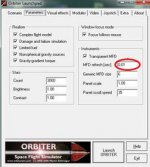
change the MFD-refresh-rate this way:

framerate fix example.jpg

sorry this is from 2006p1 wich is my good old "main"-Orbiter. I only use a version of 2010p1 with the asic Add-Ons sometimes.
 
I have run into this issue. The cockpit mesh is seen in the external view. One with the CameraMFD active the other not.
eaglemeshissue.jpg

eaglemeshissue1.jpg


And this: with the CAmeraMFD active when I switch focus the chute is show on the ummu

ummumeshcamera.jpg

ummumeshcamera1.jpg


both using 2010p1
 
Last edited:
Looks pretty useful especially if it were compatible with External MFD. Rear view mirror anyone?

I was just thinking the same thing. It could also be useful when docking to keep track of relative motion.
 
Engine Information Display

With CameraMFD, when the Shuttle Atlantis drops the main tank (switching to onboard fuel and RCS engines), the engine information display (EID) appears in CameraMFD taking up 1/4th of the screen. The EID isn't affected by zoom or direction changes. I haven't been able to remove it.

Ideas? Thanks.
 
Sorry for necro, but does this MFD work with D3D9 client? Because for me it doesn't even show up on the list after pressing SELECT though I've activated it in modules tab. Am I doing something wrong or it doesn't work with graphics client?
 
Back
Top