Request colour-textures

HAL9001

super-ninja-orbinaut
Joined
Jun 4, 2010
Messages
1,107
Reaction score
11
Points
38
Location
Stuttgart, Germany
Hi folks,

I woud like to see just one-colour-textures of different colours (black, grey, white, red, violet, blue, green, yellow, orange) as a tool for people who can't create textures. It would be not as good as an own Texture, but better than a completly untextured model.

greetings, HAL9001
 
Just convert the textures of an add-on into PSD format (or whatever) and paint on it with the color everywhere, then convert it back.
 
Make a square bitmap, let's say 32x32 pixels, in a paint or any other graphics editor. Fill it with a solid color. Save as BMP, and then convert to DDS, or save it directly to DDS, and you have a single color texture, which can be used for anything, if it's what you wanted.
 
thanks, I can now even make detailed textures!

---------- Post added at 08:44 ---------- Previous post was at 08:36 ----------

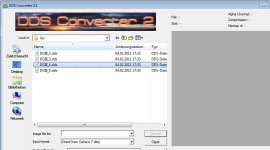
for some reason I cannot select a file to convert.
do you know what to do?
 
I can click on files, i can double-click on files - they are showngrey marked in the window, but they are not selected as the file that'll be converted.
doesn't work.jpg
 
Have you selected an output format? I can't see in the screenshot. It won't work without it.

Also, change the input format to 'All supported file types' or whatever it's called. This will help you, seriously.
 
Why don't you use DxTex from the Utils folder of Orbiter?
 
I use it sometimes ( but most often DxtBmp ) but usually from Bmp to dds. I made a try just now ( WIN XP ) dds >>> BMP and it works, that with many choices for the output ( Targa, psd...). Looking at your screencap, it seems that it should work. Windows seven ?

As said before: DxTex or DxtBmp
http://www.btinternet.com/~mnwright/
 
DtxBmp works with Windows 7
 
how can I make transparent textures with this?
With what? Every of the mentioned converters supports transparency.

You can use either binary transparency (on/off) with DXT1 compression, or semitransparent textures with DXT3 or DXT5 compressions.
 
What exactly is the purpose of these textures?
If you want a single solid colour, you don't need any textures at all.

3DModel.pdf:
MATERIAL <mtrl-name> material header
<dr> <dg> <db> <da> Diffuse colour (RGBA)
<ar> <ag> <ab> <aa> Ambient colour (RGBA)
<sr> <sg> <sb> <sa> <pow> Specular colour (RGBA) and specular power (float)
<er> <eg> <eb> <ea> Emissive colour (RGBA)

You can edit that in Notepad.

Example of a material:
Code:
MATERIAL Mtl #0
0.141176 0.141176 0.141176 1.0
0.141176 0.141176 0.141176 1.0
0.9 0.9 0.9 1.0 0.0
0.0 0.0 0.0 1.0

This is how you set the colour in Gmax.
 
Last edited:
Back
Top