Problem "Config folder not present in modules/server"

BobB

New member
Joined
Mar 4, 2017
Messages
11
Reaction score
0
Points
0
I recently installed Orbiter 2016, and for the most part I am not having problems. That said, each and every time I run a scenario, the program displays the following message on the splash screen prior to running:

"Config folder not present in modules/server. Please create symbolic link." (I think I copied it verbatim; if not, it's close.)

What's the problem, and is there a solution?

Thanks for the help,

Bob
 
That's a standard message generated by D3D9Client that you haven't linked the Config folders so that SC3 works properly. You can ignore it.
 
I recently installed Orbiter 2016, and for the most part I am not having problems. That said, each and every time I run a scenario, the program displays the following message on the splash screen prior to running:

"Config folder not present in modules/server. Please create symbolic link." (I think I copied it verbatim; if not, it's close.)

What's the problem, and is there a solution?

Thanks for the help,

Bob

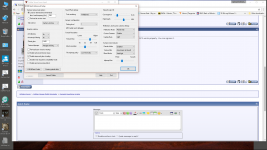
Start Orbiter 2016 to bring up the Launcpad then click on Video, Click advanced and then Create Symbolic Links, click OK, and you're done.
 

Attachments

  • 2017-03-14.png
    2017-03-14.png
    423.7 KB · Views: 26
Last edited:
Back
Top