Creation of meshes for surface bases

ar81

Active member
Joined
Jun 19, 2008
Messages
2,357
Reaction score
8
Points
38
Location
Costa Rica
Website
www.orbithangar.com
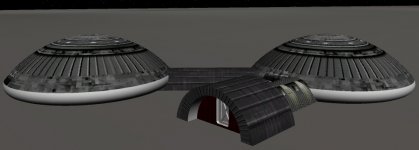
I am trying to break my creative blocking and I am starting with very small projects.
I came to the idea of creating meshes for surface bases.
This is work in progress. I modeled it with Trispectives and textured using Mesh Wizard...
 

Attachments

  • Moon01.jpg
    Moon01.jpg
    104.9 KB · Views: 68
That's a cool start.
 
Is there some sort of internal scaling involved with surface base meshes not found with vessel meshes? When I make a mesh for a vessel, the units line up between Orbiter and MAX. When I make a surface base, a 0.0254 scale must be applied. Is there a config switch I'm missing somewhere?
 
If you open your mesh with [ame="http://www.orbithangar.com/searchid.php?ID=2740"]Mesh Wizard 1.9d[/ame] you may see exactly the size that Orbiter sees it. Also you can scale it with this tool.
 
That was my guess also but it seems mighty odd - surface meshes are in imperial units but vessel meshes are metric?
Nope. Nothing in Orbiter uses imperial units. Everything is in the SI system.
 
I think what it is is that Max uses imperial units and instead of converting, just slaps an m onto 1 unit so maybe when you export using inches, it changes 1in to 1m.
 
Yes I'm doing something stupid (not Orbiter). I just duplicated a simple mesh as both vessel and base and they come out the same inside a scenario. Oh well, part of solving a problem is knowing what isn't causing it!
 
Converting *.skp or *.kmz Files to *.msh

Hi all,
Question: is there a way to convert *.skp Files (Google SketchUp) or *.kmz Files (GoogleEarth) into *.msh ?
I am asking because I want to bring this:
Tempelhof Hangar
into Orbiter.
 
No, convert them to .3ds files then you can convert them to .msh file with 3Ds2msh.
 
Back
Top