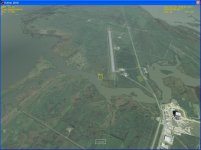
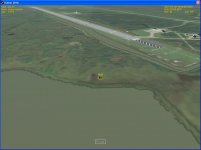
Define "off the runway." To me, that says altitude.
IIRC, this is a common bug, due to the coordinates not quite lining up properly. You'll have to tweak the scenario file in a word processor program to adjust your placement.
the culprit I BELIEVE is that these scenarios were made for Orbiter 2006, and in Orbiter 2010, a more accurate KSC is implemented, causing the action you see.
I'm guessing I need to tweak the POS parameter (and maybe the HEADING), but I'm not sure how to weak that parameter. Is it pretty much "guess and check", or is there a way to calculate exactly what changes would need to be made?
How are the coordinates determined? I saw another runway a bit further south at the Cape that I'd like to try out, but it seems a bit time-consuming to try to tweak the starting coordinates bit by bit until I stumble across the right ones.
If you look at the coordinates in the scenario editor, and there's a couple sets of arrows. One set is for "rough" adjust and the other is for "fine" adjust. Just use an external view and click and hold the arrows to move the vessel.
That runway to the south is Cape Canaveral Air Force Station. And just a bit further south is Patrick AFB. If I can, I'll get you the coordinates for them once I get home.
How are the coordinates determined? I saw another runway a bit further south at the Cape that I'd like to try out, but it seems a bit time-consuming to try to tweak the starting coordinates bit by bit until I stumble across the right ones.
You can go to http://maps.google.com/ and search for KXMR. It will find you the CCAFS airstrip and place a marker at the center of it. Now if you right click on the either end of the runway (for example at the designation mark in satellite view), by choosing "Directions from here" and "Directions to here" at the other end, you can get coordinates for both ends in "A" and "B" text fields, which should be very close to those in Orbiter (could be different by only few meters). If you have Google Earth, you can do the same, and even get more precise heading than just from the runway's designation. Similarly, you can get coordinates for the other end of the KTTS runway (SLF - RWY15).
This site uses cookies to help personalise content, tailor your experience and to keep you logged in if you register.
By continuing to use this site, you are consenting to our use of cookies.





 eltaGliderIV


