Flight Question Determining Entry Angle

Mantis

Member
Joined
Oct 23, 2009
Messages
547
Reaction score
0
Points
16
Location
Mississauga, Ontario
I have been using Grover's wonderful DeltaGlider IV re-entry tutorial with great success. I've mastered re-entry and landing with the Deltaglider and I now want to branch out and try it with the Shuttle Fleet as well as the XR2. My question is this: How do I determine my entry angle? In the Deltaglider IV, I can use the Deltaglider's de-orbit information program in the central display to monitor my entry angle and stop my retro burn when I reach the desired angle (0.7). There is no such display on the Shuttle Fleet or XR (that I am aware of) and as a result, I don't know when to stop my burn. Any help would be appreciated.
 
For XR2

-Deorbit from 200-400k alt.
-Burn half an orbit before tgt base till PeA ~70k alt depending on Your reentry mass.
-Initially keep AoA at 40deg and then tune it accordingly to get Yourself all the way to the base.

Works every time for me. You will pull max 4.5 G and shouldnt get hot. Slow and boring.
 
For XR2

-Deorbit from 200-400k alt.
-Burn half an orbit before tgt base till PeA ~70k alt depending on Your reentry mass.
-Initially keep AoA at 40deg and then tune it accordingly to get Yourself all the way to the base.

Works every time for me. You will pull max 4.5 G and shouldnt get hot. Slow and boring.

Thanks! I'll give it a shot.
 
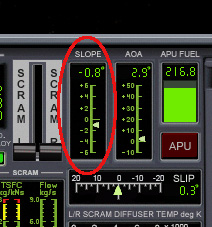
BTW, XR vessels have a Slope indicator on the main panel that shows your entry slope (angle). But personally I like using BaseSync MFD to calculate my deorbit burn. :thumbup:
 
BTW, XR vessels have a Slope indicator on the main panel that shows your entry slope (angle). But personally I like using BaseSync MFD to calculate my deorbit burn. :thumbup:

Thanks. I actually do use BaseSync....I'm following Grover's tutorial which seems to work quite well. In it, he says to terminate the re-entry burn when the entry angle reaches .7....I couldn't see how to determine that in the XR2. I'll take another look right now.
 
The Slope indicator is on the main panel next to the AoA and Slip indicators:

slope2.jpg


I should point out, however that the Slope indicates your ship's current slope, not your projected slope at some point in the future. For that, you'll need BaseSync MFD. :tiphat:
 
Back
Top