New Release DGIV-3, UCGO 2.5 and UMMU 2.5 christmas release

Outstanding work Dan! Thank you ever so much, the new Arrow is amazing! Just one small problem: I tried to download the .psd skin sources but only get uwv.png in both 'simple' and 'root' links from the doc. Is it a bad link or is it on hold until full release?
 
Possible bug in DGIV: Not sure if this is an old bug or not, but if you open the nose cone, then speed of so it's destroyed, stop the vessel, open the inner and outer hatch and try to EVA one of the crew, nobody comes out.
 
Possible bug in DGIV: Not sure if this is an old bug or not, but if you open the nose cone, then speed of so it's destroyed, stop the vessel, open the inner and outer hatch and try to EVA one of the crew, nobody comes out.

The hatch is considered as twisted and not usable any more. Solution eject or don't forget the door :lol:
 
Possible bug in DGIV: Not sure if this is an old bug or not, but if you open the nose cone, then speed of so it's destroyed, stop the vessel, open the inner and outer hatch and try to EVA one of the crew, nobody comes out.

For me this doesn´t look a bug, because when the nosecone is broken also the airlock could be damaged, and you can´t make a EVA.

Edit: Dan, it looks like we answered at the same time :P
 
Didn't see this addressed, but when I'm running it on D3D9, my UMMU is completely black! :blink:

That's most probably a DX & driver problem with the normal map, check your GC driver, the DX9 client (last version?) etc. etc.

If nothing work use the "low" version (see doc) that doesn't have the normal map. Let me know if nothing solve your problem.

---------- Post added at 08:42 PM ---------- Previous post was at 08:41 PM ----------

Outstanding work Dan! Thank you ever so much, the new Arrow is amazing! Just one small problem: I tried to download the .psd skin sources but only get uwv.png in both 'simple' and 'root' links from the doc. Is it a bad link or is it on hold until full release?

You welcome :cheers:

The skin SDK is still on my todo list, I'll post here when ready.
 
I am having so much fun with these new UMMUs. The suit looks sooooooooooo good. And the lights.... Awesome awesome awesome.
 
Hello, every time I launch a DGIV scenario it will load entirely, when it completes loading I hear the start up chime for orbiter sound 4.0 but i have the white screen of death. I than get the orbiter.exe has stopped working.
 
Feature Request

Hello,

first of all I want to thank you for this awesome release.

A small thing is bugging me: when the DGIV is loaded with UCGO cargos it is not possible to choose which one to release (it allways releases the first one).

Not that important, but a possibility to cycle through the cargos would be nice.

Thanks and RGDS,
Georg
 
UCGO cars "help" function bug?

Thank you Dan for this wonderful update to an already superb set of Orbiter addons.

Can anyone else confirm a possible bug I may have found in UCGO 2.5 cars?

This happens on two different computers, both with Orbiter 100830 P1 installed. Try using the scenario included in:

UniversalCarsandCargo(UCGO) \ Learning features \ Cars - AI cars dance

With the focus on a car, if you press the "H" key the help messages do not appear. Instead you get a white screen that persists till you have pressed "H" 4 times to cycle thru the 4 pages of help text.

The help text IS present in directory:

<Orbiter Root Directory>\meshes\UniversalCars\Bin

Filenames UcarHelp1.txt to UcarHelp4.txt.

Strangely this error does NOT occur when using the D3D9 client graphics. I have D3D9 client RC48 (21 Aug 2012).

The help messages do show up correctly when the focus is on an UMMU, it is just the cars that seem affected and only when NOT using the D3D9 client.

Perhaps it is just my installation that is faulty, but as it occurs on two seperate installs on different machines I think it may not be.
 
On a sidenote...why don't you update it?
http://d3d9client.codeplex.com/

Thank you, I will. :thumbup:

The problems I have only happen when using the standard Orbiter graphics. D3D9 client RC48 seemed to work OK.

Regarding the possible UCGO cars bug as outlined in post 69, when I press F10 to get the "Settings and utility" display I also get a white screen with the outline of the vehicle front in black (Eg: the forklift truck) and the text IS visible in orange and red text...

Is it just me? If so I'll try a completely new install.
 
Is it just me? If so I'll try a completely new install.

I get the same with the built in gfx. The only thing visible is the internal mesh. If I rotate view I can see the text where it overlaps the mesh. Everything else is white.
 
is this only in that specific scenario or is this with cars in general, because I am pretty sure I drove around the Azure rover on the Moon and didn't encounter this.
 
It's the mesh for dark screen that is not supported with Orbiter.exe (work with DX9 &DX11)

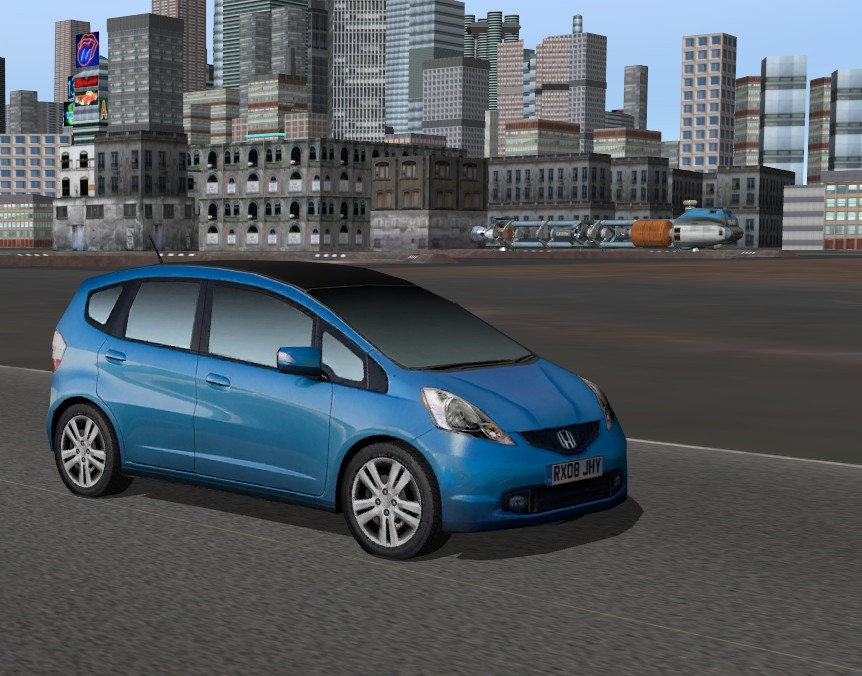
In anyway download this new car, it contain a patch for this problem: (new mesh for dark screen)
http://orbiter.dansteph.com/UCGO_CarsHondaJazz.zip (Unzip in Orbiter)

Jazz20121228141445.jpg


The town behind is not included of course but you can find an article
(and the download link) for this exceptional (en over optimized) work by Picto here:
"Pictown: Your journey to mars start at home"
http://orbiter.dansteph.com/index.php?news=250

This "base" run even smoothly on low end computer, a great add for Orbiter.
 
Last edited:
It's the mesh for dark screen that is not supported with Orbiter.exe (work with DX9 &DX11)

In anyway download this new car, it contain a patch for this problem: (new mesh for dark screen)
http://orbiter.dansteph.com/UCGO_CarsHondaJazz.zip (Unzip in Orbiter)

Thanks Dan for the quick reply. Have downloaded the HondaJazz and it has fixed the UCGO help & settings/utility functions on all cars.
 
Hi everyone! Am russian so sorry for my english.
I have a little problem with cars and humans only in atmosphere: they are moving only right-n-back or left with a huge velocity. It not depends of 'Atmosphere Configuration' in Extra.
I have not this in space or a moon.
 
I don't understand that question. How would you get the two working together?

2.5 will replace 2.0 so the two should never need to work together.
 
HI Dan, everything is great,and looks awesome,but I ran into two problems 1. the UCGO ShuttleA MFD"s dissapear when in the virtual cockpit, once in awhile,and 2.After docking to the arrow in docking bay 1 with the DG.it won't register docked on the systems screen in the virtual cockpit of the Arrow.Thanks
 
Back
Top