DGIV Autopilot & Concept Questions

Ghostly

AstroSandwich
Joined
Jan 29, 2013
Messages
26
Reaction score
0
Points
0
There are a few things I have yet to understand about the DGIV,
1. Can you add in new autopilot programs
2. Has Dan ever experimented with a VC*BEFORE YOU START GOING INSANE*
---If he has, is there at least a concept picture of what it was planned to look like?
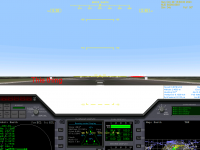
3. Why does a white block appear at the top of the 2d cockpit between the indicator panel and flight programs?

:idk:
 
1. yes or so I think there's some example of customized autopilot you can find, AFAIK it all boils down into some .cfg

2. No, not going to happen

3. screenshot?
 
A white block? Need to see it, but I would guess something with graphics drivers/setting.
 
Regarding point 1:
This is explained within the DGIV documenation (ORBITER-INSTALL-DIR\Doc\DeltaGliderIV\res\DGIV_Documentation_en.pdf, page 19)

"The scripts of ascent program are in « Sound/DeltaGliderIV/Prog » directory, you can edit existing or add more,
simply copy one and rename it for example PRO908SPEC.txt and edit it with a text editor. Set debug parameters
to 1 to help you tune your new autopilot and launch it as usual (Ie: PRO908SPECNN)."
 
Oh and I already know that a Virtual Cockpit in the DGIV isn't going to happen, I was just curious as to what it was to look like if he did. I believe it won't happen due to graphic and lag issues...


Here is my problem
Screenshot.png
 
Never seen this before.
Just an idea:
Within the DGIV configuration-program, there is an option called:
"Enable ground camera effect (head up/down).
Maybe unticking this option might help.

I see, that you are rolling (very slow, but moving).
Some people have problems with this option (in my case, the HUD is not visible while moving on the ground).
Btw...is the nose-cone closed ? Depends on graphics card and drivers, there could be an issue with "local-light sources enabled" (within orbiter visual-effects tab).
As long as the nose-cone is open, the new DGIV has front-lights.

Does it happen within the glass-cockit, too (F8) ?
 
It only occurs in fullscreen mode, in window mode, it isn't appearing... so I can just deal with that. Window mode is much better :chainsaw:
 
It only occurs in fullscreen mode, in window mode, it isn't appearing... so I can just deal with that.
If you want. Did you check if 32bpp color depth fixes it for you in the full screen mode before switching to windowed?

Switching to windowed mode isn't the solution, but only a workaround, because you use the color depth of the desktop then, which is most likely 32bpp.

If you still want to really fix it, here's a couple of links with similar issues:If setting 32bpp color depth in the full screen mode doesn't fix it for you, then maybe "Try stencil buffer" option.
 
Regarding point 1:
This is explained within the DGIV documenation (ORBITER-INSTALL-DIR\Doc\DeltaGliderIV\res\DGIV_Documentation_en.pdf, page 19)

"The scripts of ascent program are in « Sound/DeltaGliderIV/Prog » directory, you can edit existing or add more,
simply copy one and rename it for example PRO908SPEC.txt and edit it with a text editor. Set debug parameters
to 1 to help you tune your new autopilot and launch it as usual (Ie: PRO908SPECNN)."

Im trying to create my own autopilots, but... where is that "Debug parameters to 1"?? I only see the Meshdebug in Modules. :facepalm:

Also... i have no idea what mean this ALT values... meters? Kilometers?

Code:
// -----------------------------------------------
// ASCENT PROGRAM PRO904 FROM EARTH
// HOVER TAKE-OFF
// -----------------------------------------------
PROGNAME: EARTH ~230km Hover start
TYPE:     ASCENT
START:    HOVERGROUND
ALT: 0      ENG:   1.10 ; Will use turbo pump
ALT: 10     PITCH: 65
ALT: 15     SNMSG: #RaiseLandingGear
ALT: 60     PITCH: 65
ALT: 320    PITCH: 65
ALT: 1500   PITCH: 65
ALT: 40000  PITCH: 65
ALT: 45000  PITCH: 52
ALT: 50000  PITCH: 45
ALT: 66000  PITCH: 40
ALT: 80000  PITCH: 40
ALT: 100000 PITCH: 40
ALT: 130000 PITCH: 35
ALT: 150000 PITCH: 30
ALT: 160000 PITCH: 25
ALT: 175000 PITCH: 20
ALT: 190000 PITCH: 15
ALT: 200000 PITCH: 12
ALT: 205000 PITCH: 10
ALT: 210000 PITCH: 09
ALT: 212000 PITCH: 08
ALT: 212500 PITCH: 07
ALT: 213000 PITCH: 06
ALT: 400000 PITCH: 0
ENDPROG:
 
You must add a line that reads like this:

Code:
DISPLAYDEBUG: 0		;Display some debug information to help tune an autopilot. (0=off 1=on)

Have a look at the other 3 autopilot files.
You picked up the only file without that line.

The values are in meters.
For example, raise gear at 15 mt altitude.
 
Last edited:
You must add a line that reads like this:

Code:
DISPLAYDEBUG: 0		;Display some debug information to help tune an autopilot. (0=off 1=on)

Have a look at the other 3 autopilot files.
You picked up the only file without that line.

The values are in meters.
For example, raise gear at 15 mt altitude.

YAY Thanks a lot! :lol:
 
Back
Top