Hardware Dual Graphics recognition

Fearless

Member
Joined
Oct 16, 2007
Messages
56
Reaction score
2
Points
6
Hi all,

I've a Dell Laptop with Intel and AMD Radeon graphics. Currently Orbiter only recognises the Intel Graphics.

Is there a way that Orbiter can be set to recognise the AMD graphics? I have included Orbiter in the AMD Radeon settings but the video setting in Orbiter still shows the Intel graphics.

Thank you in advance.
 
It could be Orbiter did not recognize the other video card.

On the Orbiter-Launchpad go Video and checkmark "Always enumerate devices".
After re-launching Orbiter both video cards should be shown in the 3d device drop-down list.
 
Last edited:
I had the same issue with my machine, which uses an Nvidia, at least they have an option in their GPU control panel to force orbiter to use the Nvidia chip.

There should be something similar in the Radeon equivalent (Catalyst Control Center IIRC?), I'd dig into the settings if Francisdrakes advice wont work.
 
It could be Orbiter did not recognize the other video card.

On the Orbiter-Launchpad go Video and checkmark "Always enumerate devices".
After re-launching Orbiter both video cards should be shown in the 3d device drop-down list.

Thanks for that. That option is ticked in orbiter.exe so no probs however it doesn't indicate AMD. Only other settings and the intel settings. When in orbiter2016_ng.exe, that option is not there.
 
Last edited:
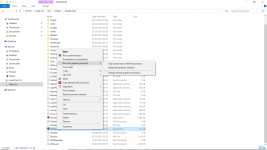
Do you have maybe option like one on the picture? Cause in my case Orbiter doesn't see my Nvidia card as well. I always have to tell it explicitly to run with high performance graphic processor.
 

Attachments

  • screenshot.png
    screenshot.png
    122.3 KB · Views: 36
Last edited:
Do you have maybe option like one on the picture? Cause in my case Orbiter doesn't see my Nvidia card as well. I always have to tell it explicitly to run with high performance graphic processor.

Thank you but no.. I have AMD Graphics. I'm assuming that the AMD radeon Settings Catalyst does similar.
 
I always have to tell it explicitly to run with high performance graphic processor.

In the right-click menu you can also change the default graphics processor.
At my computer it opens the Nvidia control panel, where I can force to use the high-performance graphics processor.

Note: For most of the time, I actually run my Orbiter on the built-in Intel graphics processor. I get 40-50 fps using 'normal' spaceships and addons. And the laptop runs much cooler when on the top of my lap. :)
 
Back
Top