Problem Engine graphics appear as blocks!

gamcdonald

New member
Joined
Jul 25, 2012
Messages
19
Reaction score
0
Points
0
Hi all,

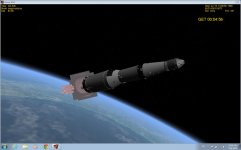
I've just re-installed Orbiter 2010 and i'm having problems with the graphics for my engines (and smoke). Attached is what it looks like at the moment. I'm not using any external graphics. Pure clean install.

Thanks
 

Attachments

  • Orbiter Print Screen.jpg
    Orbiter Print Screen.jpg
    69.6 KB · Views: 70
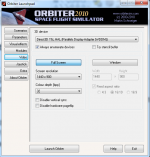
Yup, very familiar with this one. Not a bug, but a limitation of yuor graphics setting. Go to the "Video" tab on the launchpad, and check what the setting on the dropdown menu is. It appears to be on RGB Emulation. If you have a higher performance setting available, go for it. It may even allow you to use local light sources, which looks awesome. :)

Hope this helps,
MaverickSawyer

P.S.: Welcome aboard, and :hailprobe:! :lol:
 
Last edited:
Thanks for the swift response!

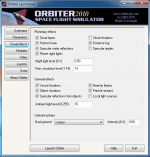
As you can see in the pictures below, unfortunately, that's not the root of the problem!
 

Attachments

  • Video.png
    Video.png
    65.8 KB · Views: 35
  • Visuals.png
    Visuals.png
    64.3 KB · Views: 30
"Try stencil buffer". It helps with pitch black ground shadows, so it might help you with exhaust transparency.
 
Still no luck I'm afraid. It never used to do this. I did install directx from windows, i had planned on using D3D9 but gave up because orbiter_ng.exe opened up in server mode every time, but thats a different matter. Could that have done anything?
 
:hmm: I think that the issue IS with the video tab. I have had issues with the Direct3D T&L HAL before. Do you have any other settings you can run it at? I'm thinking that this is not curable without some upgrades to your graphics system...
 
I forgot to mention quite an important point! As i'm not so technically literate, i didn't mention that i'm actually running windows on Parallels 7. The previous instances of orbiter i used in bootcamp (i.e. not a virtual machine).

I have since given up with ever having orbiter fully functional (including my D3D9 dilemma)! I appreciate all your help, but after doing a bit of reading, i don't think Parallels 7 utilises my GPU (?) well enough to have a fully functional orbiter. Do you concur?! Because my graphics system is AMD Radeon HD 6490M & Intel HD Graphics 3000. Not sure if that info is useful...

 
I forgot to mention quite an important point! As i'm not so technically literate, i didn't mention that i'm actually running windows on Parallels 7. The previous instances of orbiter i used in bootcamp (i.e. not a virtual machine).

I was about to ask if you were on a Mac, seeing that Parallels video adapter in your screenshot, but you confirmed it. Looking at the Parallels release documentation, I think you should look at doing the Parallels 8 upgrade from your version 7. Two things caught my eye ... DirectX 9.0c support, and enhanced full screen support. This should mean that you can run the D3D9 client with Orbiter_NG.exe instead of the default Orbiter.exe client, and see if the DirectX 9 graphics in that version work nicely for you on your Parallels setup.

Otherwise - your previous idea of having a Bootcamp setup allowing you to boot cleanly into Windows is very solid. You then bypass any emulation issues of Windows on OS X.
 
Back
Top