Project First add on attempt: Narn Bin'tak

It might help if you said what the error was.

Have you converted the textures to DDS?
 
First of all you have to understand basics:

- 3ds & msh are storing geometry
- dds files storing texture wrapped around geometry

So in 3ds or msh files you don't have textures but filenames of textures

I don't have Wings3D but 3ds Max gives me error in material #379 - as I stated before model is not optimized for orbiter and you need to at least make proper materials for it. 3d modelling programs allow more material functions than Orbiter msh format so usually exporters are throwing strange errors if something is not right (lack of UVW mapping on textured material, composite materials in single meshgroup etc.)
 
Last edited:
Yes I have converted the textures to DDS. I have the JPEG textures in the folder with the model and these show up when I open the model in Anim8tor and in Wings3D. I have the DDS textures already in Orbiter waiting for the new msh. but they wont show on the model in the sim.
Like I said when I have the textures loaded in Wings3D they show on the model and when I try to save it as a msh. it saves some of it but then it locks and says "Wings3D has stopped working Window is searching for a solution to the problem" etc, etc.
No details. No logs. No nothing.
And again the msh. converter plugin for Anim8tor does not work.
The thing pops up and it shows the plugin starting to work but then it says "some missing code" and it doesn't even save the new msh.
I ungrouped and "converted to mesh" in anim8tor like Kendo said but still no go.
I'm close to giving up this is starting to get out of my league...
 
I use Anim8or v079d with the mesh plugin.
Put the mesh plugin file (call it a script file from now on) in the same folder as the Anim8or exe file is in.
Then load Anim8or and go the File dropdown list and choose Configure and locate the script using the Scripts button to load the script.
Make sure you tick Preload scripts.
You cant load Orbiter msh. files, only save them.

Use the Save dropdown menu to save (Orbiter msh.)
 
Last edited:
Thank you Kendo your instructions are very helpful.
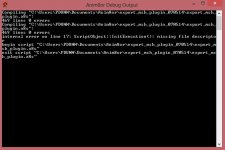
I've done exactly as you said. I'm assuming when the msh. script is loaded into Anim8tor the msh. format should appear in the "save as", "save as file type" drop down menu. I cant see it. When the script is loaded it says this.
"internal error on line 17"...

error.jpg

My Anim8tor version is 0.95.
 
Do you load it on start-up or do you execute the script manually?
 
Oooops, I meant to say version 097d. Its got the extra texture modes.

It looks as though the plugin is loading twice!!!!.

It works with 95c anyway.
Try loading the script with the Scripts/Load script, you only need to do it once.
 
Last edited:
Oooops, I meant to say version 097d. Its got the extra texture modes.

It looks as though the plugin is loading twice!!!!.

It works with 95c anyway.
Try loading the script with the Scripts/Load script, you only need to do it once.

For the 097d version, you only need to edit the first lines of the script, since the signature of the export plugin API changed.
 
Urwumpe, I was referring to Motherbrains screenshot.
The plugin works superb as it is with v097d. :thumbup:
 
Urwumpe, I was referring to Motherbrains screenshot.
The plugin works superb as it is with v097d. :thumbup:

Oh ok :)

I had needed some fixes on the 097d the last time I tried.
 
Guys I may have to call it quits.
Kendo the anim8tor script is loading nothing but errors.
First it says something about the file being out of bounds, I tried to get a screen shot but couldn't. Then it says "error reading file" then nothing happens. I can tell its doing something to the mesh because it goes from being from about 12'000KB to about 30'000KB. I think its trying to convert it but it doesn't change it from a 3ds to a msh. When I try and change the file type manually it wont load in Orbiter.
I'll just wait and see if Stevecast makes this one.
Thanks for the help anyway.:)
 
Motherbrain, if its reading out of bounds, that,s an Anim8or error, not the mesh plugin.
My advice is to try another smaller 3ds and see if that works.
That,s what happens to me with some model files.
 
Kendo even if it does work with another model it wont work with the model I need to finish the project. I'll try. But I'm afraid I already know what the result will be...
When I follow your previous step. Ungroup. Convert to mesh. Export as orbiter mesh it says out of bounds then it starts to save the mesh then windows shuts it down saying "Anim8tor has stopped working" etc. etc.
It saves a msh. file but its 0KB.
 
Last edited:
Motherbrain - I hinted before that 3ds file from Motherlode of this craft contains either unmapped vertices or wrong material for msh format. 3ds files were in older days standard of 3d modelling and they can include lots of data that is not compatibile with Orbiter's msh format.

I tried to export it from 3ds max but had error also. Since craft contains hundreds of meshgroups & materials I won't try to track it (XR3 and my spacefighter/scout are taking most of my time).

as kendo said. Try with simple model - few meshgroups, few materials - you'll familiarize yourself with modelling exporting and then you can always return to this project.
 
Back
Top