
You are using an out of date browser. It may not display this or other websites correctly.
You should upgrade or use an alternative browser.
You should upgrade or use an alternative browser.
Installation Having Issues with textures in the BETA version of Orbiter
- Thread starter dnimigon
- Start date
No Help
Hi list . I've posted this elsewhere but having no luck getting help. I downloaded and installed the new Beta, low res earth, moon, clouds, minor bodies, mars. Loaded them. No problem. Then downloaded hi res earth and moon, mars. Loaded them. No problem with install. Updated SVN. Earth and moon, probably mars show as grey balls. No textures. Did I do something wrong. My Beta directory shows little red tags on the texture and scenarios folders. When I click on SVN update it does it thing and says all is okay. Completed, at revision 43. When I right click under the Beta directory I also see Tortoise SVN but not sure if I should be doing something in there. Most all other directories under the Beta directory show a little green tag. It's just the 2 that have the red tags. Not really sure what I need to do here now. Can someone help me out here. I also have the D3D9ClientR14-for2010-P1 installed if that makes any difference which I'm thinking it might as I'm not sure if that was the right one I should have. .
Hi list . I've posted this elsewhere but having no luck getting help. I downloaded and installed the new Beta, low res earth, moon, clouds, minor bodies, mars. Loaded them. No problem. Then downloaded hi res earth and moon, mars. Loaded them. No problem with install. Updated SVN. Earth and moon, probably mars show as grey balls. No textures. Did I do something wrong. My Beta directory shows little red tags on the texture and scenarios folders. When I click on SVN update it does it thing and says all is okay. Completed, at revision 43. When I right click under the Beta directory I also see Tortoise SVN but not sure if I should be doing something in there. Most all other directories under the Beta directory show a little green tag. It's just the 2 that have the red tags. Not really sure what I need to do here now. Can someone help me out here. I also have the D3D9ClientR14-for2010-P1 installed if that makes any difference which I'm thinking it might as I'm not sure if that was the right one I should have. .

- Joined
- Sep 12, 2010
- Messages
- 3,131
- Reaction score
- 415
- Points
- 123
- Location
- Rome
- Website
- www.tuttovola.org
Since you are trying to run the Beta, you don't need that version of D3D9 but this one
http://www.orbiter-forum.com/showthread.php?p=520444&postcount=3273
http://www.orbiter-forum.com/showthread.php?p=520444&postcount=3273
Last edited:

- Joined
- Feb 6, 2008
- Messages
- 38,938
- Reaction score
- 3,937
- Points
- 203
- Location
- Wolfsburg
- Preferred Pronouns
- Sire
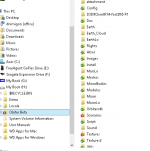
Thought I'd post my directory tree in case someone sees something.
Rule 14: The textures go into the "textures" folder!

To expand a bit on Urwumpe's diagnosis:
The various "Earth", "EarthLo", "Earth_Cloud", etc. folders should not be present. Instead, the contents (presumably) of these folders should have ended up in the Textures folder.
Can you explain what you did to end up with a directory structure like this (so as to help me write clearer instructions)? Did you use the built-in Windows extraction facilities to unzip the packages?
Does Windows always create a new folder, named according to the zip file, when extracting it? Is there a way to prevent this? If not, that would be utterly useless. Do I have to amend the instructions to tell people to always use 7-zip to extract the texture packages?
The odd thing is, you also have a folder "Earth", which I assume contains the high-res textures. Since they were provided in 7z format, you must already have used 7-zip to extract them. I don't understand how you ended up with this spurious "Earth" folder then.
The various "Earth", "EarthLo", "Earth_Cloud", etc. folders should not be present. Instead, the contents (presumably) of these folders should have ended up in the Textures folder.
Can you explain what you did to end up with a directory structure like this (so as to help me write clearer instructions)? Did you use the built-in Windows extraction facilities to unzip the packages?
Does Windows always create a new folder, named according to the zip file, when extracting it? Is there a way to prevent this? If not, that would be utterly useless. Do I have to amend the instructions to tell people to always use 7-zip to extract the texture packages?
The odd thing is, you also have a folder "Earth", which I assume contains the high-res textures. Since they were provided in 7z format, you must already have used 7-zip to extract them. I don't understand how you ended up with this spurious "Earth" folder then.
- Joined
- Sep 12, 2010
- Messages
- 3,131
- Reaction score
- 415
- Points
- 123
- Location
- Rome
- Website
- www.tuttovola.org
And the D3D9 Client too (not in that way)....The various "Earth", "EarthLo", "Earth_Cloud", etc. folders should not be present...
You don't have to "move" the downloaded addons into your Orbiter's folder.
Generally, it's the contents of a properly packaged addon (a zip file) that goes into it.
Have a look a this video, from our member blixel.
If the addon isn't properly packaged (i.e. it contains an extra folder level, or it doesn't contain folders at all), you'll have to manually place its files/folders in the correct Orbiter folders.
It sounds complicated at first, but you'll soon get the hang of it.
Last edited:
- Joined
- Feb 6, 2008
- Messages
- 38,938
- Reaction score
- 3,937
- Points
- 203
- Location
- Wolfsburg
- Preferred Pronouns
- Sire
The odd thing is, you also have a folder "Earth", which I assume contains the high-res textures. Since they were provided in 7z format, you must already have used 7-zip to extract them. I don't understand how you ended up with this spurious "Earth" folder then.
If you right-click on Earth.7z, the 7zip context menu offers "extract to Earth\", which possibly caused this behavior.
If you right-click on Earth.7z, the 7zip context menu offers "extract to Earth\", which possibly caused this behavior.
Ok, that makes sense.
So here are the "official, amended" installation instructions:
- make sure you have 7-zip installed.
- move the texture zip/7z packages into the Orbiter root directory
- Right-click on the zip/7z archive, and select "Extract here" from the 7-zip context menu.
Hi. I did use 7zip and from my download area where I downloaded them all I unzipped them to the root directory using 7zip
make sure you have 7-zip installed I Do
move the texture zip/7z packages into the Orbiter root directory
Do you mean moving them prior to unzipping
Right-click on the zip/7z archive, and select "Extract here" from the 7-zip context menu.
I guess this relates to above
Not sure how I ended up with it that way. I think I'll delete it all and start over.
make sure you have 7-zip installed I Do
move the texture zip/7z packages into the Orbiter root directory
Do you mean moving them prior to unzipping
Right-click on the zip/7z archive, and select "Extract here" from the 7-zip context menu.
I guess this relates to above
Not sure how I ended up with it that way. I think I'll delete it all and start over.
- Joined
- Sep 12, 2010
- Messages
- 3,131
- Reaction score
- 415
- Points
- 123
- Location
- Rome
- Website
- www.tuttovola.org
This is the content of a vanilla Orbiter Beta (Rev. 43) folder:

Match yours with this.
If you want, you can move (as Urwumpe and Martins said) your misplaced textures folders into Orbiter's "Textures" folder.
After doing so, you'll still have some out-of-place folders in your Textures folder (namely, EarthLo, Earth_Cloud, MoonLo and MarsLo).
These folders' content will presumably be:
- Textures
-- Planet_name
--- Cloud
--- Elev
--- Mask
--- Surf
You may or may not have ALL those folders, but you'll have to move all those Textures into Orbiter's Textures.
This is the content of the "Textures" folder, as it should be.

---------- Post added at 14:21 ---------- Previous post was at 12:20 ----------
Next, delete that D3D9Client you have in your Orbiter's folder. It's not the right version.
Download this one instead:
http://www.orbiter-forum.com/showthread.php?p=520444&postcount=3273
Move it into your Orbiter's folder, right-click it, and select "7-zip -> Extract here". Say "yes" to overwrites.
When you have done that, you can delete your "D3D9ClientBeta13c-forRev43.zip".
Match yours with this.
If you want, you can move (as Urwumpe and Martins said) your misplaced textures folders into Orbiter's "Textures" folder.
After doing so, you'll still have some out-of-place folders in your Textures folder (namely, EarthLo, Earth_Cloud, MoonLo and MarsLo).
These folders' content will presumably be:
- Textures
-- Planet_name
--- Cloud
--- Elev
--- Mask
--- Surf
You may or may not have ALL those folders, but you'll have to move all those Textures into Orbiter's Textures.
This is the content of the "Textures" folder, as it should be.
---------- Post added at 14:21 ---------- Previous post was at 12:20 ----------
Next, delete that D3D9Client you have in your Orbiter's folder. It's not the right version.
Download this one instead:
http://www.orbiter-forum.com/showthread.php?p=520444&postcount=3273
Move it into your Orbiter's folder, right-click it, and select "7-zip -> Extract here". Say "yes" to overwrites.
When you have done that, you can delete your "D3D9ClientBeta13c-forRev43.zip".
Last edited:
So I've re-installed the Beta and zipped them. All seems fine now but I have and error flag coming up.
I'm loading the new Beta version and when I unzipped your UCGO 3.0 + UMmu 3.0 - 2014 edition My Beta directory showed an error in the Textures folder and the scenarios folder.
The texture folder showed a red flag on the Ball3.dds file
The scenario folder had a flag on the (Currtent State).scn
Not sure why or if this program isn't compatible with the new Beta or do I need a update to this file.
I'm loading the new Beta version and when I unzipped your UCGO 3.0 + UMmu 3.0 - 2014 edition My Beta directory showed an error in the Textures folder and the scenarios folder.
The texture folder showed a red flag on the Ball3.dds file
The scenario folder had a flag on the (Currtent State).scn
Not sure why or if this program isn't compatible with the new Beta or do I need a update to this file.
- Joined
- Feb 6, 2008
- Messages
- 38,938
- Reaction score
- 3,937
- Points
- 203
- Location
- Wolfsburg
- Preferred Pronouns
- Sire
So I've re-installed the Beta and zipped them. All seems fine now but I have and error flag coming up.
I'm loading the new Beta version and when I unzipped your UCGO 3.0 + UMmu 3.0 - 2014 edition My Beta directory showed an error in the Textures folder and the scenarios folder.
The texture folder showed a red flag on the Ball3.dds file
The scenario folder had a flag on the (Currtent State).scn
Not sure why or if this program isn't compatible with the new Beta or do I need a update to this file.
Red flag = TortoiseSVN detected that the file was changed when you unzipped the files.
Everything is very likely fine, no issues.
If you would be developing software, such red flags warn you, that this file contains changes, that have not yet been committed, which is really bad, if you are developing software.
But that is no problem for you, since you are not committing any new versions of the software.
Last edited:
- Joined
- Feb 4, 2008
- Messages
- 9,753
- Reaction score
- 1,027
- Points
- 203
The red exclamation sign on the icons is just TortoiseSVN's way of telling you that the files are different from the ones in the source repository. It is not an indication of an problems or incompatibilities.So I've re-installed the Beta and zipped them. All seems fine now but I have and error flag coming up.
I'm loading the new Beta version and when I unzipped your UCGO 3.0 + UMmu 3.0 - 2014 edition My Beta directory showed an error in the Textures folder and the scenarios folder.
The texture folder showed a red flag on the Ball3.dds file
The scenario folder had a flag on the (Currtent State).scn
Not sure why or if this program isn't compatible with the new Beta or do I need a update to this file.
Similar threads

- Replies
- 11
- Views
- 3K


- Replies
- 12
- Views
- 5K

- Replies
- 3
- Views
- 2K