Meshing Question Help With .3ds or .obj to .msh

JamiDodger23

New member
Joined
Apr 13, 2013
Messages
6
Reaction score
0
Points
0
Hey,

I currently have a mesh file of a base and when ever I try to change it into a mesh file and put that in orbiter, it goes into orbiter but it is completely white and loses its textures :facepalm: . When it is in anim8or it has all the materials assigned correctly. Can someone please help me???????

I will attach the file in .3ds format and animator format too

Thanks Guys!!!

:thumbup:
 

Attachments

What file format and compression method are the textures saved in? What are their dimensions?


I'm currently on a mobile, so I can only search in the anim8or file in a text viewer for presence of dds, bmp, jpg, png, tif, tga strings but I haven't found any of these (other than the UV map coordinates, which the file is full of, from what I can see, but no file names), and I won't read a 6 MB file line by line to find where texture file references are saved, so can you tell what files are they and how are you converting them and mapping to the output mesh file?
 
(i)At the very end of the mesh file, which can be viewed in a text editor, what texture files are be quoted ; if any. It could be the textures are not being exported.

(ii) Also are the textures to be found in the textures folder.

((iii) could the materials also be wiping out the texture image.

Could you post the end of the mesh file which quotes the materials and the texture files, say the last 20 lines.

I have have some issues in the past and the help offered here was just great, so we will crack this I am sure.
 
There are no textures. Only material colours. What are the 2 large square blocks underneath the island in the an8 file?. Did you make your Orbiter msh from the 3ds file or the an8 file?

---------- Post added at 02:23 PM ---------- Previous post was at 01:52 PM ----------

Just converted the 3DS file to an8, (as your an8 looked weird with the 2 large blocks underneath) then to Orbiter msh and all is O.K.
In notepad, change the reflection from 20 to 0 for the parts you don,t want to be shiny etc. You can try 0 or 5 or 10 or up to 100 for the effect you want.
There are no textures, it uses colours.
 
Last edited:
Pardon the evangalism but Blender 3D really is the way go for this kind of thing.

The program is a open source (IE "free") professional cinema grade 3D editor/renderer, and with Vlad's Blender-to-Orbiter plugin it is capable of opening, editing, and exporting Orbiter meshes and textures directly.

Simply open your .Obj or .3ds file in Blender, confirm that your textures are assigned propperly, select all, and click "Export Orbiter Mesh".
 
I Normally use Blender, but this is a simple mesh so I used an8 to check.
But, as far as importing a msh then exporting to msh, then its pretty crap as the file size nearly doubles,
and the materials get messed up etc.
I only use Blender for tweaking 3ds files, but then when you resave the physical size as changed.
 
Last edited:
Wow. Thanks for all the help guys!!!
And sorry for misleading you. I meant I have the colours assigned in anim8or. I have no textures. Do I need these?
 
Wow. Thanks for all the help guys!!!
And sorry for misleading you. I meant I have the colours assigned in anim8or. I have no textures. Do I need these?

All look better with texture,but you can have mesh with no textures just with color. ;)
When you paint model you need to have for each color it's own group.
You can not paint two or one part with different color and merge into one group.
anim8or have great exporter for orbiter mesh try it if you do not use it already.

[ame="http://www.orbithangar.com/searchid.php?ID=2698"]http://www.orbithangar.com/searchid.php?ID=2698[/ame]
 
Last edited:
thanks for all the help. I seem to be having a problem when I export it. It exports fine but when I run orbiter it just crashes. This when colours are applied. When I apply no colours, orbiter doesn't crash but the object is invisible. Do you have any ideas? :idea:
 
I've made color textures for a lot of my meshes, I simply use Paint Shop Pro, but any paint program will do. Just make a new BMP, PNG, or DDS, make it a size that is divisable by 2, like 1024 x 1024, use the paint bucket and fill a square shape with the a shade of color. I used greys, ranging from 90% to 10%, I have 10 files, one is black, and one is white, all others are greys in between...

Do the same with Blues, Reds, Yellows and so on. Use these as textures on objects and viola, you have a primary color, just like the 3D program would provide, but it's a texture that will export with the painted object.

In 3DS max we use stock materials to do the same technique, but you get the idea. All the texture files names will be in the newly created .msh file after you export. Just be sure to include the original files with your mesh.

Make sure your putting the texture files in the textures folder in orbiter...
 
If your doing solid colors like that, you can even use a tiny 32x32 texture file. As there are no actual pixels, it works just the same as a larger one.
 
Hey again. I just cant get it to work so could someone please do it for me?

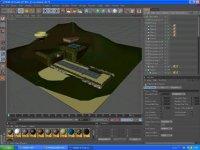
I will attach an image of it in cinema 4d with the colours it should have, and it in 3ds format. I have also fixed the blocks that appeare. Could you send it back as a mesh, just so it is working. Im sure its easy but I just ant manage it. Thanks :thumbup::thumbup::thumbup::thumbup::thumbup::thumbup::thumbup::thumbup::thumbup::thumbup::thumbup::thumbup::cheers::cheers::cheers:
 

Attachments

  • what it should look like.jpg
    what it should look like.jpg
    17.5 KB · Views: 14
  • Tracy-Island.zip
    Tracy-Island.zip
    562.3 KB · Views: 4
I took the .3ds file an imported it in to Wing3D.

It is a very large file. Would it not be better broken into smaller units?

When I tried a test export as a mesh it crashed Wings so I will not be able to help much more sorry to say
 
Back
Top