Help with PC sound.

dmc

New member
Joined
Jun 10, 2008
Messages
54
Reaction score
0
Points
0
Location
1.3e-11 light years SWW of the cape
Im gonna get straight to the point, I can hear what my PC is doing.
Recently ive tried hooking up to my audio system through the "Digital Out"
connection. But when I turn the PC on i get this scratchy distorted noise that overpowers my music and stuff.
When I listen closer it sounds like what the PC is doing. When I slide one of the scroll bars I can hear a "zzzzzz" noise, when I begin to start a program the scratchy noise intensifys and it sounds like the noise your actual PC makes when its loading something big.
Sorry if this is confusing but it is really hard to explain.
Just wondering if there is anybody out there that knows what im talking about and can tell me how to fix it.
And btw this noise only comes through the digital out, the headphones jack works fine.
 
Is the Digital-Out connection on your motherboard or is it on an expansion card?

Also, can you hear normally sound out of it, or is there nothing but the staticy noise?
 
I've experienced such behaviour since 80286 times.
It is a bad shielding that let's your soundcard recieve radio waves from other hardware.
This used to be solvable by switching the position of the soundcard, but I assume you are using an onboard sound chip.
Since this is only recognizable on your digital out I suspect something very close to the wiring is transmitting. Try looking for dirt near the device.
If you are using a coax cable then most likely the cable acts as an atenna. Try running it on a different path from the computer and avoid loops, other cables and proximity to any power lines. (or get a well shielded cable).
If you are using optical cable then the problem either is inside the computer or in the reciever. (Or you have a serious problem with sabotage :rofl: )

Most likely your reciever understands AC3 (Dolby Digital) and/or DTS (Digital Theater System, often in combination with a THX certification). Feed such signals to it (see below), if the problem is still there then you most likely have defective parts in the reciever.
The easiest way to send AC3/DTS is to play a Video DVD and enable pass through in the player software. Or you can get AC3Filter and enable AC3 encoding in the output options.

Good Luck and Happy Orbiting
May the Furry Dicez comfort you!
Hail Probe!
Good Morning.
I need sleep.
Good Morning.
 
Is the Digital-Out connection on your motherboard or is it on an expansion card?

Also, can you hear normally sound out of it, or is there nothing but the staticy noise?

1. I have no idea lol
2. I can hear the sound that im trying to play(ex. games and music) but the static noise overpowers it so much that it you can barely hear what im trying to play.

Thx for help guys.
I will try the AC3filter and let you know how that works.
 
1. I have no idea lol
2. I can hear the sound that im trying to play(ex. games and music) but the static noise overpowers it so much that it you can barely hear what im trying to play.

Thx for help guys.
I will try the AC3filter and let you know how that works.

Good. What TSPenguin said sounds right, although I wonder what would actually "transmit" interfering EM waves.

An easy and mostly reliable way to check if you have a soundcard or you are using integrated audio is to check the location of the connection. If it is about midway up, near things like the monitor-out (the blue one if it' s color coded) connection, than most likely you have integrated audio. If it's farther down the case, near the bottom, then you most likely have a soundcard.

One (more like two) question: Are you using wireless internet or wired, and if wired, what kind of wiring (Fiber optic, "eathernet" [properly called twisted pair] cable, co-axial)?
 
Its further down, towards the bottom.

And currently the PC im talking off is not connected to the internet. Though we do have a wireless router in the house that a few laptops run off of.

P.S. with that AC3 filter... I have no idea what I am doing lol
 
Its further down, towards the bottom.

And currently the PC im talking off is not connected to the internet. Though we do have a wireless router in the house that a few laptops run off of.

P.S. with that AC3 filter... I have no idea what I am doing lol

Ok, so you probably have a soundcard.

I know it sounds stupid, but is there any kind of dirt or dust in the connection? Might be worthwhile to check that...

Another thing: Is the headphones jack right next to the digital out connection or is it farther up the case?
 
No problem. Look, I've got to go for now (my computer has serious overheating issues, so it keeps freezing, not to mention I'm tired). I'll be back tomorrow, but hopefully TSPenguin can help you with the AC3 filter.

:cheers:
 
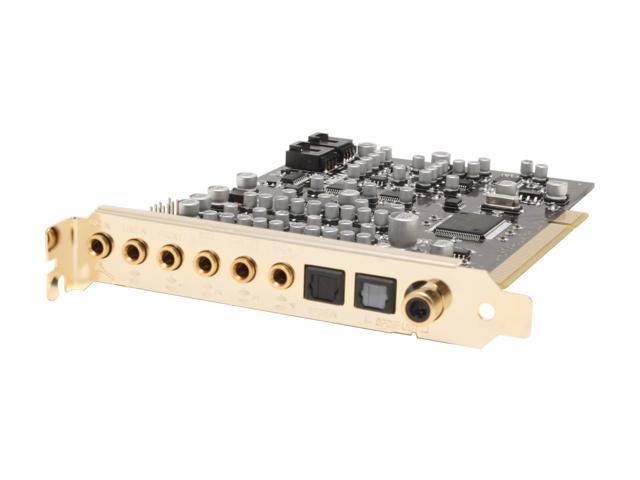
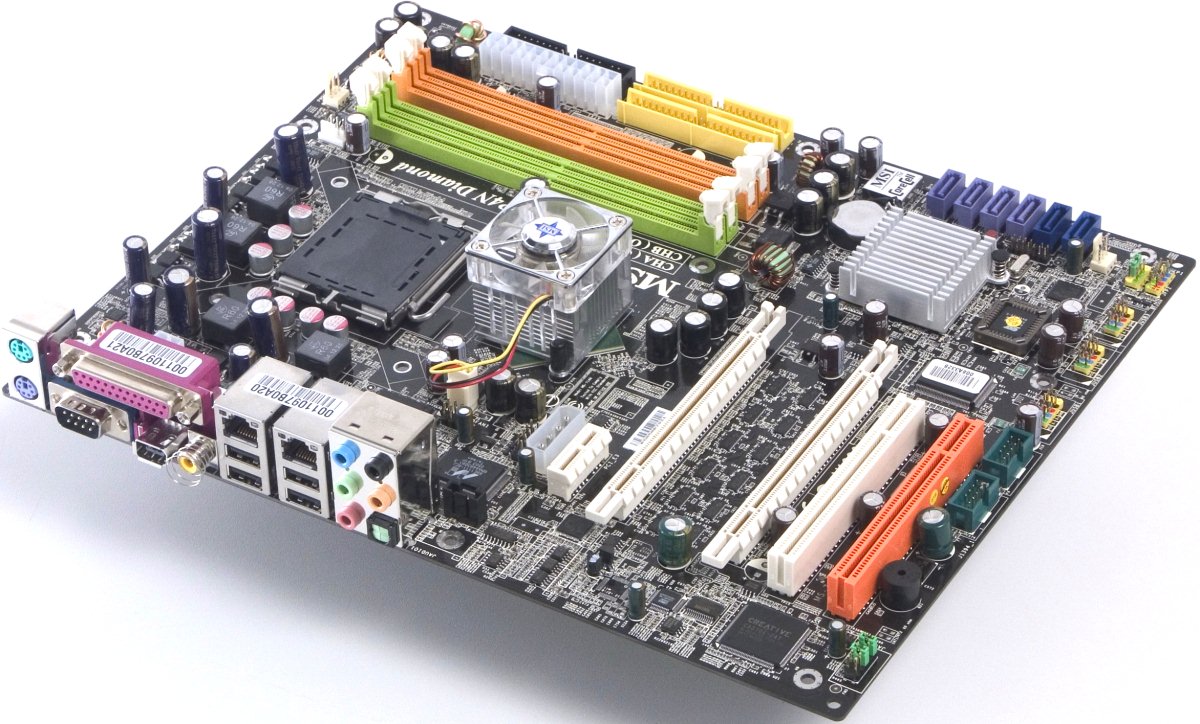
Are you using a soundcard like the first picture, or the on board output like shown on the second one? (just to be sure :) )
Optical or coax?

29-271-002-02.jpg


board-rear.jpg


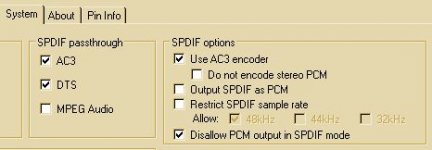
Just to clarify: The AC3Filter method I am about to explain in detail will only serve as a diagnostic tool. It can solve your problems only for very few situations, all of them orbiter unrelated :(

Here is how it is done:
Get Media Player Classic.
Start MPC and load up any media file with sound (.MP3, .WAV, Videos).
You should hear your noise now while playing.
Go into the play menu, enter filters. click AC3Filter and configure it in the way it is on my screenshot. (If it is not there, view->options->External filters->select AC3Filter->click prefer->apply->close MPC(!) and start it again)
Your reciever should recognize the AC3 stream and display some sort of Dolby DIgital logo on its display, the noise is gone.

If the noise is still there:
1. AC3 output didn't work, try fiddling with the AC3Filter options until your reciever recognizes the signal.
2. Can't be! The AC3 stream is created via software. Any tampering with it after this will result in corrupt data beeing send which your reciever won't play, most likely you will experience short bursts of good audio. If you have a bad reciever you might also hear somewhat distorted audio, but this will sound completely different than what you experienced before. If this is the case, then something is transmitting into your coax cable. If you use an optical cable, then your soundcard is badly shielded and is recieving those distortions somewhere between the soundchip and the digital output. This would be very unlikely because your analog output remains clear of those.

Try reseating the soundcard to another slot.
If you are using the onboard chip, please post make and model of your mainboard so everybody can stay clear of it, also tell your computer dealer to go **** himself for selling you crap.

Good Luck
 

Attachments

  • filtersettings.jpg
    filtersettings.jpg
    15.9 KB · Views: 4
Well I can only see one picture but its deff not like the one I see, so I must have an integrated sound card. I also played around with the AC3Filter and nothing seemed to work.
Well they crappy seller would be Best Buy. lol I will try to find out the make and model of the mainboard and edit it into this post later.
 
In the meantime, for the third time, are you using optical or coaxial cable?
What kind of reciever do you have?
 
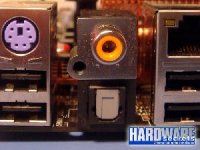
Here's a picture of an onboard sound connection (digital connection is under the yellow headphones jack). Ignore the stuff in the background.

onboard.jpg


Keep in mind that the arrangement, number, and type of connections can vary greatly between systems, both on soundcards and onboard devices.
 
Here's a picture of an onboard sound connection (digital connection is under the yellow headphones jack).

The yellow one is not a headphone jack at all. It is a digital coaxial SPDIF output. The bottom one is an optical digital output.
 
The yellow one is not a headphone jack at all. It is a digital coaxial SPDIF output. The bottom one is an optical digital output.

Figures. How did (do) you know? :lol:


P.S. I did realize that it wasn't an actual headphones jack (which is green), but I could not identify what it was. Should have called it a mini-DIN connection, but whatever. Thanks for the correction anyway.
 
Figures. How did (do) you know? :lol:

Very easy. Those connections haven't been used for audio since the early 80386 times. Back then the color coding was red and white (and usaly still is). With the gaining popularity of SPDIF and the high costs for optical cable the connection came back, yellow. Besides that, it is sitting on top of the optical connection and I bet they share the same two cables to the board.

BTW: In the AV world this yellow connection is for video. You will find it on most TVs and as output from camcorders, digital cameras even some phones.
 
Very easy. Those connections haven't been used for audio since the early 80386 times. Back then the color coding was red and white (and usaly still is). With the gaining popularity of SPDIF and the high costs for optical cable the connection came back, yellow. Besides that, it is sitting on top of the optical connection and I bet they share the same two cables to the board.

Interesting. Thanks for the info. :)

BTW: In the AV world this yellow connection is for video. You will find it on most TVs and as output from camcorders, digital cameras even some phones.

Yeah, I've noticed that. On everything I've got they use the Red/White combonation for the audio, too.

P.S. I must correct myself while I'm at it: When I said "mini-DIN connection" before, I actually meant to say a "TRS connection." I often get these things mixed up.
 
Back
Top