Hover engine control missing

Pixelator

Member
Joined
Nov 30, 2008
Messages
6
Reaction score
0
Points
0
Location
Earth
Hi, i am relatively new to orbiter, and have learned how to get into LEO and do some basic in-orbit maneuvers. I recently downloaded "Go Play in Space" and am reading it and doing it's tutorials. I just recently started "Hovering at the beach" when i realized that i couldn't find the hover engine controls. I am using a joystick for flying and main engine throttle controls, so at first i thought that it would just be n the virtual cockpit or the normal cockpit. However, when i went into both, the panel that had the throttle control for the hover engines was missing. I went to the modules tab of the launch pad to see if the hover engines were a module that i needed to activate and found that they weren't. I tried re-downloading and installing orbiter but it was the same. I tried installing the patch but no change. I have the most recent version of Orbiter on a really nice computer without Orbiter sound. I also tried using the number pad controls but it was like the hover engines didn't even exist.

If anyone may know why i can't use the hover engines i would appreciate their help.
 
:welcome:what space craft are you flying in ?
 
numpad 0 is the default for increasing hover thrust. Numpad . is default for decreasing over thrust. While the throttle can be good, I usually use 0 and .

Are you in Panel view, not VC or Glass Cockpit?
 
i tryed glass cockpit, VC and panel view. I also forgot to mention that the numpad 0 and . didn't work either. it just acted as if the hover engines didn't exist.
 
Get into the panel view, and hit Prt Scr (the button above Insert). Then upload it to photobucket or something and post it
 
Panelvieworbiterdg.jpg

here it is at the moon.
 
Press and hold the left arrow key from that view. Looks like you're playing at a horribly small resolution - I feel for you. ^_^

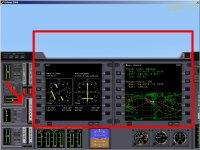
The panel should be where the red arrow is pointing in the picture.
The red box represents the area shown on your screen.

Pressing the arrow keys (generally speaking) will shift the view of the 2D cockpit around. Also helpful is control+downarrow, which shows you where your brakes and landing gear controls are.

Edit: I'm a lamer. The box should extend down farther. It still gives you an idea of where you are on your console. >_>
 

Attachments

  • hovercontrol.jpg
    hovercontrol.jpg
    211.9 KB · Views: 23
Last edited:
I didn't know i could raise the resolution! something i should look into as a have a very large and relatively hi-def monitor.
 
In the Launchpad, go to Video, and set your resolution there.
 
Back
Top