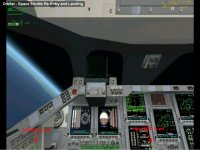
General Question How can activate other MFD in cockpit?

Um...press the power button? :huh:

You need to be much more specific about your problem. My mind-reading ability doesn't reach to Romania.
 
If you mean turn them on, Izack is right, hit the 'PWR' button.

If you mean switching the display, you hit "SEL' and then select the mode you want.

If you want more than two, you will need to activate external MFD in the modules tab, and hit CTRL=F4 and select the module. Please be more specific next time.
 
LOOK HERE AT 1:32

[ame="http://www.youtube.com/watch?v=C-iXsaM82jY&feature=related"]YouTube- Orbiter - Space Shuttle Re-Entry and Landing[/ame]
all mfd are activated in diferent ways
 
Last edited:
LOOK HERE AT 1:32
all mfd are activated in diferent ways
Both MFD are off, take a look at my screenshot (red arrows).

Secondly you see the space shuttle is turning/pitching, but the artifactical horizon does not move/turn/whatever (and all other visible MFD's are dead).
The "MFD's" you see/mean, are only textures.
 

Attachments

  • example05.jpg
    example05.jpg
    82.2 KB · Views: 21
Last edited:
Huh, that's odd. All those MFDs are static (not functional, just pictures.)

Which Space Shuttle addon is that? Default Atlantis has functional MFDs all over the place.
 
Where i can download this textures?
What textures?? :idk:

If you use the Space Shuttle Atlantis that came with Orbiter (look in the folder Space Shuttle Atlantis in the scenarios tab of the launchpad), go to the virtual cockpit with F8, and press the PWR button next to any of the MFDs. There's a much better description in Atlantis' manual.
100723091741sts101.jpg


Do you see the little On/Off buttons next to every MFD? Press those. Look in Atlantis' manual for how to operate them once they're on.

Also, don't use whatever Shuttle was in that video if you want to do this. It has no MFDs in its VC for some reason. (Older version??)
 
Where i can download this textures?
I found this texture in ShuttleFleet-Addon
[ame="http://www.orbithangar.com/searchid.php?ID=4701"]Shuttle Fleet V4.5 for Orbiter 2010[/ame]

called STSinstruments.dds - found in \textures\ folder
(but unused by addon)
 
Oh look: [ame="http://www.orbithangar.com/searchid.php?ID=2462"]STS Visual Upgrade 2.0 Beta[/ame]

I think, the texture is from this (very) old version of ShuttleFleet. :)
 
Back
Top